
You can use smart bulbs outside, but only if you pick bulbs rated for outdoor use or put indoor smart bulbs inside a fully protected fixture. Outdoor-rated smart bulbs or weatherproof fixtures keep electronics safe from rain, cold, and dust while letting you control lights remotely.
If you want color scenes, timers, or motion-triggered safety lights, check the bulb’s weather rating, power needs, and how it connects to your hub or Wi‑Fi. With the right bulb and proper installation, you get smart control plus reliable outdoor lighting without constant worry.
Key Takeaways
- Choose bulbs that are made for outdoor exposure or use a sealed, weatherproof fixture.
- Confirm power type and network range before installing to avoid connectivity problems.
- Maintain and test outdoor smart lights regularly to ensure safety and long life.
Can Smart Bulbs Work Outdoors?
Smart bulbs can work outside if you pick the right model and protect the fixture and connection. Look for weather ratings, correct fittings, and a reliable way to connect to your hub or Wi‑Fi.
Types of Smart Bulbs Suitable for Outdoor Use
Outdoor-rated smart bulbs include LED lamps with an IP rating (usually IP65 or higher) and integrated outdoor fixtures like smart floodlights and pathway lights. These bulbs resist water spray, dust, and temperature swings.
You can also use smart bulbs inside a weatherproof fixture. If the bulb lacks an outdoor rating, place it in a fully enclosed, sealed light housing designed for exterior use. That protects electronics from rain and condensation.
Key features to check: IP/ingress rating, operating temperature range, and whether the bulb uses Wi‑Fi, Zigbee, or Bluetooth. Bulbs using a hub (Zigbee/Z‑Wave) often keep better range and reliability than direct Wi‑Fi at long distances from your router.
Indoor Versus Outdoor Smart Bulbs
Indoor smart bulbs typically lack sealing and use cheaper materials not meant for heat and moisture. They can fail if exposed to rain, snow, or humid air. Never install an indoor-only bulb in an open, unprotected outdoor fixture.
Outdoor bulbs use tougher gaskets, silicone seals, and corrosion-resistant bases. They also list an operating temperature span so you know if they handle your climate. Manufacturers often label bulbs as “outdoor” or show an IP code—use that label as the deciding factor.
If you want simpler retrofit options, choose an outdoor-rated smart bulb that matches your socket (A19, PAR, BR, etc.) and communication protocol. That avoids buying new fixtures or hubs.
Common Misconceptions About Outdoor Compatibility
Myth: Any smart bulb works outside if you keep it under a porch. Fact: Even sheltered spots can collect moisture and experience large temperature swings that kill indoor bulbs. Always check ratings.
Myth: Range isn’t important. Fact: Wi‑Fi signal and hub placement matter. Weak signal causes lag or disconnection. Place hubs within 50–100 feet or add a mesh extender or a Zigbee/Z‑Wave hub for better reliability.
Myth: Weatherproof casing is enough. Fact: The fixture matters too. Use rated fixtures, correct wattage, and bulbs made for outdoor heat output. Also verify the bulb’s warranty and replacement options for outdoor use.
Weather Resistance and Durability

You need bulbs that keep working in rain, wind, heat, cold, and dusty conditions. Check ratings, temperature limits, and how fixtures protect the bulb before you buy.
Waterproof and Weatherproof Ratings
Look for an IP (Ingress Protection) rating printed on the bulb or box. IP65 or higher means the bulb resists jets of water and is a good choice for exposed fixtures. IP44 covers splashes and is acceptable for covered porches or soffits.
Note the two digits: the first is solid particle protection (dust), the second is water protection. A higher second digit matters most for outdoor use because it shows resistance to rain or heavy spray. Also confirm the manufacturer labels the bulb as “outdoor” or “weatherproof.”
If you place bulbs in completely exposed fixtures, aim for IP66 or IP67. If they go inside a sealed fixture, a lower rating may be fine—but check the fixture’s rating too. Never assume indoor-only bulbs will hold up to wet conditions.
Impact of Extreme Temperatures
Check the operating temperature range in the product specs. Many smart LEDs work between -20°C and 40°C (-4°F to 104°F), but some fail in colder winters or hot attic-like fixtures. If your climate hits extremes, choose bulbs rated for those temperatures.
Cold can slow electronics and reduce brightness at startup. Heat shortens LED driver life and can cause flicker or premature failure. Place bulbs where airflow reduces heat buildup, and avoid enclosed metal fixtures in direct sun unless the bulb is rated for high temps.
If your area has wide temperature swings, pick bulbs with proven low-temperature startup and high temperature tolerance. Manufacturer test data or user reviews often note problems in extreme climates.
Protection from Dust and Debris
Dust and grit can abrade coatings, clog vents, and interfere with heat dissipation. An IP5x or higher solid protection rating helps keep dust out of internal electronics. For windy, sandy locations, you want at least IP6x for full dust protection.
Also check the bulb shape and sealing. Bulbs with gasketed bases and fused seams shed dirt better than ones with exposed seams. Use enclosed or screened fixtures in areas with heavy debris to reduce maintenance.
Regularly inspect and clean outdoor bulbs and fixtures. Wiping lenses and removing nests or spider webs helps maintain light output and prevents hotspots that reduce bulb lifespan.
Power and Installation Requirements
You need the right bulb type, a compatible socket, and a weatherproof fixture. Also check power source voltage and whether the bulb needs a hub or Wi‑Fi range that reaches the outdoor location.
Wiring and Socket Compatibility
Confirm the bulb base matches your socket (E26/E27 for most outdoor fixtures, GU10 for spotlights). If the fixture uses low-voltage wiring (12V), you must use bulbs rated for that system or replace the transformer with one that supports smart LED loads.
Check line voltage (120V in the U.S., 230V in many other countries) on the fixture label before installing. Do not install an indoor-only smart bulb in a damp or exposed socket; it can fail or short. If your fixture has a manual switch that cuts power completely, pick bulbs that store settings or pair with a switch that stays on.
If the smart bulb requires a hub, confirm the hub can be placed indoors with reliable range to the outdoor bulb, or choose a bulb with built-in Wi‑Fi or Bluetooth that reaches the fixture.
Placement Considerations for Outdoor Use
Use outdoor-rated bulbs (look for “outdoor,” “weather-resistant,” or an IP65+ rating) when the fixture faces exposure to rain, snow, or dust. Even weatherproof bulbs perform best when installed in a fully sealed or covered fixture to avoid direct water contact.
Keep the bulb within the wireless range of your router or hub. Walls, doors, and distance reduce signal strength; aim for under 30 meters (100 ft) of clear line-of-sight for most Wi‑Fi bulbs, or place a compatible bridge closer to the fixture.
Avoid fixtures that trap heat around LEDs. Good ventilation extends bulb life. Also, consider temperature ratings—extreme cold or heat can affect smart electronics—so choose bulbs rated for your local climate.
Connectivity and Smart Home Integration
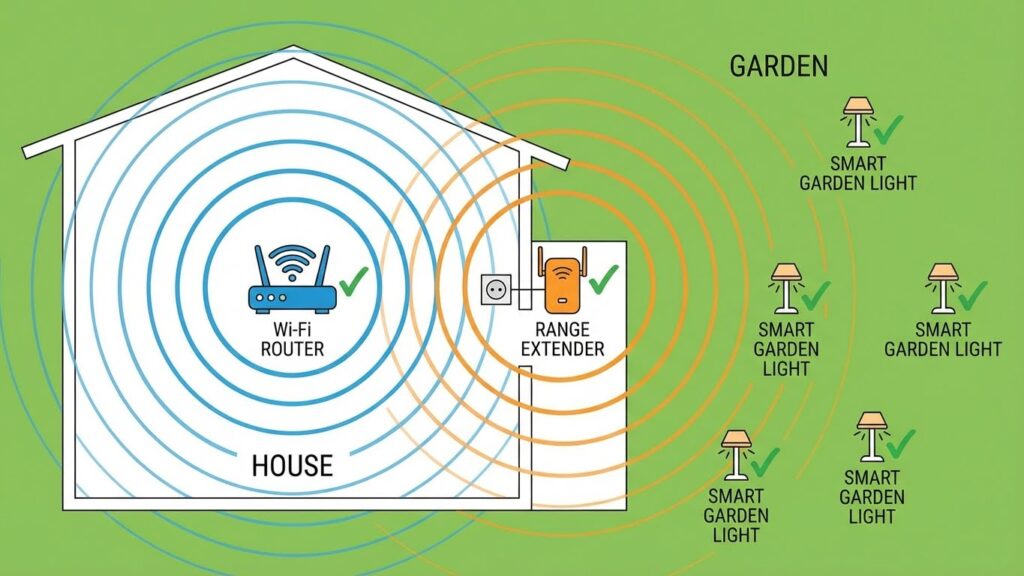
Strong signal and the right hub make smart outdoor lighting reliable. You need good wireless range, weather-rated hubs or bridges, and clear power or mounting plans to keep bulbs online.
Wi-Fi and Bluetooth Signal Strength Outdoors
Wi‑Fi drops quickly with distance and walls. Place your router or a mesh node closer to the outdoor area, or use an outdoor access point. Check band: 2.4 GHz reaches farther than 5 GHz but runs slower; choose 2.4 GHz for most bulbs.
Bluetooth works well for short runs like a porch or patio. It can be spotty beyond 30–50 feet or through thick walls. Some bulbs use Bluetooth mesh, which extends range by passing commands between devices.
Test signal strength before final mounting. Use your phone to check dBm (aim for -65 dBm or better for steady control). If signal is weak, add a mesh node, Ethernet‑backed access point, or move the hub nearer.
Smart Home Hub Compatibility
Confirm which ecosystem your bulbs support: Wi‑Fi, Zigbee, Z‑Wave, or Bluetooth. Zigbee and Z‑Wave need a hub (Hue Bridge, SmartThings, or similar) but offer lower power use and stronger mesh networking outdoors when repeaters exist.
Match protocols: a Hue Bridge or a Zigbee hub lets many bulbs work reliably and supports automation like sunset scheduling. If you use a hub, place it inside near an exterior wall or buy an outdoor‑rated hub to reduce signal loss.
Check app and voice assistant support before buying. Look for firmware updates and security features. A compatible hub gives you local control, automations, and better uptime than direct cloud‑only connections.
Safety and Security Considerations

You need to protect both the wiring and the network when using smart bulbs outside. Focus on proper outdoor-rated fixtures, correct wiring, and strong network security to prevent hazards and intrusions.
Electrical Safety in Outdoor Environments
Use bulbs and fixtures with an IP rating rated for outdoor exposure; IP44 is basic splash protection, while IP65 or higher protects against jets of water and dust. Only install bulbs in fixtures labeled for outdoor use.
Keep bulbs inside covered fixtures when possible. Exposed bulbs face rain, insects, and dirt that can short the electronics.
Check the power source and wiring before installation. Turn off the circuit at the breaker, and test wires with a voltage tester. Replace damaged sockets, cords, or junction boxes with weatherproof-rated parts.
Use GFCI-protected circuits on all outdoor lighting. GFCI trips quickly if a ground fault occurs, reducing shock risk.
Avoid extreme heat and cold beyond the bulb’s rated temperature. LEDs usually tolerate wider ranges than smart electronics inside the bulb. If your climate regularly exceeds the bulb’s spec, choose fixtures with ventilation or use bulbs designed for that climate.
Secure Smart Bulb Network Setup
Place smart bulbs on a separate guest or IoT network when your router supports VLANs or multiple SSIDs. This keeps them isolated from your main devices and prevents attackers from reaching laptops or phones through a compromised bulb.
Use WPA3 or WPA2 with a strong, unique password for the wireless network the bulbs use.
Change default usernames and passwords on hubs, bridges, and any cloud accounts tied to the bulbs. Disable UPnP on the router if you don’t need it; UPnP can expose devices to the internet.
Keep firmware updated for bulbs, hubs, and your router. Updates patch security flaws that attackers could exploit to turn lights on/off, spy on activity, or gain deeper network access.
If bulbs support local control or secure protocols (Zigbee/Z-Wave with a well-configured hub), prefer those over cloud-only setups. Turn off unnecessary remote access features and review app permissions regularly.
Popular Outdoor Smart Bulb Brands
Several brands make smart bulbs suitable for outdoor use. Philips Hue, LIFX, and Wyze are well known and widely available, so you’ll find lots of accessories and community support for them.
Philips Hue offers weather-resistant fixtures and a strong ecosystem. You can connect bulbs to Hue Bridge for reliable schedules and group control.
LIFX bulbs often give brighter output and vivid colors without a separate hub. They work well in covered outdoor fixtures, but check IP ratings before direct exposure to weather.
Wyze keeps prices low and adds useful features like app schedules and motion-triggered scenes. Their bulbs are a budget-friendly option for patios and porches when used in sheltered locations.
Other brands such as Sylvania (Smart+), TP-Link/Kasa, and Sengled provide a mix of budget and midrange choices. Some models focus on brightness, others on durability or color options. Read each product’s weather-resistance rating and installation instructions.
Tips to compare brands:
- Check IP rating and “outdoor use” label.
- Note whether a hub is required.
- Look at app features and third-party integrations like Alexa, Google, or HomeKit.
Maintenance and Troubleshooting Tips
Keep bulbs and fixtures clean. Wipe lenses and sockets with a dry cloth every few months to remove dirt that lowers light output. Avoid water contact unless the fixture is rated for wet locations.
Check seals and enclosures for weatherproofing. Replace cracked covers or worn gaskets to stop moisture and pests from entering. Use silicone sealant on small gaps if needed.
Verify power and wiring first when a bulb stops working. Test the socket with a known working bulb and check the circuit breaker. Loose connections often cause flicker or intermittent power.
Reset and update bulbs before replacing them. Power-cycle or use the bulb’s app reset sequence to fix connectivity issues. Keep firmware and app software up to date for best performance.
Monitor signal strength if bulbs use Wi‑Fi or Zigbee. Move the hub, router, or a repeater closer to improve range. Avoid placing bulbs behind dense materials or metal that block signals.
Use proper bulbs for the environment. Replace indoor-only smart bulbs with outdoor-rated models in exposed areas. Outdoor-rated fixtures protect electronics and extend bulb life.
Keep a short troubleshooting checklist handy:
- Power on/off test
- Socket swap with a working bulb
- App/firmware update
- Hub/router proximity check
- Inspect seals and fixture condition
Document recurring problems. Note time, weather, and actions taken so you can spot patterns. That makes it easier to explain the issue to support or replace a faulty product.
Alternative Outdoor Lighting Solutions
If smart bulbs don’t fit your outdoor needs, consider traditional LED fixtures. They offer long life, high brightness, and clear weather ratings that handle rain and temperature swings.
Solar-powered lights work well for low-maintenance spots like pathways and garden beds. They charge by day and turn on automatically at night, though they need enough sunlight and may dim on cloudy days.
Hardwired motion-sensor lights boost security without a smart hub. They turn on only when movement triggers them, saving energy and providing instant, bright light for safety.
Low-voltage landscape lighting gives you more control over brightness and placement. You can run multiple fixtures on a single transformer and use simple timers or photocells for dusk-to-dawn operation.
If you want remote control without outdoor-rated smart bulbs, use weatherproof smart fixtures or an outdoor-rated smart hub. These options keep electronics safe while still letting you schedule and dim lights from your phone.
For decorative or accent lighting, consider LED strip lights in waterproof casings. They bend around railings and eaves and often come in color-changing models that you control with a remote or controller.
Quick comparison:
- LED fixtures: durable, bright, weather-rated
- Solar lights: low upkeep, depends on sun
- Motion sensors: security-focused, instant light
- Low-voltage systems: flexible layout, centralized control
- Waterproof LED strips: decorative, adaptable
Choose the option that matches your budget, climate, and how much control you want.
Future Trends in Outdoor Smart Lighting
You will see more devices use AI and IoT to make outdoor lights smarter and more useful. Lights will learn schedules, adjust brightness to activity, and link with other smart gear for coordinated responses.
Expect wider use of energy-saving LEDs and adaptive color temperature. These let you change mood and save power, and some systems will shift white tones automatically for safety at night.
Weather-resistant designs and integrated sensors will become common. Motion, light, and air sensors will trigger lighting only when needed, improving security and cutting energy waste.
Connectivity will improve with mesh networks and stronger hubs. That means better range and fewer dropouts, so bulbs up to 100 feet from a hub will work more reliably than today.
You should watch for more service and privacy controls. Manufacturers will offer clearer settings so you control data sharing, firmware updates, and which apps can access your lights.
Installation will get simpler with plug-and-play fixtures and better app-guided setup. This will help you place smart bulbs in protected outdoor fixtures without complex wiring.
Look for greener options and standards for outdoor lighting. Regulations and design trends will favor fixtures that reduce light pollution while keeping paths and entries safe.
FAQs
Can I use regular smart bulbs outdoors?
Most smart bulbs are made for indoor use. You can use them outdoors only if the bulb or the fixture is rated for damp or wet locations.
How do I know if a bulb is outdoor-rated?
Check the packaging for damp-rated or wet-rated labels. Wet-rated bulbs (like many PAR38 types) handle direct exposure to rain and work well for open fixtures.
Will the smart features still work outside?
Yes, as long as the bulb stays within your Wi‑Fi or hub range. Signal loss can stop app control, schedules, and voice commands.
Do I need a special fixture?
Use a covered fixture for damp-rated bulbs and a sealed, wet-rated fixture for wet-rated bulbs. The fixture must protect the bulb and electrical parts from water.
What about temperature and weather?
Extreme cold or heat can shorten bulb life or cause flicker. Check the operating temperature range from the manufacturer before installing outdoors.
Can smart outdoor bulbs use batteries or solar?
Some outdoor smart lights come with battery or solar power, but most smart bulbs plug into standard fixtures. Match power type to your installation needs.
Are outdoor smart bulbs safe?
They are safe when you follow ratings and install them in appropriate fixtures. Keep bulbs dry or properly housed and follow manufacturer instructions.
Conclusion
You can use smart bulbs outdoors, but only if you choose the right type and protect them from the elements. Pick bulbs labeled for outdoor use or with an IP65 rating, and place them in a covered, weather-resistant fixture to keep moisture and debris away.
Think about connectivity and placement before you install. Keep bulbs within range of your Wi‑Fi or hub, or add a mesh extender if signal is weak. For complex setups, check compatibility with your hub or platform on the manufacturer’s site or on a trusted resource like the FCC or CNET.
Follow simple safety and maintenance steps to extend bulb life. Turn off power before swapping bulbs, clean fixtures occasionally, and replace any cracked or corroded parts. Using LEDs designed for outdoor conditions reduces energy use and gives you reliable performance.
If you want smart outdoor lighting for security or convenience, plan for weather, signal, and fixture protection. That approach keeps your lights working well and lowers the chance of damage or failure.
