

You can usually put a smart bulb in a lamp as long as the bulb fits the socket and the lamp keeps power on or allows the bulb to connect. Most smart bulbs work in standard sockets and will function like regular LED bulbs, but check socket type, switch behavior, and space for heat before buying.
If your lamp uses a common base (like E26/E27) and the switch stays on for connectivity, you should be fine. Some fixtures, dimmer switches, enclosed shades, or uncommon bases can block features or stop the bulb from working properly.
Key Takeaways
- Check that the bulb base matches your lamp and that the lamp supplies constant power.
- Watch for dimmers, enclosed fixtures, or odd bases that can limit smart features.
- Confirm connectivity needs and room for ventilation before installing.
Fundamentals of Smart Bulb Compatibility

You need to match the bulb to the lamp’s physical socket, size limits, and electrical ratings. Check the socket type, measure the bulb and shade clearance, and confirm voltage and wattage before buying.
Standard Bulb Socket Types
Most household lamps use a few common socket types. The E26 (medium) is the standard in the U.S.; the E27 is its near-equivalent in many other countries. Smaller lamps often use E12 (candelabra) or GU10 (twist-and-lock) for spotlights.
Look at your lamp’s socket label or remove the existing bulb to read the base type. Smart bulbs list their base type in the product specs; match that exactly. Adapters exist (for example, E26-to-E12), but they can change the bulb position or ventilation, so use them cautiously.
If your lamp has a proprietary base (common in some desk or decorative lamps), you may not find a direct smart bulb fit. In those cases, measure the base and consider replacing the socket or using a smart bulb in a different fixture.
Smart Bulb Size and Shape
Size matters for fit and heat. Smart bulbs come in shapes like A19 (standard pear), BR30 (flood), and G25 (globe). Measure the socket-to-shade distance and the shade opening before buying. A larger BR30 might not fit inside a small table lamp or a narrow glass pendant.
Also check the bulb’s length and maximum diameter in the product specs. Some smart bulbs have extra electronics that make them longer or thicker than comparable LED bulbs. If the bulb sits too close to a fabric shade or gets trapped, it can overheat or reduce light output.
If you need color or wide-angle light, pick the correct form factor: A19 for general rooms, BR for directional lighting, and globe for exposed-bulb fixtures. Swap bulbs only when the new bulb clears the fixture and leaves space for ventilation.
Voltage and Wattage Requirements
Match electrical ratings to avoid damage. Most smart bulbs in North America are built for 120V AC mains; many European models expect 220–240V. Check the packaging or product page for the voltage range before installing.
Wattage matters in two ways: the bulb’s actual power draw (often 6–12W for LED smart bulbs) and the lamp’s maximum rated wattage. Your lamp will have a max-wattage label near the socket—do not exceed that rating even with low-wattage LEDs if the label warns about heat for certain fixtures.
If your lamp is on a dimmer switch, ensure the smart bulb lists dimmer compatibility. Many smart bulbs use built-in dimming via their app and do not work properly with legacy dimmer hardware.
Types of Lamps and Fixture Compatibility
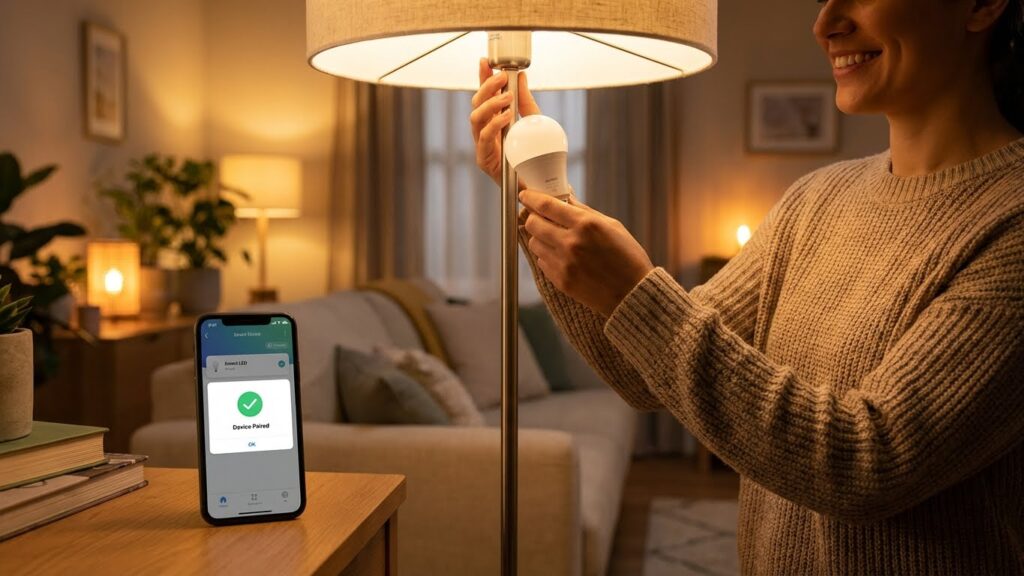
Check the bulb base, physical size, and any dimmer or enclosure limits before buying. Most smart bulbs use common screw bases, but size, heat, and dimmer type matter for safe use and full feature support.
Table Lamps
Table lamps usually use standard E26/E27 screw sockets. If your lamp has one of those, most full-size smart bulbs will fit and work. Measure the shade and socket depth; some smart bulbs are taller or wider than incandescents and may hit the shade or harp.
Watch wattage and heat. Smart bulbs draw low power but can get warm in tight, non-ventilated shades. Use bulbs rated for enclosed fixtures only if your lamp has a fully covered shade.
If your lamp uses a candelabra (E12) socket, you’ll need a smaller smart bulb or an adapter. Also check for pull-chain or rotary switches; those still control power, so smart features require the bulb to stay powered on.
Ceiling Fixtures
Ceiling fixtures vary a lot: flush mounts, recessed cans, and pendant lights each have different space and heat limits. Recessed cans often have limited clearance and can trap heat, so choose smart bulbs rated for enclosed or recessed use.
Pendant and semi-flush fixtures usually allow more space, so full-size smart bulbs fit easily. Confirm the socket type—many ceilings use E26/E27. For multi-bulb fixtures, use bulbs from the same brand or protocol (Wi‑Fi, Zigbee, Z‑Wave) to avoid pairing issues.
If the fixture is on a wall switch or dimmer, check compatibility. Electronic dimmers may not work with all smart bulbs; look for manufacturer guidance on dimmer-compatible modes.
Wall Sconces
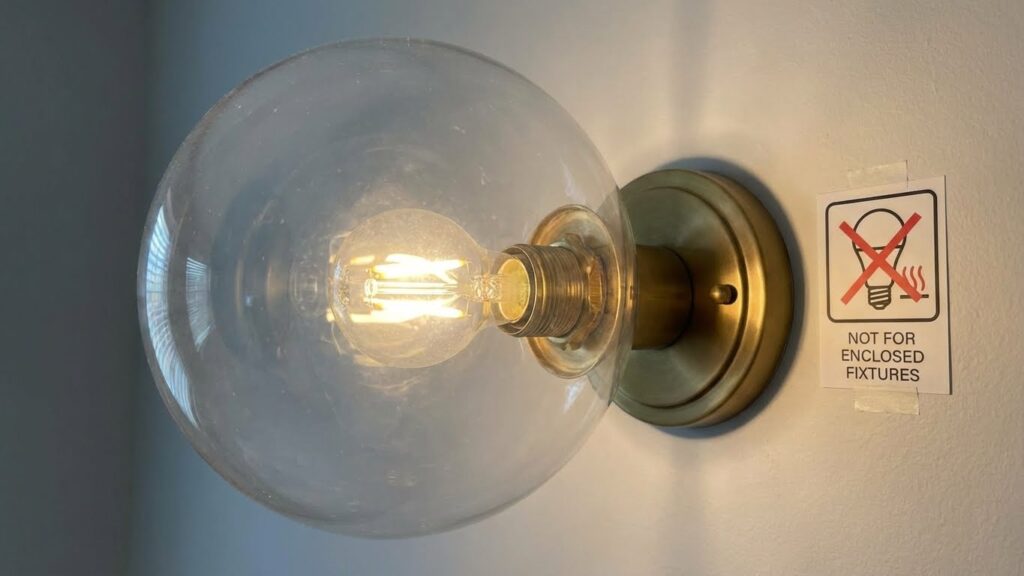
Wall sconces come in open and enclosed styles. Open sconces let heat escape, so most smart bulbs will operate normally. Enclosed or glass-covered sconces can trap heat and may shorten bulb life unless the bulb is rated for enclosed fixtures.
Consider size and beam angle. Some sconces use directional or decorative bulbs, so a standard A‑shape smart bulb might look bulky or block design details. Candelabra-style sconces often need E12 bulbs, so pick a smart option made for that base.
If the sconce is connected to a 3‑way switch, buy smart bulbs that support 3‑way operation or avoid using the mechanical switch to retain smart control.
Outdoor Lamps
Outdoor fixtures expose bulbs to moisture and temperature swings. Only use smart bulbs rated for damp or wet locations if the fixture lacks full weather protection. Check IP ratings when available.
Temperature affects electronics and battery‑assisted bulbs, so verify operating temperature ranges for cold or hot climates. Many outdoor fixtures use E26 sockets and standard sizes, but enclosed porch lights still require enclosed‑rated bulbs.
For landscape or post lights with low voltage or integrated LEDs, smart screw‑in bulbs won’t work. In those cases, use smart fixtures or smart switches designed for outdoor and low‑voltage systems.
Electrical Considerations for Smart Bulbs
Check the lamp’s wiring, switch type, and socket size before buying a smart bulb. Also confirm whether the fixture supports dimming or multi-position switching to avoid flicker or damage.
Dimmable Lamp Compatibility
Not all smart bulbs dim the same way. If your lamp has a standard dimmer switch, make sure the smart bulb states “dimmable” on the package and supports electronic (ELV) or leading-edge dimmers as required. Many smart bulbs use internal electronics and expect a full, constant supply; pairing them with an old resistive or incompatible dimmer can cause flicker, humming, or reduced life.
If you use a smart bulb with a dimmer, set the physical dimmer to full power when controlling brightness via an app or voice. Some smart bulbs provide a dedicated dimming range in their specs; check the minimum and maximum percentages to match the behavior you want. When in doubt, swap the dimmer for a smart-compatible model or use the bulb without a dimmer.
Three-Way and Multi-Switch Fixtures
Three-way bulbs and fixtures use special wiring and a three-position switch. Standard smart bulbs are usually single-circuit devices and will not act like a true three-way filament bulb. If your lamp uses a three-way socket, buy a smart bulb explicitly labeled for three-way use or use a compatible smart switch that replaces the wall control.
If two or more switches control the same fixture (multi-switch setups), avoid leaving the physical switches off; cutting power prevents the bulb’s smart functions. Use smart switches or keep one switch permanently on and use the app or voice control. Check wiring diagrams or consult an electrician if you see unexpected behavior like intermittent connectivity or loss of dimming.
Smart Bulb Technology and Connectivity
Smart bulbs use built-in electronics and wireless radios to let you control light from an app, voice assistant, or automation. Pay attention to the communication method, required hub, and how the bulb handles local vs cloud control.
Wi-Fi vs Bluetooth Bulbs
Wi‑Fi bulbs connect directly to your home router and work across your whole Wi‑Fi range. That means you can control them from anywhere if the bulb and app use cloud services. They often support richer features like color scenes, schedules, and third‑party voice assistants, but they use more power and can add traffic to your network.
Bluetooth bulbs pair directly with your phone and don’t need a router or internet to work locally. They are simpler to set up and use less network bandwidth. However, Bluetooth range is short (typically 30–60 feet) and you usually can’t control them remotely unless you add a hub or bridge.
Key tradeoffs:
- Wi‑Fi: remote access, advanced features, higher power and router load.
- Bluetooth: local control, lower power, limited range and features.
Smart Home Integrations
Check whether the bulb works with the smart platform you use: Amazon Alexa, Google Home, Apple HomeKit, or Zigbee/Z‑Wave hubs. Native integration lets you use voice commands, routines, and cross‑device automations without extra apps.
If a bulb uses Zigbee or Z‑Wave, it needs a compatible hub (like a SmartThings or Hue Bridge) to join your home network. That hub lets many bulbs form a mesh, improving reliability and range.
Look for these specifics when buying:
- Supported ecosystems (Alexa, Google, HomeKit).
- Need for a hub or bridge.
- Whether the bulb offers local control or depends on cloud services.
- Grouping and scene support for multi‑bulb control.
These details determine how easily you can add bulbs to lamps and build automated lighting that fits your home.
Limitations and Exceptions
Some lamps will accept smart bulbs with no trouble. Others pose risks like overheating, poor fit, or electrical incompatibility that can shorten bulb life or create hazards.
Enclosed Fixtures
Enclosed fixtures trap heat. Many smart bulbs contain electronics that run hotter than incandescent or simple LED bulbs. If you place a smart bulb in a fully enclosed ceiling can, dome lamp, or glass shade, the higher internal temperature can reduce lifespan or cause the bulb to fail.
Check the bulb packaging for an “suitable for enclosed fixtures” label. If it lacks that label, avoid sealed housings. For partially open shades, leave a few inches of clearance around the bulb to help airflow.
Heat Dissipation Issues
Smart bulbs include drivers and radios that need to shed heat. Overheating can cause flicker, color shift, or sudden shutdown. High-wattage LED smart bulbs in tight spaces are most at risk.
To reduce heat problems:
- Use bulbs rated for the fixture type.
- Keep vents or openings clear.
- Avoid using dimmer switches not specified by the bulb maker.
If bulbs get very hot to the touch, turn power off and move the bulb to a more open fixture.
Specialty Lamps
Not all specialty lamps accept smart bulbs. Appliances like ovens, saunas, or heavy-duty shop lights use different voltages or sealed, high-heat bulbs. Low-voltage fixtures (12V landscape or puck lights) need matching base and transformer compatibility.
Also check bayonet, candelabra, or mini-fluorescent sockets. Smart bulbs commonly come in E26/E27 or B22, but many specialty fixtures use other bases. For incompatible sockets, consider an adapter only if it matches voltage and safety specs.
Installation Tips and Best Practices
Check the socket size first. Most smart bulbs use standard sockets like E26 or E27, so make sure your lamp matches before you buy.
Turn the lamp off and let the old bulb cool. Screw the smart bulb in gently until secure, but do not overtighten.
Keep the lamp’s power switch in the ON position if the bulb uses Wi‑Fi or a smart hub. These bulbs need constant power to stay connected and respond to apps or voice commands.
Watch bulb size and shape. Some smart bulbs are larger than regular bulbs and may not fit inside shades or small fixtures. Measure clearance if the lamp has a tight cover.
Ensure good ventilation around the bulb. Smart bulbs can run warmer than LEDs without smart features. Avoid enclosed fixtures unless the bulb is rated for them.
Follow pairing instructions exactly. Use the maker’s app or your smart home hub steps and complete any firmware updates right away. Updated firmware fixes bugs and can improve performance.
Test functionality after installation. Try basic on/off, dimming, and color changes if available. If the bulb doesn’t respond, reset it and repeat the pairing process.
Use consistent power and network settings. Keep your Wi‑Fi password stable and place hubs or routers within range for reliable control.
Keep the lamp’s switch labeled if others might turn it off. A simple note prevents accidental power cuts that disconnect the smart bulb.
Troubleshooting Common Issues
If your smart bulb won’t turn on, first check the lamp’s power switch and the bulb’s base. A loose connection or a defective socket can stop power flow even if the bulb is fine.
Verify the bulb type and lamp compatibility. Some smart bulbs need a neutral wire or a specific base size. If the bulb feels hot or flickers, remove it and test in another lamp to rule out bulb or fixture damage.
Confirm wireless connection and app setup. Make sure your phone and the bulb use the same network band (2.4 GHz for many bulbs). Restart the router and the bulb if pairing fails.
Check physical switches and wall controls. If someone turns off the lamp at the wall, the smart bulb loses power and won’t respond. Consider using a switch that stays on or a smart switch designed for smart bulbs.
Use updates and resets as troubleshooting steps. Update the bulb’s firmware in the app. If problems persist, follow the reset steps from the maker and re-pair the bulb to your network.
Quick checklist:
- Ensure lamp is powered and socket is intact.
- Confirm base size and electrical requirements.
- Use the correct Wi‑Fi band and restart router.
- Keep wall switch in the ON position for smart control.
- Update firmware or perform a factory reset if needed.
Future Trends in Smart Bulb and Lamp Compatibility
You will see wider adoption of the Matter standard, which makes devices from different brands work together more easily. This means a bulb from one maker will more likely pair with hubs, voice assistants, and apps you already use.
Manufacturers will design bulbs with slimmer or adjustable shapes to fit more lamps. Expect more bulbs labeled for tight-fit fixtures and those that match old lamp sizes, so physical compatibility improves.
Smart bulbs will use lower-power, more reliable wireless tech to cut delays and dropouts. That helps if your lamp sits far from your router or hub, and it reduces the need for repeaters.
You will find more built-in dimming and switch-compatibility features so bulbs work with existing wall dimmers. Look for clear labeling about dimmer types supported and simple setup steps.
Feature tables will help you compare bulbs quickly.
- What to check: socket type, max lamp depth, dimmer support, protocol (Wi‑Fi, Zigbee, Matter), voice assistant compatibility.
- What helps: bulbs with multi-protocol support or included bridges.
You should also expect better energy savings and human-centric lighting options. Manufacturers will add color-tuning and circadian profiles that work across lamps, not just ceilings.
Finally, firmware updates will keep bulbs compatible longer. You can extend the life of your bulbs by updating them, so check for regular software support when you buy.
FAQs
Will a smart bulb fit my lamp?
Check the socket type (like E26 or E27) and the bulb shape. If those match and the bulb can physically fit, it should work.
Do smart bulbs need a special switch?
You still need a working power switch. Keep the switch on for app or voice control unless the bulb supports secondary control methods.
Can smart bulbs work in lamps with dimmers?
Most smart bulbs have built-in dimming and may not work with older mechanical dimmer switches. Use a compatible dimmer or leave the dimmer off.
Do smart bulbs need Wi‑Fi or a hub?
Some use Wi‑Fi or Bluetooth and connect directly to your phone. Others use Zigbee or Z‑Wave and need a hub or bridge to connect to your smart home system.
Will a smart bulb overheat in a shaded lamp?
Smart bulbs generate heat. If your lamp has poor ventilation or an enclosed shade, choose a bulb rated for enclosed fixtures or check the manufacturer’s guidance.
Can you control smart bulbs with voice?
Yes, most work with assistants like Alexa, Google Assistant, or Siri when they’re set up through the app or a hub.
What about color and brightness limits?
Color bulbs show a wide range but may not match every color exactly. Check lumen and color temperature specs for brightness and white tone.
Conclusion
A smart bulb will work in most lamps if the socket type matches and the lamp supplies power. Check the base size (like E26/E27), ensure the lamp can ventilate, and confirm the bulb fits the shade or housing.
Think about how you control the lamp. If your lamp uses a wall switch that you turn off often, the bulb won’t respond to remote apps when the switch is off. Consider using smart switches or leaving the lamp switch on and using app or voice control instead.
Match dimmer compatibility before pairing a smart bulb with a dimmable lamp. Some smart bulbs include built-in dimming and don’t work with old analog dimmer switches. If you need technical specs, consult the bulb maker’s guide or a trusted resource like the EPA ENERGY STAR page for lighting basics and manufacturer support pages for setup steps.
Smart bulbs add convenience, color, and automation without major wiring changes. If you check socket size, power, ventilation, and control method first, you’ll avoid most issues and get reliable smart lighting in your lamps.