
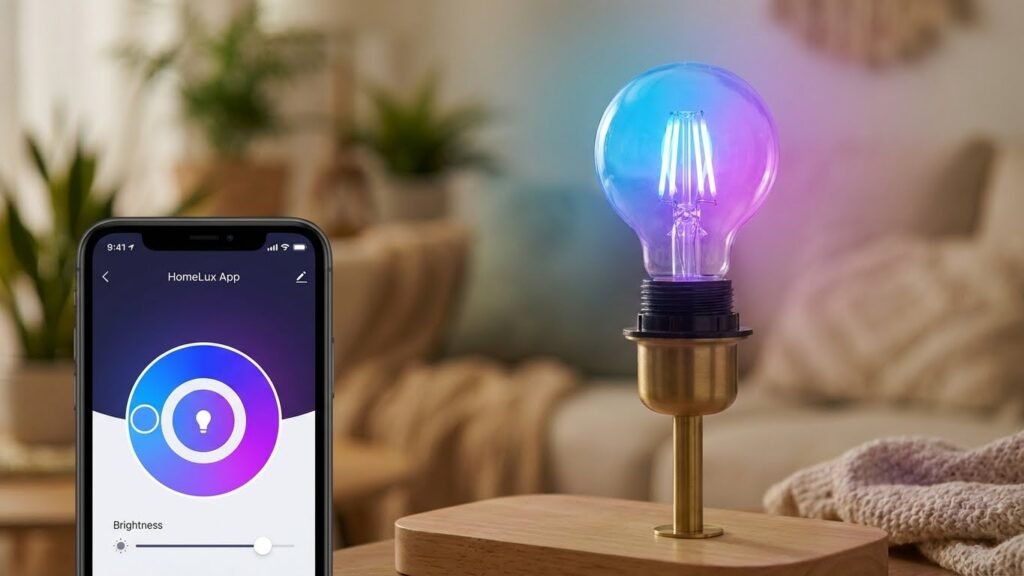
Smart bulbs are regular light bulbs with built-in wireless chips and smart controls that let you change brightness, color, and schedules from your phone or voice assistant. They connect to your home network using Wi‑Fi, Bluetooth, Zigbee, or Z‑Wave, so you can control them remotely, automate routines, and tie them into other smart devices.
You can set up smart bulbs in minutes, group them by room, and use apps or voice commands to dim lights, create scenes, or sync with music and movies. With better energy efficiency and long lifespans than many old bulbs, they save power while giving you flexible lighting options.
Key Takeaways
- Smart bulbs use wireless tech and onboard controls to replace standard bulbs.
- You control them via apps, voice, or home hubs for automation and scenes.
- They often cut energy use and last longer than traditional bulbs.
Core Technology Behind Smart Bulbs

Smart bulbs combine wireless radios, a tiny onboard computer, and efficient LED hardware to let you control brightness, color, and schedules from a phone or voice assistant. These parts work together to translate your commands into light changes, keep power use low, and connect with other smart devices.
Wireless Communication Methods
Smart bulbs use short-range radios to receive commands and talk to hubs or phones. Common protocols include Wi‑Fi, Bluetooth, Zigbee, and Z‑Wave. Wi‑Fi connects directly to your router so you can control bulbs from anywhere with internet access, but it uses more power and each bulb sits on your home network. Bluetooth links to your phone with low power and simple setup, but range is limited and remote control often needs a paired hub or bridge.
Zigbee and Z‑Wave are mesh networks: each device relays signals to extend range and improve reliability. These protocols use a dedicated hub (like the Philips Hue Bridge) to translate between the bulbs and your router. Mesh systems reduce Wi‑Fi congestion and often allow more bulbs per network with lower latency.
Microcontroller Integration
A microcontroller acts as the bulb’s brain. It runs firmware that handles communication, parses commands, controls LED drivers, and manages schedules and scenes. You can expect an ARM Cortex‑M or similar low‑power microcontroller inside many bulbs.
The microcontroller monitors inputs (wireless messages, timers, sensors) and outputs pulse‑width modulation (PWM) signals to LED driver circuits. It also keeps the bulb stable: it protects against voltage spikes, handles over‑temperature limits, and performs updates when the manufacturer pushes new firmware. Security features like encrypted communication and authentication often run on the microcontroller to prevent unauthorized control.
LED Lighting Efficiency
LEDs provide the light source and are far more efficient than incandescent bulbs. Smart bulbs use arrays of LED chips for white and RGB or RGBW combinations for color mixing. You control brightness by changing current or using PWM, which switches the LEDs on and off rapidly to vary perceived brightness without wasting energy.
LED drivers convert AC from your socket to the DC current LEDs need while maintaining a stable output across dimming ranges. Heat management is critical: aluminum heat sinks and thermal pads pull heat away from LED chips and electronics to preserve lifespan and color stability. Efficient LEDs plus smart control reduce energy use and keep the bulb life measured in tens of thousands of hours.
How Smart Bulbs Connect to Networks

Smart bulbs link to your home in three main ways. Each method affects range, speed, device count, and whether you need a hub or app.
Wi-Fi Connectivity
Wi-Fi bulbs connect directly to your router using built-in Wi‑Fi chips. You set them up through the manufacturer’s app, which asks for your network name (SSID) and password. After pairing, you can control bulbs from the app or voice assistants like Alexa or Google Assistant.
Expect higher bandwidth and direct internet access, so features like firmware updates and remote control work without extra hardware. Wi‑Fi bulbs can use more power when idle and may overload crowded networks if you have many devices. Place bulbs where Wi‑Fi signal is strong, or add a mesh system if coverage is weak.
Security depends on your router settings. Use strong Wi‑Fi passwords and keep bulb firmware updated. If you worry about privacy, put smart bulbs on a separate guest network.
Bluetooth Integration
Bluetooth bulbs pair directly with your phone or a Bluetooth hub. Setup often uses an app that finds the bulb nearby and links it with a tap. Bluetooth uses less power than Wi‑Fi and works well for single-room control.
Range is short—typically 30 to 50 feet indoors—and walls reduce that distance. You can control bulbs only when your phone or a paired hub is within range, unless you add a bridge device to provide remote access. Bluetooth also supports simple group control for a few bulbs, but it does not scale well to dozens of devices.
Bluetooth is easy to set up and more private because it usually does not require internet access. For whole-home automation, consider bulbs that support both Bluetooth and another protocol or that offer an optional hub.
Zigbee and Z-Wave Protocols
Zigbee and Z‑Wave use low-power mesh networking through a dedicated hub. Each bulb acts as a node, relaying signals so range grows as you add devices. You install a hub (from the bulb maker or a compatible smart home hub), connect that hub to your router, then pair bulbs to the hub.
Mesh networks handle many devices without clogging Wi‑Fi. They offer fast, reliable local control and lower power use per bulb. Z‑Wave and Zigbee use different frequencies and are not directly compatible, so check which standard your hub and bulbs support.
These protocols often provide stronger security options and better scaling for larger setups. You’ll need the hub for remote control and voice assistant linking, but once set up, the system runs smoothly and stays responsive even if your internet goes down.
Smart Bulb Control and Management
You can control smart bulbs from your phone, by voice, or with timed rules. Each method gives you on/off control, brightness, color (if supported), grouping, and status feedback.
Mobile App Functionality
Use the bulb maker’s app or a hub app to set up bulbs, update firmware, and adjust settings. The app shows each bulb’s name, current state, brightness, color temperature, and energy use when available.
Most apps let you group bulbs into rooms or zones so you can change several lights at once. You can create scenes (preset brightness and color) and activate them with one tap. Look for an app that supports local control on your Wi‑Fi or hub to keep responsiveness fast.
Apps also handle over‑the‑air updates and bulb resets. Good apps include quick actions, like tile shortcuts or widgets, so you can trigger common scenes without opening the full app.
Voice Assistant Compatibility
Enable the voice skill or link the app to your voice assistant account to control bulbs by voice. Common assistants include Alexa, Google Assistant, and Siri; each exposes bulb controls slightly differently.
You can ask the assistant to turn lights on/off, set brightness, change color, or run scenes. For example, “Set living room lights to 50%” or “Make bedroom lights warm white.” Naming bulbs clearly in the app prevents confusion when you give voice commands.
Some features need cloud linking; others work locally if the bulb and assistant share the same hub or protocol (like Zigbee). Check whether the assistant supports advanced features like color temperature or power monitoring before relying on voice for those tasks.
Scheduling and Automation Features
Schedules let you turn lights on or off at set times and can follow sunrise/sunset or fixed clock times. Use schedules for daily routines, security simulations, or to match your sleep and wake times.
Automations combine triggers (time, motion sensor, door sensor, location) with actions (turn on, dim, change color). For example, set lights to turn on at 80% brightness when a motion sensor detects movement after sunset.
Many systems let you build conditionals: only run an automation if you’re home, or only on weekdays. Test automations after creating them and include delays or fade times to avoid abrupt changes.
Energy Consumption and Efficiency
Smart bulbs use LED technology and small wireless electronics. They save far more energy than incandescent bulbs, and their extra electronics add only a small amount of standby power.
Power Usage Comparison
Most smart bulbs draw 7–12 watts when producing light similar to a 60W incandescent. That means you cut bulb power use by roughly 75–85% compared with older incandescent lamps.
When turned “off” by app or voice, many smart bulbs still draw a tiny standby current. Typical standby is below 1 watt (often 0.2–0.8 W). If you have a hundred smart bulbs, that standby can add a noticeable amount over time; for a few bulbs it’s negligible.
Use this quick reference:
- Typical smart LED active: 7–12 W
- Typical standard LED active: 6–10 W
- Standby (smart bulb): ~0.2–1.0 W
Measure with a plug meter if you need exact numbers for your model and setup.
Dimming Capabilities
Dimming reduces bulb power and light output together. When you set a smart bulb to 50% brightness, power often drops to roughly 40–60% of full power, depending on the bulb’s driver and firmware.
Smart bulbs let you schedule and automate dimming to match routines. That means you can lower power use at night or during daytime when full brightness isn’t needed. Dimming also extends bulb life by reducing operating stress.
Keep in mind that exact power vs. brightness varies by brand. Check manufacturer data or run tests if you need precise energy savings for a specific bulb.
Security Considerations for Smart Bulbs
Smart bulbs can expose your home network and personal data if you don’t secure them. Focus on who can access the bulbs, what data they send, and whether the bulb firmware stays current.
Data Privacy Issues
Smart bulbs can send usage data to cloud servers and mobile apps. This may include when lights turn on/off, color and brightness settings, and IP addresses. If a manufacturer collects location or account data, it can reveal your daily routines.
Limit data exposure by using accounts with minimal personal info and turning off optional data-sharing in the bulb’s app. Prefer bulbs that support local control (no cloud) or that allow you to opt out of telemetry.
Place smart bulbs on a separate network or guest Wi‑Fi to prevent attackers from reaching other devices. Use strong, unique passwords for the bulb account and your Wi‑Fi router. Regularly review app permissions and delete accounts for bulbs you no longer use.
Firmware Updates
Firmware fixes security bugs and adds protections, so keep bulbs updated. Check the manufacturer’s update schedule and enable automatic updates when possible. Some bulbs update only via the vendor’s cloud; others update through a local gateway or app.
Verify update authenticity by using devices from reputable brands and downloading apps from official app stores. If your bulb lacks ongoing updates, consider replacing it. Keep a log of firmware versions for critical devices and apply updates soon after release to reduce the window for exploits.
Installation and Setup Guide

You will screw in the bulb or install the switch, connect it to power, and pair it with an app or hub. Expect to confirm network type, follow app prompts, and test basic controls.
Initial Configuration Process
Turn off the power, then screw the smart bulb into the socket like a regular bulb. Restore power and make sure the bulb blinks or shows a setup color—this indicates it’s in pairing mode.
Open the bulb maker’s app on your phone. Create or sign into the account, then choose “Add Device.” Grant the app permission to use Bluetooth or your local network if prompted.
Choose the correct network: most bulbs use 2.4 GHz Wi‑Fi, Bluetooth, Zigbee, or Z‑Wave. If using Wi‑Fi, enter the network name and password exactly. If using a hub (Zigbee/Z‑Wave), put the hub in pairing mode first, then add the bulb from the hub’s app.
Name the bulb and assign it to a room. Test basic commands: on/off, brightness, and color (if supported). Update the bulb firmware if the app prompts you to do so.
Troubleshooting Common Issues
If the bulb won’t pair, first confirm it’s in pairing mode. Power‑cycle the bulb (off 10 seconds, on) to force pairing mode. Check the app for step‑by‑step pairing instructions specific to your model.
For Wi‑Fi problems, confirm your router broadcasts 2.4 GHz and that the SSID and password are correct. Move your phone and bulb closer to the router during setup. If the bulb uses Bluetooth, keep the phone within 10–15 feet and turn off battery saver or low‑power mode.
If the bulb flickers or won’t stay on, tighten the bulb, test a different socket, and check the switch type—dimmer switches can cause issues unless the bulb is dimmer‑compatible. Reset the bulb using the manufacturer’s reset sequence when other fixes fail.
If voice control fails, re‑link the bulb’s account to the voice assistant (Google Home, Alexa, etc.) and check that both apps are on the same network and updated.
Integration With Smart Home Ecosystems
Smart bulbs connect to hubs and services so you can control them alongside other devices. Expect to check protocols, app compatibility, and cloud features before you buy.
Compatibility With Hubs
Check which wireless protocol your hub uses: Wi‑Fi, Zigbee, Z‑Wave, or Thread. If your bulb supports Zigbee or Thread, it often joins a hub like Philips Hue or a HomeKit bridge for local control and lower latency. Wi‑Fi bulbs connect directly to your router and usually need the bulb maker’s app, which can be simpler but may add network traffic.
Look for these specifics when choosing bulbs:
- Protocol listed on the box or product page.
- Local control vs. cloud dependence — local control keeps basic functions working if the internet drops.
- Firmware update path — some hubs push updates, others require the bulb app.
Third-Party Service Support
Verify voice assistant and automation support up front: Amazon Alexa, Google Assistant, and Apple HomeKit are the most common. Brands like Philips Hue and LIFX publish clear compatibility notes; lesser-known brands may rely on open APIs or a cloud bridge.
Consider these practical points:
- Voice commands — test simple phrases you’ll use, like “set living room to 50%.”
- Routines and scenes — confirm the bulb supports schedules and multi-device scenes in the ecosystem app.
- IFTTT and APIs — useful if you want custom triggers or integrations with services outside the main platforms.
Long-Term Maintenance and Support
Smart bulbs last many years but need basic care and a clear plan for support. You should track bulb hours, avoid heat buildup, and know your warranty terms so you can get help or replacements when needed.
Lifespan and Durability
Most smart LED bulbs last about 15,000–25,000 hours, which equals roughly 5–9 years at 8 hours daily. Heat shortens lifespan, so avoid using non-rated bulbs in fully enclosed fixtures. Overheating shows as dimming, color shifts, or flicker; remove power and let the bulb cool before checking.
To extend life, keep firmware up to date and use stable power. Frequent power cycling and voltage spikes stress internal electronics. Use surge protectors for outdoor or vulnerable circuits. For color-tunable bulbs, note that color LEDs and wireless modules can fail before the LED diodes do.
Track serial numbers and installation dates. Replace bulbs in groups if you want uniform light and minimize mismatched color or brightness over time.
Warranty and Customer Support
Check the manufacturer warranty length before buying; many offer 2–3 years, while some advertise up to 25,000-hour coverage. Read the fine print: warranties often cover manufacturing defects but exclude damage from misinstallation, overheating, or third-party firmware.
When you need support, have this ready: model number, purchase date, photo of the bulb label, and screenshots of app/device logs showing errors. This speeds service and warranty claims. Use the manufacturer app for diagnostics first — many apps run self-tests and report connectivity issues.
If a corporate support agent can’t help, escalate to retailer support or request a replacement under warranty. Keep purchase receipts and register bulbs with the maker when possible to simplify claims.
Emerging Innovations in Smart Bulb Technology
New smart bulb features are focusing on making light adapt to your day and the room itself. You’ll see bulbs that change color and intensity automatically, and bulbs that sense temperature, motion, or air quality to act without extra devices.
Adaptive Lighting Features
Adaptive lighting adjusts color and brightness through the day to match your needs. Many bulbs now use built-in clocks or your phone’s local sunrise/sunset times to shift from cool, bright white in the morning to warmer, dimmer tones at night. This helps you wake up and prepare for sleep without manual changes.
Some models use sensors or your home hub to react instantly. For example, bulbs can boost brightness when you enter a room or reduce glare during evening TV viewing. Advanced bulbs offer scene learning: they record your manual adjustments over days and then apply the pattern automatically.
Key capabilities:
- Circadian schedules tied to local time or custom routines.
- Motion-triggered and ambient-light responses for automatic on/off and dimming.
- Scene learning that mimics your regular preferences.
Environmental Sensing Integration
Smart bulbs increasingly include sensors that monitor the room and the environment. Common built-in sensors detect motion, ambient light level, and sometimes temperature or humidity. When your bulb senses motion, it can turn lights on for safety or convenience without separate sensors.
Some bulbs link to air-quality or VOC data via a hub or through integrated sensors. This can trigger ventilation alerts or change light color to warn you of poor air. Matter and other standards improve how bulbs share sensor data with thermostats, fans, and security systems.
What this means for you:
- Fewer separate devices: one bulb can handle lighting and basic sensing.
- Automated actions like fan activation, lighting alerts, or recording occupancy.
- Better cross-device automation when bulbs use open standards for data sharing.
FAQs
What do smart bulbs need to work?
Smart bulbs usually need power from a light socket and a way to communicate, like Wi‑Fi, Bluetooth, Zigbee, or Z‑Wave. You often control them with an app, voice assistant, or a smart hub.
Can smart bulbs save energy?
Yes. Most smart bulbs use LEDs, which use less energy than incandescent bulbs. You can also schedule or dim lights to cut power use further.
Do smart bulbs work when the power is off?
If the wall switch cuts power to the socket, the bulb will be off and cannot be controlled remotely. Smart bulbs need continuous power to respond to apps or voice commands.
Are smart bulbs secure?
Security varies by brand. Use strong Wi‑Fi passwords, enable device updates, and keep hub firmware current to reduce risks. Buy bulbs from reputable manufacturers when possible.
Do you need a hub for all smart bulbs?
Some bulbs work directly with your phone over Wi‑Fi or Bluetooth. Others use Zigbee/Z‑Wave and require a hub or a compatible smart speaker to connect to your network.
Can smart bulbs change color and brightness?
Yes. Many smart bulbs offer adjustable brightness and a wide range of colors. Check the bulb’s specifications for color temperature and lumen output before you buy.
What happens during a firmware update?
Updates can add features or fix bugs. Your bulb may restart and be temporarily unreachable. Allow updates to finish to keep the bulb working safely.
Conclusion
Smart bulbs give you control, convenience, and energy savings in one simple device. You can schedule lights, change colors, and connect them to other smart devices using Wi‑Fi, Bluetooth, Zigbee, or Z‑Wave.
Pick bulbs that match your hub or app so setup stays simple. If you use a smart home hub, check compatibility on the manufacturer’s site like the Zigbee Alliance or a major smart home platform such as Amazon Alexa for clear guidance.
Security and privacy matter. Keep firmware updated and use strong Wi‑Fi passwords to reduce risks. You can also isolate smart bulbs on a guest network if you want extra protection.
Smart bulbs cost more than regular LEDs, but they can save energy with dimming and precise control. Think about how you will use them — mood lighting, schedules, or voice control — before you buy.
You can mix smart bulbs with motion sensors and routines to make your home more comfortable and efficient. Start small, test what works for you, and expand your system as you learn.