
You can use some non-Philips bulbs with your Hue system, but full feature support usually requires official Hue products or compatible devices listed as “Works with Philips Hue.” If you want all features — scenes, Entertainment sync, and full app control — stick with Hue-branded bulbs or officially supported models.
You can mix certain third‑party bulbs for basic on/off, dimming, or color changes if they use the same Zigbee standards and appear on Hue compatibility lists, but expect limits and extra setup steps. This guide shows which brands work best, what features you may lose, and simple setup tips so you can pick the right bulbs for your home.
Key Takeaways
- Official Hue bulbs give the smoothest experience and full feature set.
- Some Zigbee third‑party bulbs work for basic lighting but can miss advanced features.
- Check compatibility lists and expect extra setup for non‑Hue devices.
Understanding Philips Hue Compatibility
You need to know how Hue talks to bulbs, which wireless standards matter, and whether you must use a bridge or can run devices directly on Wi‑Fi. These factors decide which third‑party bulbs will work, what features you get, and how reliable your setup will be.
Philips Hue Bridge and Communication Protocols
The Hue Bridge is a small hub that connects to your router and translates commands between your phone or voice assistant and Zigbee bulbs. If you use the Bridge, you can add Zigbee bulbs that follow the same profile as Hue. That lets you control lights in the Hue app, use scenes, schedules, and Hue’s entertainment features (but note: entertainment sync is limited to Hue-branded devices).
The Bridge also handles firmware updates and keeps large bulb networks stable. You will lose some advanced Hue features if a bulb only speaks Wi‑Fi or a different Zigbee variant not recognized by the Bridge. If you want full Hue app control and grouping, prefer bulbs listed as “Works with Philips Hue” or those using the standard Zigbee Light Link profiles.
Zigbee and Matter Integration Explained
Zigbee is the main radio standard Hue uses. Many third‑party bulbs that use standard Zigbee profiles can join your Hue Bridge network. Compatibility often depends on whether the bulb implements the correct Zigbee clusters for on/off, brightness, and color. If it does, you’ll get basic and color controls inside the Hue app.
Matter is a newer smart‑home standard designed for cross‑platform compatibility. Hue has added Matter support on certain devices, letting some lights work across ecosystems without a Bridge. Matter over Thread or Wi‑Fi can make setup simpler, but feature support varies by product. Check manufacturer notes: Matter devices may work with Hue’s ecosystem differently than Zigbee bulbs do.
Differences Between Hub and Hubless Setups
With a hub (Hue Bridge) you get centralized control, better mesh reliability, and access to Hue app features. The Bridge supports many bulbs on one network and simplifies firmware updates. You can mix supported Zigbee bulbs, but expect full feature parity only with Hue-made lights.
Hubless setups use Wi‑Fi or Matter directly with your phone, router, or smart speaker. These avoid buying a Bridge but can add network traffic and reduce battery life on some devices. Hubless bulbs may not join the Hue app or support entertainment syncing. Choose hubless if you prefer plug‑and‑play and don’t need deep Hue features; choose the Bridge if you want large installations, advanced scenes, and tighter control.
Smart Bulb Brands That Work With Philips Hue

You can add non-Hue bulbs to a Hue Bridge if they use Zigbee Light Link or are compatible with the Bridge’s Zigbee implementation. Some brands give near-native control, while others need the vendor’s firmware or limited features.
innr Bulbs
Innr bulbs use Zigbee and connect directly to the Hue Bridge for core functions like on/off, dimming, and color control. You’ll get reliable performance for A19 and GU10 types, often at a lower price than Hue-branded bulbs.
Set up is simple: pair the bulb to the Hue Bridge via the Hue app and assign it to rooms and scenes. Advanced Hue features such as entertainment sync or some firmware-driven effects may not work the same as with Hue bulbs. Still, innr bulbs keep stable connections and good color accuracy for everyday use.
IKEA TRÅDFRI Bulbs
IKEA TRÅDFRI bulbs also run on Zigbee and generally pair well with the Hue Bridge. You can control white spectrum, tunable white, and many color models directly from the Hue app after pairing.
TRÅDFRI bulbs often require a firmware update through their IKEA gateway or via the Hue Bridge in some cases. Expect basic controls—on/off, dim, color temperature, and color—plus group control. Performance is solid for fixed fixtures and budget installs, but occasional model-specific quirks mean you should test color bulbs before wide deployment.
Sengled Smart Bulbs
Sengled offers Zigbee and Wi‑Fi bulbs; only the Zigbee models pair with the Hue Bridge. If you choose Sengled Zigbee, you’ll get standard controls like dimming and color where supported, and decent range in multi-bulb setups.
Sengled Zigbee bulbs generally join the Bridge with the Hue app’s add-light flow. Some Sengled features, like proprietary effects or Bluetooth setup, will not carry over. Pay attention to model numbers (look for Zigbee in the specs) to avoid buying Wi‑Fi-only bulbs that won’t integrate with Hue.
GLEDOPTO Bulbs
GLEDOPTO makes Zigbee color, white, and RGB+CCT controllers that work well with the Hue Bridge for mains-powered fixtures and LED strips. These devices prioritize flexible form factors and often cost less than Hue alternatives.
You should expect solid dimming and color control once paired. Some GLEDOPTO controllers expose extra parameters in third-party apps, but the Hue app covers the essentials. For LED strips, choose GLEDOPTO models labeled Zigbee and check compatibility notes for voltage and connector type before purchase.
Third-Party Smart Bulb Integration
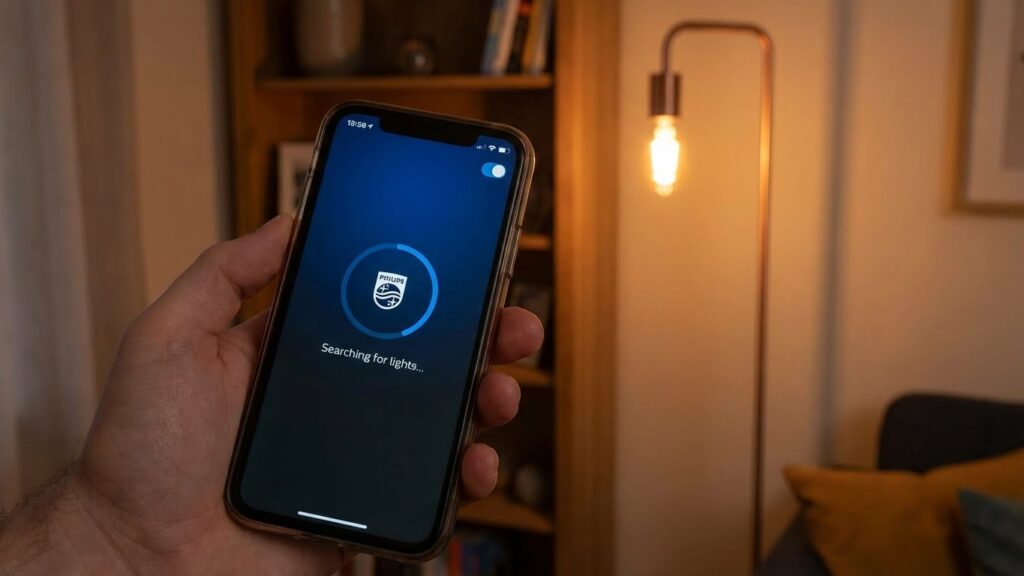
You can add some non-Hue bulbs to your Hue setup, but compatibility depends on the bulb’s wireless protocol and feature set. Expect Zigbee bulbs to work best with a Hue Bridge, while other types may need a separate hub or will have limited features.
How to Connect Non-Hue Zigbee Bulbs
If a bulb uses Zigbee Light Link (ZLL) or Zigbee 3.0, you can often pair it to your Hue Bridge. Put the Bridge in pairing mode from the Hue app, then power-cycle the new bulb or follow the bulb maker’s pairing steps.
Supported steps vary by brand, so keep the bulb’s manual handy. Some bulbs need a factory reset before the Bridge will find them.
Be aware: third-party bulbs might not show full color or effect options in the Hue app. They can appear as generic lights and may miss advanced features like Entertainment sync or certain dynamic scenes.
Connecting Matter-Enabled Bulbs
Matter-compatible bulbs aim to simplify multi-vendor use by using a common standard over Thread or IP (Wi‑Fi/Ethernet). If you use a Hue Bridge that supports Matter routing (or a Matter controller), you can add Matter bulbs to the same smart home ecosystem.
Follow the bulb maker’s Matter onboarding steps in their app, then link the device to your smart home controller.
Note that Matter support depends on firmware and the particular Hue hardware or app versions. Some Matter bulbs will control basic on/off, brightness, and color, but advanced Hue-only scene features may still be unavailable.
Bluetooth Bulb Limitations
Bluetooth-only smart bulbs cannot join the Hue Bridge directly. You can control them from the bulb maker’s app or by grouping them with a Bluetooth-compatible Hue product, but they won’t appear as Bridge‑managed lights.
Bluetooth bulbs also limit range and multi-user control because each phone or tablet connects directly.
If you want full Hue Bridge features—remote access, HomeKit via Hue, routines, and the Entertainment API—choose Zigbee or Matter bulbs that can join the Bridge or a Matter controller instead of Bluetooth-only models.
Features and Limitations of Supported Bulbs
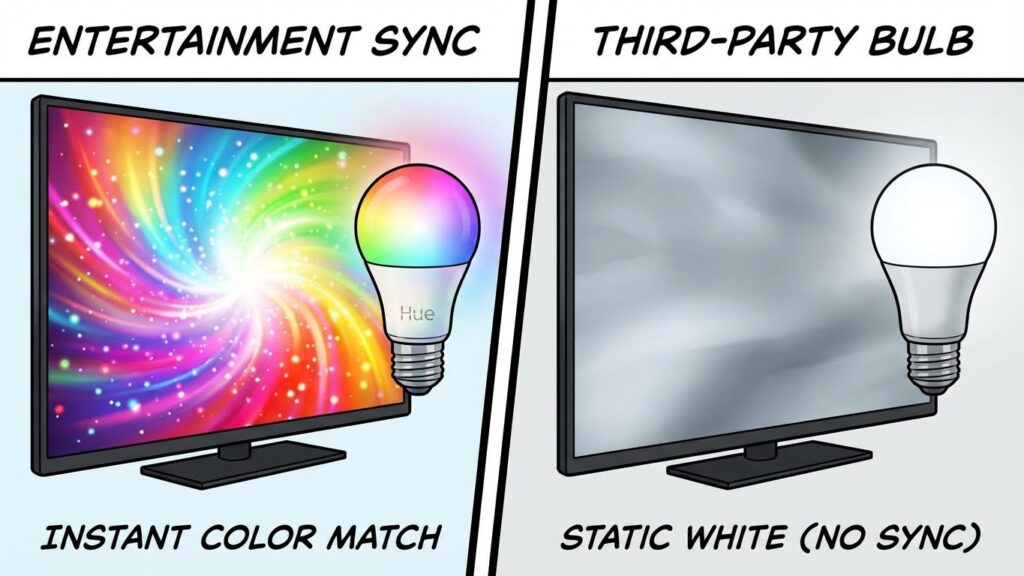
Supported bulbs vary by color range, brightness, grouping behavior, and firmware update support. Know which features you need—color accuracy, sync with scenes, or regular firmware fixes—before adding non-Hue bulbs to your system.
Color and Brightness Control
When a third-party bulb is “supported” by Hue, color and white-temperature control may work, but limits exist. Some bulbs offer full RGB+W color control through the Hue app. Others only support tunable white (warm to cool) or a narrower color gamut. Expect differences in color accuracy and saturation compared with genuine Hue bulbs.
Brightness often varies by model and is listed in lumens. Non-Hue bulbs can reach similar lumen outputs, but dimming smoothness may differ. You might notice stepped dimming, slower response, or colors that shift when dimmed. Check product specs for lumens and color temperature range before you buy.
Grouping and Scene Compatibility
Supported bulbs usually join Hue rooms and groups, letting you control multiple lights at once. However, some third-party bulbs won’t respond the same way in Hue Entertainment zones or advanced sync features. You can add them to basic scenes and routines, but expect limited compatibility with dynamic effects tied to Hue hardware.
If you use Hue Bridges and third-party bulbs together, grouping works in the app. Still test scene recall: some bulbs reset color or take longer to match the group setting. Label bulbs clearly in the app so you can spot any that behave differently.
Firmware Updates and Support
Firmware updates are key for stability and new features. Philips (Signify) pushes updates to Hue-brand bulbs through the Hue Bridge. For supported third-party bulbs, update paths vary: some manufacturers release updates through their own hubs or apps, while others rely on the Hue Bridge only if the vendor allows it.
If a bulb can’t receive Hue-delivered firmware, you may miss bug fixes or new features. Confirm with the bulb maker how updates are handled before integrating into a Hue setup. Also check warranty and customer support options—issues in mixed systems can require contacting both Hue and the third-party maker.
Best Use Cases for Compatible Smart Bulbs
Compatible smart bulbs let you expand lighting without replacing every Hue product. Use them to control many rooms, add color or bright task lights, and link lights to voice assistants and routines.
Whole Home Automation
You can use Zigbee bulbs that join the Hue Bridge or Wi‑Fi bulbs that work through their own hubs to automate every room. Add compatible A19 bulbs in bedrooms, recessed downlights in the living room, and outdoor floodlights at the front door for a consistent control point.
Group bulbs by room in the Hue app to set schedules, scenes, and away modes. Use a Hue Bridge to keep Zigbee bulbs on the same mesh network for faster response and broader range. If you mix Wi‑Fi bulbs, assign them to rooms in their native app and link them to Hue only where supported.
Plan layouts so critical loads (hallway, entry, kitchen) use bulbs with fast turn‑on and reliable dimming. Less critical spots—closets, closets, craft areas—can use budget compatible bulbs. That gives you whole‑home coverage while keeping cost and performance balanced.
Accent Lighting
Use color-capable compatible bulbs for accent spots like shelves, alcoves, and under‑cabinet runs. Choose bulbs with wide color gamut for living rooms and media walls so you can match mood scenes and media sync effects accurately.
For strips and recessed cans, check that the bulb or fixture reports accurate brightness (lumens) and supports the Hue scene sync if you want dynamic color changes. Place color bulbs where you often change hues—behind TVs, under counters, or in bookcases—to make the most of scenes and routines.
Use dimmable white bulbs for subtle accents like step lights or hallway guides. Those require lower maintenance and still integrate into timed routines, making them a practical choice for safety and ambiance.
Smart Home Integration With Voice Assistants
You can control compatible bulbs with Alexa, Google Assistant, or Siri once they’re linked to the Hue Bridge or their native hub. Use voice commands to turn rooms on and off, change scenes, or set brightness without opening apps.
Set voice routines for common actions: “Good night” can turn off living room lights and dim bedroom lights to 10%. Confirm the bulb supports the voice platform you use—some third‑party bulbs offer full voice control only when bridged through Zigbee or their own cloud service.
Keep commands simple and consistent by naming rooms and groups clearly in the Hue app. That reduces misfires and makes voice control faster and more reliable for daily use.
Troubleshooting and Setup Tips
Start by checking the basics: make sure bulbs are powered on and within range of your Hue Bridge or Bluetooth device. If a bulb does not appear, screw it in and cycle the wall switch off and on once.
Use the Hue app to add devices. Scan the bulb QR code or follow the in-app prompts. If the app can’t find a bulb, try a factory reset on the bulb (consult its manual) and then attempt pairing again.
If lights flicker or drop offline, check your network and Zigbee traffic. Place the Bridge away from large metal objects and Wi‑Fi routers, and avoid heavy interference from other wireless devices. Moving the Bridge or adding a Hue dimmer or smart plug as a repeater can help.
Keep firmware and apps updated. Open the Hue app and install any bridge or bulb updates. Updates often fix compatibility and stability issues.
If a third‑party bulb won’t join, confirm compatibility: some bulbs require the Hue Bridge or only work via Bluetooth. Use the Bridge for the most reliable support and advanced features like routines and integrations.
When using Matter or smart home assistants, ensure each platform’s account and permissions are set correctly. Revoke and re-link services if devices behave oddly.
If problems persist, record the model and firmware, reboot your Bridge and router, and contact support with those details. That helps technicians diagnose the issue faster.
Future Developments in Philips Hue Compatibility
You can expect broader Matter support to keep improving. Philips Hue already adopted Matter early, and that trend will make Hue more likely to work with a wider range of smart bulbs and hubs from other brands.
New Hue hardware and firmware updates often add features and fix bugs. Keep an eye on Bridge and app updates, since they can enable compatibility or new integration options without buying new bulbs.
Third-party bulbs may gain partial compatibility but not full feature parity. You might control basic on/off, dimming, and color temperature on some non-Hue bulbs, but advanced features like Entertainment sync or ultra-low dimming will likely remain Hue-only.
Signify has shown it will refresh product lines and add capabilities over time. That means cheaper or more efficient Hue bulbs could appear, and compatibility lists will expand as the company works with Matter and other standards.
What you should do: check the Hue compatibility list before buying, and update your Bridge and app regularly. This keeps your system current and ready to work with new devices as support rolls out.
FAQs
Which bulbs will connect to your Philips Hue Bridge?
Most bulbs that use the Zigbee standard can join your Hue Bridge. Genuine Philips Hue bulbs always work. Some third-party Zigbee bulbs will pair too, but results vary by brand and model.
Can Wi‑Fi smart bulbs work with Hue?
No. Wi‑Fi bulbs usually connect directly to your router or a voice assistant. They do not join the Hue Bridge. Use Zigbee bulbs or a compatible Zigbee controller for Bridge integration.
Will third‑party bulbs support all Hue features?
Not always. Third‑party bulbs may control on/off and dimming. Advanced features like color accuracy, scenes, and Entertainment sync often work best with official Hue bulbs.
How do you check compatibility before buying?
Look for Zigbee compatibility and, if possible, a note that the bulb works with Hue or Zigbee Light Link. Check recent user reports or a compatibility list from reliable sources to avoid surprises.
What if a bulb flickers or won’t stay connected?
Move the bulb closer to the Bridge for testing. Update your Bridge firmware and bulb firmware if available. Remove and re-add the bulb in the Hue app if needed.
Can you mix Hue bulbs with other Zigbee devices?
Yes. You can mix brands in one Zigbee network, but expect mixed performance. Keep critical lighting on Hue-branded bulbs when you need full feature support.
Conclusion
You can mix and match some third-party smart bulbs with a Philips Hue Bridge, but compatibility varies by feature. Basic on/off and color control often work through Zigbee bulbs that follow the same protocol, while advanced features like Hue Entertainment and full firmware updates usually require genuine Hue products.
If you want the widest feature set and best reliability, stick with Philips Hue bulbs and fixtures. They get full support from the Hue app, firmware updates, and integrations with services like Google Home and Amazon Alexa. For more technical details about Zigbee and device compatibility, check the Zigbee Alliance resources and Philips Hue support pages.
Using non-Hue bulbs can save money and expand choices, but expect limits. You may lose scene syncing, dynamic effects, or guaranteed long-term updates. Test a single bulb first to confirm it meets your needs before replacing many fixtures.
Think about your priorities: cost, features, and future-proofing. Buy Hue for a seamless, feature-rich setup. Choose compatible third-party Zigbee bulbs if you need lower cost and are okay with some trade-offs.
