
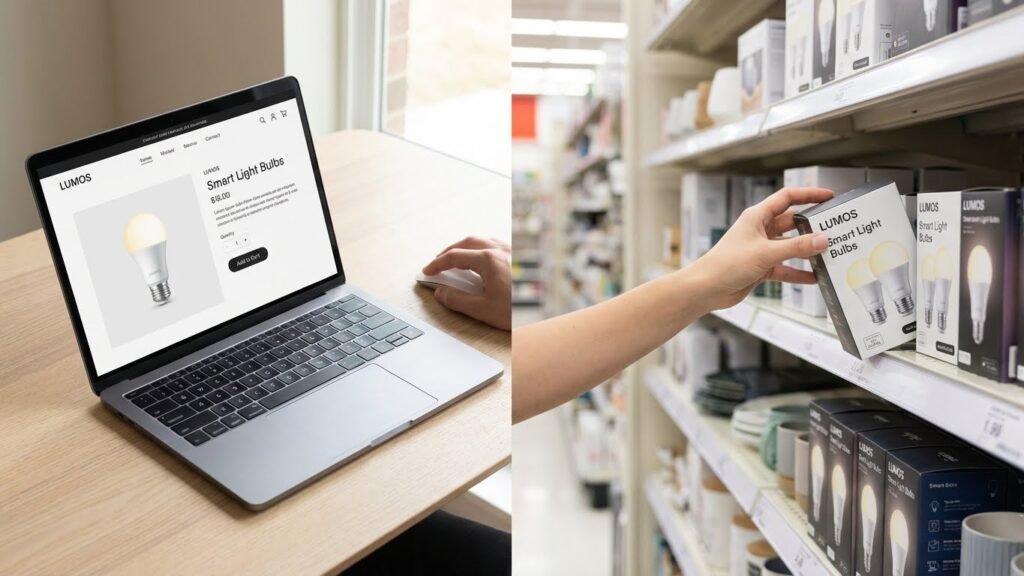
You want smart bulbs fast and that work with your setup. You can buy them online from big stores like Amazon, Best Buy, Walmart, Lowe’s, Target, and Home Depot, or get them from brand shops and local electronics stores depending on price, selection, and how quickly you need them. Buy online for the widest selection and best deals, or visit a nearby store if you want hands-on help and same-day pickup.
Think about compatibility, control options (voice, app, hub), and whether you want color or white-only bulbs before you buy. Compare prices, check return policies, and read quick reviews so you get bulbs that match your smart-home plan.
Key Takeaways
- Online marketplaces give the largest selection and often the best prices.
- Brand stores and specialty retailers offer expert help and product bundles.
- Local stores let you see bulbs in person and pick them up the same day.
Major Online Retailers
You can find smart bulbs with fast shipping, wide brand choice, and clear return policies. Compare prices, bundle deals, and compatibility information before you buy.
Amazon
Amazon offers the largest selection of smart bulbs from Philips Hue, Sengled, TP-Link (Kasa), and many budget brands. You can read thousands of user reviews and see verified photos to judge brightness and color quality.
Prime shipping often gives next-day delivery. Look for “Works with Alexa” or “Google Assistant” in the product title to confirm voice support. Use the questions section to ask about hub requirements, and check the product Q&A for real-world installation tips.
Watch for bundle discounts and subscribe-and-save options if you plan to outfit many rooms. Return windows are usually 30 days, which helps if a bulb fails or doesn’t pair.
Best Buy
Best Buy carries a curated selection of smart bulbs from popular brands like Philips Hue, LIFX, and Feit. You can filter by color vs. white-only, bulb shape (A19, BR30), and smart hub compatibility on the product page.
You can buy online and pick up in-store the same day in many locations. Best Buy often offers price matching and occasional open-box deals for lower prices. Geek Squad can help with installation if you want paid setup support.
Check the product listings for warranty length and included accessories, like a Hue Bridge. Best Buy’s customer reviews focus on usability in real homes, which helps you anticipate setup problems.
Walmart
Walmart stocks both name-brand and lower-cost smart bulbs, including GE, Sengled, and store brands. You’ll find competitive prices and frequent rollbacks on multi-packs that lower the per-bulb cost.
Walmart supports in-store pickup and returns at nearby stores, which is handy if you need a quick swap. Product pages list wattage, lumens, and whether the bulb needs a hub or uses Wi‑Fi or Bluetooth.
Read user reviews for firmware issues and app reliability; budget bulbs may need app updates more often. Look for bundle deals with smart plugs or sensors if you’re building a starter kit.
Target
Target offers a selection of smart bulbs from Philips Hue, TP-Link, and other mainstream brands, plus exclusive color or design options at times. You can use Target Circle offers and REDcard discounts to save on multi-packs.
Most product pages show compatibility (Alexa, Google, HomeKit) and whether a hub is required. Target provides same-day delivery through Shipt in many areas, and easy in-store returns if a bulb arrives damaged.
Target often highlights seasonal bundles and starter kits, making it simple to buy a hub and a few bulbs together. Check the item details for bulb base type (E26, GU10) to ensure it fits your fixtures.
Smart Home Brand Stores

You can buy directly from makers for the best selection, firmware updates, and accessory compatibility. Buying from brand stores helps ensure genuine products, warranty support, and access to specific apps or bridges.
Philips Hue Store
Philips Hue sells full ranges: white, white ambiance, and color bulbs, plus light strips, fixtures, and bridges. You can buy A19 and GU10 bulbs, outdoor lamps, and motion sensors. Their store lists compatibility like Apple HomeKit, Google Assistant, and Alexa, and shows whether a Hue Bridge is required.
Check for starter kits if you want multiple bulbs plus a Bridge; kits usually save money versus buying pieces separately. You can download the Hue app to control rooms, set schedules, and use routines. Philips offers firmware updates and clear warranty info on product pages.
LIFX Official Website
LIFX focuses on Wi‑Fi bulbs that don’t need a hub. The site shows bulb types (A19, BR30, GU10), lumen output, and color temperature ranges for each model. You’ll find detailed specs like watts, lumens, and supported integrations such as Alexa, Google, and HomeKit on each product page.
The store highlights features like high color accuracy and effects (sunrise, music sync). You can compare models side‑by‑side and download the LIFX app. Look for sales sections and multi‑pack discounts if you need several bulbs.
Wyze Online Store
Wyze sells budget smart bulbs that work via Wi‑Fi and the Wyze app. Product pages list brightness in lumens, color temperature options, and whether a color or tunable white bulb is offered. Wyze often bundles bulbs with motion sensors or smart plugs for room setups.
You get firmware updates through the app and clear return and warranty policies on the store. Wyze emphasizes low cost and straightforward setup, and the site shows compatibility notes for Alexa and Google Assistant. Check product reviews on the page to gauge real‑world performance.
Specialty Electronics Retailers
You can find a wider range of smart bulbs and related accessories at specialty electronics stores. These retailers stock brand-name bulbs, advanced models, and parts for smart lighting setups, often with detailed product specs and knowledgeable staff.
B&H Photo Video
B&H focuses on pro and consumer electronics, so you’ll see smart bulbs from major and niche brands. Product pages list lumen output, color temp, compatibility (Zigbee, Z-Wave, Wi‑Fi), and power draw, which helps when you match bulbs to hubs or fixtures.
Look for multi-packs, color-changing A19s, and BR30s for recessed cans. B&H often sells compatible bridges, smart switches, and lighting kits too. Shipping and in-store pickup are available, and their customer Q&A and tech specs help you confirm compatibility before buying.
If you need expert help, use B&H’s phone or chat support. They can advise on pro-grade LEDs, dimmer compatibility, and commercial-grade options for larger projects.
Newegg
Newegg is strong for online shoppers who want variety and user reviews. You’ll find competing models, manufacturer-direct listings, and often clearer pricing on clearance or refurbished smart bulbs.
Filter by connectivity, bulb base (E26, GU10), and features like tunable white or RGB. Pay attention to seller ratings and warranty details, since third-party sellers sometimes handle returns. Newegg’s review section can reveal real-world issues like app reliability or firmware updates.
Newegg also offers combo deals with smart plugs, hubs, or voice assistant bundles. Use those if you want a quicker start to a multi-device setup.
Micro Center
Micro Center blends online selection with local stores where you can see bulbs in person. You’ll find popular brands and some smart-home bundles that include hubs or smart switches alongside bulbs.
In-store staff can demonstrate bulbs and help you test color and brightness. Micro Center’s local stock status tool shows whether a model is available at a nearby store, which saves time if you need a quick replacement.
Micro Center often runs in-store promotions and bundle discounts. Check return policies and online reviews, and bring your hub info if you want staff to confirm compatibility before you buy.
Local Brick-and-Mortar Stores
You can buy smart bulbs quickly and see them in person before you buy. Stores let you compare brands, check packaging for compatibility, and get help from sales staff.
Home Improvement Chains
Home Depot and Lowe’s carry large selections of smart bulbs from brands like Philips Hue, Feit, and C by GE. You’ll find single bulbs, multipacks, and starter kits on shelves and online for in-store pickup. Look at packaging for hub requirements, Wi‑Fi vs. Bluetooth, and outdoor ratings.
Ask an associate about installation and returns if a bulb won’t pair with your system. Many stores run periodic sales and bundle deals that cut the price of starter kits. You can also return unopened bulbs easily if they don’t work with your hub or app.
Electronics Superstores
Best Buy and similar stores stock smart bulbs aimed at tech integration, including color-changing and voice‑control models. You can test demo displays in some locations to see color range and brightness. Staff there can advise on which bulbs work with Alexa, Google Assistant, or Apple HomeKit.
Look for Geek Squad support for setup help if you want in‑store assistance. Expect a mix of premium and budget options, and check clearance sections for discounted older models that still meet your needs.
Hardware Retailers
Local hardware stores and independent electrical suppliers often carry smart bulbs suited to everyday use and retrofit projects. These stores focus on practical details like bulb base (E26, E27), lumen output, and dimmability, which helps when matching bulbs to existing fixtures.
You’ll get hands‑on advice about durable outdoor bulbs and weatherproof fixtures. Smaller retailers may stock specialty sizes and can order specific models if they’re not on the shelf.
Shopping Apps and Marketplaces
You can find new, used, and imported smart bulbs on large apps and marketplaces that connect many sellers. Pay attention to seller ratings, return rules, and shipping times before you buy.
eBay
eBay offers both new and used smart bulbs from brand-name and third-party sellers. Check the seller’s feedback score and recent reviews to confirm reliability. Look for listings with clear photos, model numbers, and compatibility details (Wi‑Fi band, hub required, voice assistant support).
Use the filters to narrow results by condition, price, and location. Choose items with eBay Money Back Guarantee and handled returns for easier disputes. Watch estimated delivery dates—some sellers ship internationally, which adds cost and may affect warranty. If you buy a used bulb, ask about burn hours and any visible wear before purchasing.
AliExpress
AliExpress lists many low-cost and off-brand smart bulbs shipped from China. You’ll often get lower prices, but expect longer shipping times and variable build quality. Read buyer photos and comments closely to verify product claims like RGBWW, app names, and protocol (Zigbee, Bluetooth, or Wi‑Fi).
Check seller rating, number of orders, and detailed product specs. Use the buyer protection window to ensure you can open disputes if the bulb arrives damaged or not as described. Be cautious about warranty coverage; many manufacturers’ warranties don’t apply outside their regions. If you need fast delivery or full warranty support, prefer local retailers instead.
Tips for Choosing Smart Bulb Retailers
Look for stores that stand behind their products, help you before and after sale, and offer clear pricing and real discounts. Prioritize retailers that match your tech needs—brand support, returns, and honest deals matter most.
Warranty and Return Policies
Check the exact warranty length and what it covers—bulb failure, color shift, or connector issues. Prefer retailers that list warranty terms on the product page and link to the manufacturer’s warranty. A one- to two-year warranty is common; longer coverage adds value if you plan to keep the bulbs for several years.
Read the return window and restocking rules before you buy. Many big retailers offer 30–90 day returns with free return shipping, while some specialty stores charge restocking fees or limit returns on smart products. If you rent, confirm whether the retailer accepts returns of opened products when paired devices or hubs are involved.
Make sure the retailer helps with warranty claims. Retailers who will process returns and replacements for you save time. If the seller requires you to contact the manufacturer directly, factor that extra step into your decision.
Customer Service
Choose retailers with multiple support channels: live chat, phone, and email. Quick chat support helps when you need compatibility answers—like whether a bulb works with Zigbee, Z-Wave, or Wi‑Fi—and saves time compared with waiting on email.
Look for tech help beyond sales. Helpful retailers provide setup guides, compatibility lists, and firmware update notes on product pages. If you rely on voice assistants, ask customer service whether the bulb integrates with Alexa, Google Assistant, or Apple HomeKit before you buy.
Check reviews about responsiveness and problem resolution. A retailer with strong post-sale support will help replace defective bulbs, troubleshoot hub issues, and guide firmware updates. That support prevents wasted trips and long waits.
Pricing and Deals
Compare unit price, shipping, and any required hubs or bridges. A low bulb price can become costly if you must buy a proprietary bridge. Bundle discounts—multi-packs or starter kits with a hub—often lower per-bulb cost and are worth comparing.
Watch for seasonal sales and manufacturer promotions. Major retailers (online and big-box) run predictable deals on Prime Day, Black Friday, and year-end sales. Sign up for store alerts or check deal pages to catch flash sales on popular brands like Philips Hue or Wyze.
Verify final price and return policy on discounted items. Clearance or open-box bulbs may have limited warranties or final-sale rules. Use price-tracking tools or add-to-cart checks to confirm the best effective price before completing your purchase.
Things to Consider Before Buying
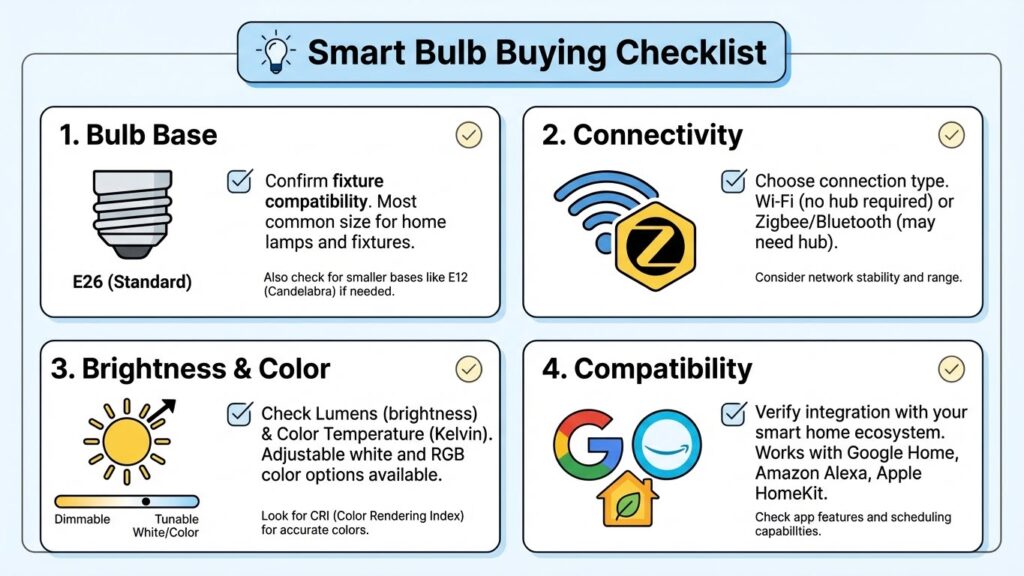
Check compatibility with your current setup. Confirm the bulb fits your fixtures (base size) and works with your hub or voice assistant. Some bulbs need a bridge while others use Wi‑Fi or Bluetooth.
Think about control options and range. Bluetooth limits you to close control, while Wi‑Fi or a hub lets you control lights remotely. Also decide if you want app control, voice commands, or physical switches.
Consider brightness and color needs. Look at lumens for brightness and whether you need tunable white or full color. Color bulbs cost more but offer flexible scenes and moods.
Factor in energy use and lifespan. Smart LEDs save energy and last longer than incandescent bulbs. Check wattage equivalent and rated hours to compare value.
Mind privacy and security. Smart devices can expose your network if not updated. Choose brands with regular firmware updates and use a strong Wi‑Fi password.
Set a budget and plan for scale. Single bulbs are cheaper, but a hub or bridge adds cost. Buy one or two to test before converting many fixtures.
Review app quality and ecosystem. A well-designed app makes setup and routines easier. If you already use a brand (like a smart speaker), pick bulbs that integrate smoothly.
Look at warranty and support. Longer warranties and clear support channels save hassle. Read basic user reviews for real-world reliability.
FAQs
What should you check before buying a smart bulb?
Check compatibility with your hub or voice assistant, bulb base type (E26, E27, etc.), and required connectivity (Wi‑Fi, Bluetooth, Zigbee). Also check brightness (lumens) and color options if those matter to you.
Where can you buy smart bulbs?
You can buy them at major retailers like Amazon, Best Buy, and home centers such as Lowe’s. You can also buy direct from brands (Philips Hue, LIFX) or local hardware stores for in‑person help.
Are smart bulbs easy to install?
Yes. Most screw in like regular bulbs and pair through an app. Some systems need a bridge or hub, which adds one extra setup step.
Do smart bulbs save energy?
Most smart bulbs are LED and use less energy than incandescent bulbs. Energy use varies by model, so compare lumens per watt for the best savings.
Can you use smart bulbs with dimmer switches?
Avoid traditional dimmer switches unless the bulb lists compatibility. Use the app or a smart dimmer designed for LEDs to prevent flicker or damage.
How long do smart bulbs last?
LED smart bulbs typically last 10,000–25,000 hours. Actual life depends on usage, heat, and build quality.
How do you manage multiple bulbs?
Use the manufacturer app or a smart home hub to create groups, schedules, and scenes. Voice assistants also let you control groups with simple commands.
Are smart bulbs secure?
Use strong passwords, update firmware, and place smart devices on a guest or separate network to reduce risk.
Conclusion
You can buy smart bulbs from many places, so pick the option that fits your needs. Big retailers and manufacturer sites offer wide selections and easy returns, while local stores let you see bulbs in person before you buy.
If you want the best deals, compare prices on marketplaces and check for seasonal sales. For reliable product details and firmware updates, visit the manufacturer’s support pages like Philips Hue or LIFX for exact specs and compatibility.
Think about what matters most: compatibility with your hub, color or tunable white options, and whether you prefer Wi‑Fi or Zigbee. Read user reviews to spot common issues, and check return policies so you can swap bulbs that don’t work with your setup.
For simple purchases, use big-box stores or Amazon for fast shipping. For the latest features and deeper tech help, buy directly from brands or consult resources like CNET for reviews and buying advice.