
You might notice your smart bulb feels warm after hours of use. That is normal: smart bulbs produce some heat from their electronics, but they should not get so hot that you cannot touch the base or that they warp or smoke. If a smart bulb becomes very hot to touch or shows signs of damage, stop using it and check the fixture and ventilation.
You can keep bulbs safe by using the right wattage, choosing bulbs with good heat sinks, and avoiding fully enclosed fixtures unless the bulb is rated for them. Learn quick checks and simple fixes so your lights last longer and you avoid fire or performance problems.
Key Takeaways
- Smart bulbs normally run warm but should not become dangerously hot.
- Proper fixtures, ventilation, and bulb ratings reduce heat risks.
- Replace or stop using bulbs that feel excessively hot or look damaged.
Do Smart Bulbs Get Hot?
Smart bulbs do produce heat, but much less than old incandescent or halogen bulbs. You’ll mainly feel warmth at the bulb base or heat sink rather than the glass, and safe use depends on placement, ventilation, and bulb quality.
Normal Temperature Range
Smart LED bulbs typically run between about 30°C and 85°C (86°F–185°F) depending on design and power. The LED emitter and driver stay cooler than incandescent filaments, but the bulb’s metal base or heat sink can reach the higher end of that range.
If a bulb is enclosed in a tight fixture or near insulation, expect temperatures near the top of the range. Well-ventilated fixtures and lower-wattage bulbs stay toward the cooler end. Check the bulb label for maximum operating temperature and follow fixture ratings to avoid exceeding those limits.
Factors Influencing Heat Generation
Bulb wattage and light output (lumens) increase heat. Higher brightness or color-changing features that draw more power will make the bulb warmer.
Fixture type matters: enclosed fixtures trap heat and raise bulb temperature. Ambient room temperature also affects heat buildup. Poor-quality bulbs with weak heat sinks or poor internal design run hotter. Finally, long continuous runtimes increase steady-state temperature, so a bulb used for hours will be warmer than one used briefly.
Comparing Heat Output to Traditional Bulbs
Incandescent bulbs convert most energy to heat and can exceed 200°C (392°F) at the surface. Smart LED bulbs convert far more energy to light and run much cooler in comparison.
In practical terms:
- Incandescent: very hot to touch, fire risk near flammable material.
- Smart LED: warm to touch at base, generally safe if used as directed.
You still must avoid direct contact for long periods with hotter parts and avoid using non-rated LEDs in enclosed fixtures.
Why Smart Bulbs Produce Heat
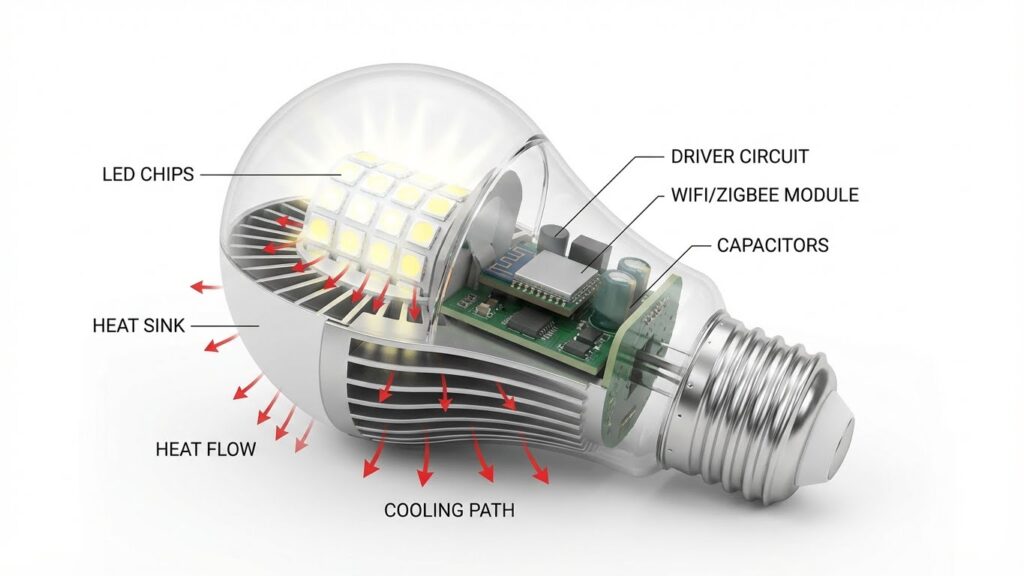
Smart bulbs create heat mainly from electrical flow, the small circuits inside them, and the way LEDs make light. Heat appears when parts resist current, when drivers and Wi‑Fi chips work, and when LEDs convert energy into light and waste heat.
Electrical Resistance
When you power a smart bulb, current flows through wires, metal contacts, and the bulb’s board. Every connection and trace has some resistance. That resistance turns part of the electrical energy into heat. Higher current or poor contacts raise the heat you can feel on the bulb surface.
Sockets, dimmers, or loose fittings can increase resistance. If you notice a bulb hotter than usual, check the socket and wiring first. Proper installation and good contacts keep resistance low and reduce extra heating.
Internal Electronics
Smart bulbs include a power driver, voltage regulators, and wireless modules. These parts convert mains voltage to the low, steady current LEDs need. Conversion wastes some energy as heat inside the bulb. Drivers with small heat sinks or compact designs concentrate heat near the base.
Wi‑Fi or Bluetooth chips and microcontrollers add extra heat when the bulb is active and connected. If you use features like color changes or high brightness, the electronics work harder and produce more heat. Bulbs with better thermal design move this heat away from sensitive parts faster.
Light Emitting Diode Functionality
LEDs produce light by moving electrons across a semiconductor. Not all energy becomes light; a portion becomes heat inside the LED junction. Higher drive currents cause more heat and can reduce LED life if not managed.
Manufacturers attach LEDs to metal core PCBs and heat sinks to draw heat away from the junction. Good heat management keeps the LED cooler and preserves brightness over time. When you mount a bulb in an enclosed fixture, trapped heat raises junction temperature and shortens bulb life, so choose bulbs rated for enclosed spaces when needed.
Safe Operating Temperatures for Smart Bulbs

Smart bulbs normally run cooler than incandescent bulbs, but their bases and heat sinks can reach warm temperatures. Check the bulb label for max operating temps, watch for discoloration or melting, and avoid putting smart bulbs in fully enclosed fixtures unless rated for that use.
Manufacturer Guidelines
Always read the bulb’s datasheet or box. Manufacturers usually list a maximum ambient temperature and a maximum case temperature. For many household LED-based smart bulbs, expect an operating range of about -20°C to +40°C (-4°F to 104°F) and a case temperature up to 60–85°C (140–185°F). If your bulb lists lower limits, follow those numbers exactly.
Use only fixtures and dimmers the manufacturer approves. Rated wattage, compatible dimmers, and ventilation notes affect heat. If a manufacturer says “not for enclosed fixtures” or “do not cover,” do not put the bulb in sealed housings. That guidance protects the electronics and maintains life expectancy.
Signs of Overheating
Watch for these clear warning signs: persistent burning smell, plastic warping near the base, visible discoloration, flickering that doesn’t stop after power cycles, or a bulb that becomes too hot to touch for more than a few seconds. These indicate temperatures above safe limits.
Also note reduced brightness or erratic behavior during normal use. Those can show internal thermal protection is cycling the bulb on and off. If you see any of the signs, turn the bulb off, let it cool, then inspect the fixture and socket for damage before replacing the bulb.
Impact of Enclosed Fixtures
Enclosed fixtures trap heat and raise the bulb’s ambient temperature. A bulb rated for open-air use can run several degrees hotter inside a recessed can or frosted globe. That extra heat shortens the smart bulb’s electronics life and can trigger thermal shutdowns.
Use bulbs specifically rated for enclosed fixtures if you plan to install them in cans, enclosed sconces, or pendant shades. If the package does not state “suitable for enclosed fixtures,” pick a different bulb or improve ventilation. Simple fixes include using open-front fixtures or adding vent holes so heat can escape.
Managing Heat for Longevity and Safety

Proper mounting, air flow, and regular checks keep smart bulbs cooler and safer. Install bulbs in fixtures that allow heat to escape, match bulb wattage and base type, and inspect sockets and seals periodically.
Proper Installation Practices
Screw bulbs in fully but avoid over-tightening, which can damage the base or socket. Use the correct base type (E26, GU10, etc.) and check the fixture’s maximum wattage rating against the bulb’s equivalent wattage. If a fixture lists a maximum of 60W incandescent, choose LED bulbs with an equivalent output within that limit.
Place smart bulbs where they get air flow. Enclosed fixtures or recessed cans trap heat; if you must use a smart bulb there, pick models rated for enclosed use. Tighten connections at the switch and fixture to avoid arcing, and turn power off before installing or removing bulbs.
Choosing Compatible Fixtures
Match bulb shape and size to the fixture so the heat sink isn’t blocked. A PAR or BR flood fits recessed cans and directs heat better than a globe that traps it. Look for bulbs labeled “suitable for enclosed fixtures” when installing inside shades or enclosed pendants.
Check fixture material and clearance. Metal fixtures conduct heat away; plastic shades may hold heat. For dimmed circuits, ensure the bulb supports your dimmer type to prevent excess heat from driver stress. Use fixtures rated for the bulb’s voltage and control method (dimmable, smart hub, or direct Wi‑Fi).
Routine Inspection and Maintenance
Inspect bulbs every few months. Look for discoloration at the base, melting, or a loose fit. Those signs indicate poor contact, trapped heat, or electrical issues. Replace bulbs that show damage immediately.
Clean fixtures and heat sinks gently with a dry cloth to remove dust that insulates and raises operating temperature. Check for darkening on sockets and test switches for warm spots. If a fixture or bulb runs unusually hot, stop using it and try a different bulb or fixture type to isolate the problem.
Potential Risks of Excess Heat
Excess heat from a smart bulb can harm parts, cut its usable life, and create fire risks if ignored. Know where heat builds, how it affects materials, and what can trigger dangerous temperatures.
Component Degradation
Heat speeds up wear on internal parts. The LED chips, driver electronics, and solder joints inside a smart bulb are sensitive to temperature. When these reach high levels repeatedly, the driver’s electrolytic capacitors can dry out and the solder can weaken, causing flicker, intermittent operation, or sudden failure.
Plastic housings and wiring insulation also soften or discolor with heat. That can lead to warped sockets or exposed wiring over time. If your bulb sits in an enclosed fixture or touches other hot components, degradation happens faster. Check bulbs for discoloration, buzzing, or loose fit as signs of internal damage.
Reduced Lifespan
A smart bulb’s rated life assumes normal operating temperatures. Running the bulb hotter than the manufacturer’s spec shortens that life significantly. For example, an LED rated for 25,000 hours may fail in a fraction of that time if the base regularly reaches high temperatures.
Higher drive current and sustained high brightness increase junction temperature in the LED chips. That lowers luminous output and shifts color over time, so the bulb looks dimmer or changes hue before it quits. Replacing bulbs more often raises your cost and creates more electronic waste. Use fixtures with ventilation and stay within recommended wattage and heat limits to protect lifespan.
Fire Hazards
Very high heat creates a direct fire risk when components or nearby materials reach ignition temperatures. Poor contacts, damaged insulation, or a failing driver can produce sparks or hot spots. In enclosed fixtures, trapped heat raises temperatures of the socket, wiring, and nearby debris, which increases the chance of ignition.
Most smart bulbs include heat sinks, but those fail when airflow is blocked or the bulb is overdriven. If you notice scorched socket areas, melted plastic, a burning smell, or frequent tripping of breakers, turn power off and replace the bulb. Always match bulb size and type to the fixture rating and avoid using non-vented covers with high-heat bulbs.
Tips to Minimize Heat Build-Up
Use LED smart bulbs instead of incandescent or halogen. LEDs run much cooler and use less power, which reduces heat near the fixture.
Keep bulbs and fixtures clear of dust and debris. Dust blocks airflow and traps heat; wipe bulbs and shades gently every few months.
Give bulbs room to breathe. Avoid fully enclosed fixtures unless the bulb is rated for them. If a bulb is in a covered lamp, pick one designed for enclosed spaces.
Check wattage and fixture ratings. Never exceed the fixture’s maximum wattage and follow the bulb manufacturer’s guidance to prevent excess heat.
Improve airflow around the fixture. Open nearby vents or leave a small gap between the bulb and its cover to help heat escape.
Choose bulbs with good heat management. Look for LED bulbs that mention heat sinks or thermal design in the specs; these models move heat away from electronics.
Avoid stacking heat sources. Keep smart bulbs away from other heat-producing devices, like halogen lamps or heating vents, to prevent temperature buildup.
Monitor temperature if you are unsure. Use a simple IR thermometer to check the bulb base after an hour of use; a warm but not scalding temperature is normal.
Replace old or faulty bulbs. If a smart bulb gets unusually hot or changes color, stop using it and swap it out to reduce fire risk.
Understanding Heat Dissipation Mechanisms
LEDs convert most electrical energy into light, but some becomes heat. You will notice heat at the tiny semiconductor junction; if it stays there, the LED will dim and fail sooner.
Most smart bulbs use metal heat sinks to move heat away from the LED chips. Aluminum or similar metals sit behind the LED and pull heat toward the bulb surface. You can usually feel warmth on the bulb’s base or fins when it runs for a while.
A simple list shows the main paths heat takes:
- Conduction: heat moves through solid parts (LED to heat sink).
- Convection: warm air rises off the bulb into the room.
- Radiation: a small amount escapes as infrared energy.
Smart bulbs also include electronic drivers that add heat. Drivers sit below the LED array and need their own cooling paths. If the driver gets hot, it raises the whole bulb’s temperature and shortens life.
Design choices affect how hot a bulb gets. Better heat sinks, ventilation, and lower drive currents all reduce temperature. High-powered or compact bulbs often run hotter because they pack more electronics into less space.
You should check bulb specs for operating temperature and placement limits. Avoid tight, enclosed fixtures unless the bulb is rated for that use to keep heat within safe limits.
Conclusion
You should expect a smart bulb to feel slightly warm at the base or heat sink during normal use. That heat comes from the electronics and is a sign the bulb is working, not that it is unsafe.
Check the bulb housing and fixture for unusual hotspots or smells. If a bulb gets very hot to the touch, flickers, or shortens its lifespan, stop using it and replace it with a properly rated model.
Match bulbs to fixtures and follow wattage and ventilation guidelines. Use bulbs labeled for enclosed fixtures when needed and avoid tight, unventilated spaces that trap heat.
If you want a quick safety check, use this simple table:
| What to check | Action |
|---|---|
| Mild warmth at base | Normal — no action |
| Very hot surface | Unplug and replace |
| Bulb rated for fixture? | Use correct rating |
| Repeated failures | Switch brand or fixture |
Choose quality bulbs from known brands and keep firmware updated for smart models. That reduces heat-related risks and helps your bulbs last longer.
FAQs
Do smart bulbs normally get hot?
Yes, smart bulbs can warm up during use. They run cooler than incandescent bulbs but still produce some heat from the LED driver and electronics.
Is the heat a safety concern?
Usually not if the bulb is installed correctly. Keep bulbs in fixtures with proper ventilation and follow the manufacturer’s wattage and fixture recommendations.
Can heat shorten the bulb’s life?
Excessive heat can reduce LED lifespan and affect smart electronics. Avoid enclosed fixtures unless the bulb is rated for them.
What temperature is too hot?
If the bulb or fixture feels uncomfortably hot to touch, it may be too warm. Check for discoloration, melting, or burning smells and turn the power off if you notice these signs.
Will using lower brightness help?
Yes. Dimming reduces power draw and heat output. Using 100% brightness continuously can increase wear on the electronics.
How do I reduce heat from smart bulbs?
Use bulbs rated for enclosed fixtures when needed. Improve airflow around fixtures and avoid stacking multiple high-output bulbs in one enclosure.
When should you contact support?
Reach out if the bulb flickers, overheats quickly, emits odors, or fails prematurely. Keep your purchase details and model number handy for faster help.
Conclusion
You can expect smart bulbs to feel warm at the base during normal use. A slight heat shows the electronics are working; it should not be blazing hot or melt nearby materials.
Check the bulb and fixture if heat seems excessive. Poor ventilation, enclosed fixtures, or incompatible dimmers can raise temperatures and shorten bulb life. The U.S. Consumer Product Safety Commission and manufacturer’s guides offer safety and installation tips you can follow.
Choose quality bulbs and correct fixtures to keep heat low. Look for good heat-sink designs and proper wattage ratings for enclosed fixtures. These choices help preserve lifespan and keep your home safe.
If a bulb becomes unusually hot, unplug it and inspect for damage. Replace suspect bulbs and contact the manufacturer if needed. Proper care prevents most heat-related issues and keeps your lighting reliable.
