
A study desk is far more than a simple table; it is a dedicated command center for learning, designed to support focus, organization, and physical well-being. This guide will show you how to select the perfect desk, ergonomically set it up with key accessories like a monitor stand, and create a personalized environment that boosts productivity and minimizes strain.
Key Takeaways
- Function Over Form: A true study desk is defined by its purpose—to create a dedicated, organized zone that promotes deep focus and efficient learning, not just by its appearance.
- Ergonomics is Non-Negotiable: Proper desk height, chair pairing, and monitor positioning (often aided by a stand) are critical to prevent fatigue, pain, and long-term injury, directly impacting your ability to concentrate.
- The Monitor Stand is a Game-Changer: A quality monitor stand lifts your screen to eye level, freeing up crucial desk real estate and creating a healthier, more organized workstation that reduces neck strain.
- Personalization Drives Consistency: A study desk that reflects your needs and style—through lighting, organization, and personal touches—makes the act of sitting down to learn more inviting and sustainable.
- Investment in Quality Pays Off: Choosing a sturdy, appropriately-sized desk made of durable materials is a long-term investment in your productivity, comfort, and academic or professional success.
- Organization is a Productivity Multiplier: Built-in storage or clever use of desk accessories to manage cables, papers, and supplies keeps your mind clear and your workflow smooth.
What Is a Study Desk Essential for Productive Learning
Think about the last time you tried to read a book or finish a project while lounging on a couch or propped up in bed. It probably started comfortably, but soon your back ached, your neck stiffened, and your focus drifted. Why? Because our brains and bodies need a proper environment to do their best work. That’s where the humble yet mighty study desk comes in.
So, what is a study desk? It’s not just a piece of furniture. It is your personal command center for learning, thinking, and creating. It’s a dedicated space engineered for one primary mission: to support your mind and body so you can achieve your goals. This guide will walk you through everything you need to know. You’ll learn how to choose the perfect desk, set it up for ultimate ergonomics, and transform it into a productivity powerhouse. Let’s build the foundation for your success.
Step 1: Understand the True Purpose of a Study Desk
Before you buy a single thing, it’s vital to grasp what makes a desk a true “study desk.” It’s defined by function.

Visual guide about What Is a Study Desk Essential for Productive Learning
Image source: thumbs.dreamstime.com
It Creates a Dedicated “Focus Zone”
Your brain loves routine. When you sit at your study desk, your mind receives a signal. It’s time to work. This mental separation is powerful. It helps you transition from relaxation mode to concentration mode much faster than a multi-use kitchen table ever could.
It Promotes Physical Support and Health
A proper study desk allows for correct posture. It should pair with a good chair to keep your feet flat, your back supported, and your arms at a relaxed 90-degree angle. This prevents the fatigue and pain that destroys focus.
It Provides Organization and Efficiency
Clutter is mental chaos. A good study desk offers solutions. This means space for your computer, books, notebooks, and supplies without feeling crowded. An organized space leads to an organized, efficient workflow.
Step 2: Choose the Perfect Study Desk for Your Needs
Not all desks are created equal. Picking the right one involves a few key decisions.
Visual guide about What Is a Study Desk Essential for Productive Learning
Image source: images.zapier.com
Consider Your Space and Size
Measure your room first. Allow for at least 36-48 inches of width for a computer, monitor, and some writing space. Depth is crucial for monitor placement; 24-30 inches is a good range. For small spaces, consider a corner desk or a wall-mounted fold-down option.
Select the Right Material and Build
Your desk needs to be sturdy. Wobbling is the enemy of focus.
- Solid Wood: Durable, beautiful, and heavy. A long-term investment.
- Engineered Wood (MDF/Particleboard): Affordable and common. Ensure it has a thick, stable top and strong legs.
- Metal & Glass: Modern and easy to clean, but can feel less warm.
Decide on Shape and Storage
Rectangular desks are classic and fit well against walls. L-shaped desks offer fantastic surface area and separation of tasks. Consider if you need built-in drawers or shelves, or if you’ll use separate storage units.
Step 3: The Essential Setup – Ergonomics and the Monitor Stand
This is the most important step. A poorly set up desk can hurt you and hinder you. Here’s how to get it right.

Visual guide about What Is a Study Desk Essential for Productive Learning
Image source: thumbs.dreamstime.com
Master the Basic Ergonomics
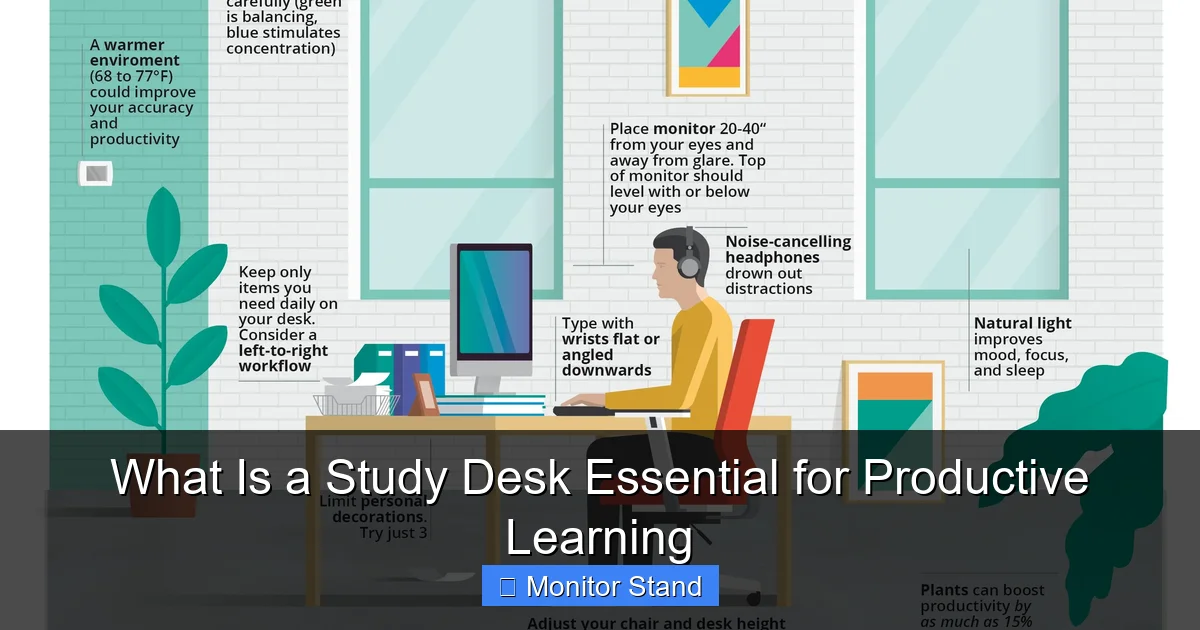
Start with your chair. Adjust it so your feet are flat on the floor (or on a footrest). Your thighs should be parallel to the floor. Now, your desk height should allow your forearms to rest comfortably on the desk with elbows at a 90-110 degree angle. If the desk is too high, raise your chair and use a footrest. If it’s too low and not adjustable, consider risers.
Elevate Your Experience with a Monitor Stand
This is the secret weapon for any modern study desk. Your monitor should be positioned so the top of the screen is at or slightly below your eye level when you’re sitting up straight. Staring down at a laptop or a low monitor strains your neck.
- Why a Monitor Stand? A dedicated stand lifts your screen to the perfect height. It also frees up a huge amount of valuable desk space underneath, which you can use for storage, a keyboard, or notebooks.
- Choosing a Stand: Look for one with height adjustment, sturdy construction, and cable management holes. Some even come with built-in USB hubs or extra shelves.
- Proper Placement: Position the monitor about an arm’s length away from you. The center of the screen should be directly in front of you to avoid twisting your neck.
Arrange Your Key Tools
Place your keyboard and mouse close together on the same surface. If you use a laptop with a monitor stand, get an external keyboard and mouse. Keep frequently used items—a pen cup, a notepad, your phone—within easy reach to minimize stretching.
Step 4: Optimize for Productivity and Personalization
Now that the fundamentals are in place, let’s make your study desk a place you *want* to be.
Conquer Cable Clutter
A tangle of wires is unsightly and stressful. Use adhesive cable clips, velcro straps, or a cable management tray underneath the desk. Route all cables together and label them if needed. A clean desk surface promotes a clear mind.
Light It Right
Good lighting is non-negotiable. Use layered lighting. Ambient room light, plus a dedicated desk lamp. For tasks, choose an adjustable lamp with warm, bright LED light to reduce eye strain. Position it to avoid glare on your monitor.
Incorporate Smart Storage
Use desk organizers, drawer dividers, or a small rolling cart nearby. Have a designated spot for everything. A simple tray for incoming/outgoing papers can work wonders. The goal is to keep only what you need for your current task on the desk surface.
Add Personal Motivation
This is your space. Add a plant for a touch of life and better air quality. Put up a small vision board, an inspiring quote, or a family photo. These small touches make the space uniquely yours and support your mental well-being.
Step 5: Troubleshooting Common Study Desk Problems
Even a great setup can have issues. Here are quick fixes.
Problem: “My Desk Feels Too Cluttered All the Time.”
Solution: Implement a “5-minute reset” rule at the end of each study session. File papers, put supplies away, and wipe down the surface. Also, honestly assess what’s on the desk. Do you use it daily? If not, store it elsewhere.
Problem: “I Still Get Neck or Back Pain.”
Solution: Double-check your ergonomics. Is your monitor truly at eye level? Is your chair providing lumbar support? Set a timer to stand up, stretch, and walk for 2-3 minutes every 30-45 minutes.
Problem: “I Get Distracted at My Desk.”
Solution: Your desk should face away from high-traffic areas if possible. Use noise-canceling headphones. Keep personal devices like phones in a drawer during focused work sessions. Make your desk a device for work, not play.
Problem: “My Desk is Too Small for Everything.”
Solution: Utilize vertical space. Add a shelf above the desk for books and less-used items. Use a monitor stand with storage underneath. Consider a desk hutch or wall-mounted organizers to get items off the primary surface.
Conclusion: Your Desk, Your Foundation for Success
A study desk is the unsung hero of productive learning. It’s the physical foundation upon which focus, health, and achievement are built. By choosing a desk that fits your space and needs, setting it up with smart ergonomics (especially with a monitor stand), and personalizing it for efficiency, you are not just buying furniture. You are investing in a tool that will serve your goals for years to come. Remember, the best study desk is the one that makes sitting down to work feel easy, keeps you comfortable for hours, and quietly supports your journey to success. Now, go build yours.