
Smart bulbs are LED light bulbs you control with an app, voice assistant, or smart hub, so you can turn lights on or off, dim them, change color, and schedule them from anywhere. They connect to your home network or a smart hub, giving you more control, energy savings, and convenience than a regular bulb.
You can use smart bulbs in table lamps, ceiling fixtures, or outdoor string lights to set mood, boost security, and automate daily routines without rewiring. Setup often takes just a few minutes, but compatibility with your phone, voice assistant, or hub matters for smooth operation.
Key Takeaways
- Smart bulbs let you control lighting remotely and set schedules.
- Different bulb types offer features like dimming, color, and energy savings.
- Check compatibility and simple setup before you buy.
Definition of a Smart Bulb
Smart bulbs are LED light bulbs that connect to your phone, voice assistant, or home network to let you control brightness, color, and schedules remotely. They use wireless protocols and built-in electronics to add features beyond simple on/off lighting.
What Sets Smart Bulbs Apart From Traditional Bulbs
Smart bulbs include networking and control electronics inside the bulb itself. Traditional bulbs only emit light when powered; smart bulbs also receive commands over Wi‑Fi, Bluetooth, or Zigbee. This lets you turn lights on or off from an app, set timers, or use voice commands without rewiring switches.
You can change color temperature and full color on many models. That makes them useful for tasks, mood lighting, or syncing to media. Some smart bulbs work alone through Bluetooth, while others join a hub or Wi‑Fi network for multi‑room control.
Smart bulbs can report status back to your phone. They can show if a bulb is on, at what brightness, or if it needs replacement. This feedback improves troubleshooting and home automation accuracy.
Core Technologies in Smart Lighting
Smart bulbs rely on three main tech pieces: LEDs, wireless radios, and embedded firmware. LEDs provide efficient light and long life. Radios — commonly Wi‑Fi, Bluetooth, Zigbee, or Z‑Wave — handle communication with your phone or hub.
Firmware inside the bulb interprets commands and controls light output. Manufacturers push firmware updates to add features or fix bugs. Some bulbs include sensors like temperature or motion for extra automation.
Power and socket compatibility matter. Most smart bulbs use standard bases (E26/E27) and run on household voltage. Check whether a bulb needs a separate hub or works directly with your router or smart speaker.
Key Features of Smart Bulbs
- Remote control: Use a smartphone or voice assistant to change state and settings from anywhere.
- Dimming and color control: Adjust brightness and color temperature; some offer RGB color for full-color lighting.
- Scheduling and scenes: Automate routines, set wake/sleep schedules, and create scene presets for rooms.
- Integration: Work with platforms like Alexa, Google Assistant, or Home Assistant for routines and multi-device automation.
- Energy tracking and status: Many bulbs use less power than incandescents and can report usage or run-time.
- Security and firmware: Look for bulbs with regular firmware updates and secure communication to prevent unauthorized access.
Each feature affects cost and setup. Decide if you need color control, hub requirements, or platform compatibility before buying.
How Smart Bulbs Work
Smart bulbs use small onboard computers and wireless links to let you control light settings, schedules, and automation from devices you already own. They combine LED lighting, a wireless radio, and firmware that interprets commands and reports status.
Wireless Connectivity and Protocols
Smart bulbs connect using Bluetooth, Wi‑Fi, Zigbee, or Z‑Wave. Bluetooth pairs directly with your phone for simple setups but limits range to a room or two. Wi‑Fi gives remote control from anywhere but can add network load and higher power use.
Zigbee and Z‑Wave form mesh networks through a hub or bridge. Each bulb relays messages, so range improves as you add devices. These protocols use low power and are reliable for many smart home setups.
Check compatibility before buying. Some bulbs require a specific hub or bridge to use Zigbee/Z‑Wave, while Wi‑Fi bulbs often work without extra hardware.
Integration With Smart Home Systems
Bulbs integrate with hubs like Philips Hue Bridge, Samsung SmartThings, or vendor-specific bridges. A hub translates between your home network and the bulb’s protocol and enables advanced automation.
Look for built‑in support for Amazon Alexa, Google Assistant, or Apple HomeKit if you want voice or ecosystem control. Some bulbs use third‑party cloud services to enable routines, geofencing, or third‑party app integrations.
If you use multiple brands, choose a hub that supports standard protocols (Zigbee/Z‑Wave) to keep devices manageable. Integration often affects features available, like color scenes, power monitoring, or firmware updates.
Mobile App and Voice Control
You control smart bulbs through a mobile app or voice assistant. Apps let you set schedules, create scenes, dim lights, and change color temperature or RGB colors. Most apps also push firmware updates to fix bugs and add features.
Voice control works via Alexa, Google Assistant, or Siri Shortcuts. Say commands like “turn off living room lights” or “set bedroom to 50% warm white” to change lights hands‑free. For responsive voice control, link the bulb’s app account to your voice assistant and enable the required skill or service.
Expect some features to differ by platform. For example, HomeKit often exposes precise color temperature controls, while other ecosystems might offer broader scene libraries.
Types of Smart Bulbs

Smart bulbs differ by how they connect, how you control them, and whether they need a hub. Pick the type that matches your phone, home network, and whether you want local control or integration with other devices.
Wi-Fi Smart Bulbs
Wi‑Fi bulbs connect directly to your home network so you control them with your phone or voice assistant from anywhere you have internet. You install the bulb, join it to your 2.4 GHz or 5 GHz Wi‑Fi, and use the maker’s app to set schedules, scenes, and brightness levels.
They often support color changes (RGB) and routines without extra hardware. Expect higher energy use for radio duty than a non‑smart LED, but still far below incandescent bulbs. If your Wi‑Fi goes down, local control may be limited unless the bulb supports offline Bluetooth or a local API.
Pros:
- No hub required
- Remote control from outside your home
- Simple setup for a few bulbs
Cons:
- Uses your router’s bandwidth
- Can slow if you have many devices
- Some brands lock features behind cloud services
Bluetooth Smart Bulbs
Bluetooth bulbs pair directly with your phone or a nearby Bluetooth hub. You control them with an app when you’re within range, making them ideal for small spaces or a single room where remote access isn’t needed.
They usually consume less network bandwidth and avoid router setup, but they lack native remote control unless paired with a Bluetooth bridge or smart speaker that supports Bluetooth mesh. Setup is fast: turn on the bulb, open the app, and pair.
Good for:
- Single‑room installations
- Lower network complexity
Limitations:
- Shorter control range
- Fewer integration options without a bridge
Zigbee and Z-Wave Smart Bulbs
Zigbee and Z‑Wave bulbs use low‑power mesh networks that route messages through other devices. You need a compatible hub (Philips Hue Bridge, SmartThings, etc.) to manage them, but the mesh improves range and reliability across many bulbs.
These protocols work well for larger setups and smart home automation because devices can still communicate if the internet fails. Expect slightly more setup: buy or use an existing hub, add bulbs to the hub, then configure automations through the hub’s app.
Advantages:
- Reliable mesh networking
- Low power use and fast local control
- Better for large installations and multi‑device scenes
Tradeoffs:
- Hub adds cost and one more device to manage
- Compatibility can vary by brand and hub model
Benefits of Using Smart Bulbs
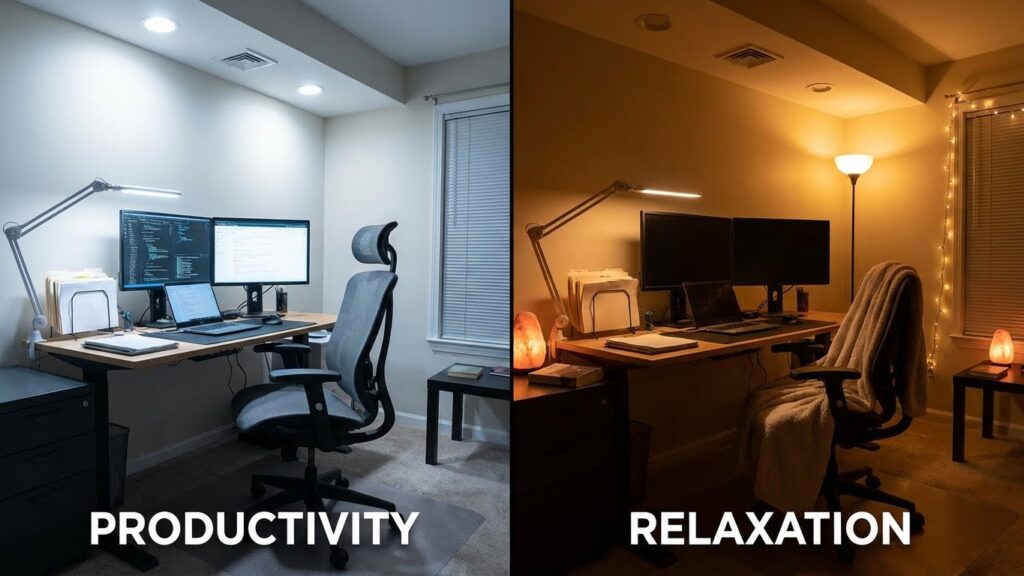
Smart bulbs save you money and let you control light easily. They cut energy use, lower bills, and let you set exact brightness and color for tasks, moods, or routines.
Energy Efficiency and Cost Savings
Smart LED bulbs use much less power than incandescent bulbs. You can expect 70–90% lower wattage for the same light output, which reduces electricity use immediately.
Use scheduling and automation to keep lights off when you don’t need them. Set bulbs to turn off at bedtime or when you leave, or link them to motion sensors so lights run only when someone is present.
Many smart bulbs report energy use in their app. That lets you track consumption and spot high-usage rooms. Over time, longer bulb lifespans (often 15,000–25,000 hours) cut replacement costs too.
Personalization and Scene Setting
You can change brightness, color temperature, and full RGB color with a tap or voice command. Set bright, cool white for work and warm, dim light for relaxing without changing fixtures.
Create and save scenes for routines: “Morning” could raise brightness to 80% with warm white, while “Movie” dims to 20% and shifts to a warm amber. Trigger scenes with schedules, buttons, or location-based rules.
Group bulbs by room to control many lights at once. Integrate with assistants like Alexa, Google, or Siri so you can say simple commands such as “set living room to reading” to get the exact light you want.
Installation and Setup

You will check fixture fit, power type, and control method. Then you will install the bulb, connect it to the network or hub, and test basic functions.
Compatibility With Existing Fixtures
Confirm the bulb base matches your socket (E26/E27, B22, GU10, etc.). Also check bulb size so it fits shades or recessed cans.
Verify the fixture supplies continuous power. Smart bulbs need a live circuit; dimmer switches or motion sensors can break connectivity unless they are labeled smart-compatible.
Match voltage and wattage to the fixture rating to avoid overheating. For outdoor use, choose weather-rated bulbs and enclosures with proper IP ratings.
If you use a hub (Zigbee/Z-Wave), confirm the hub brand and protocol work with the bulb. Some bulbs connect only via Wi‑Fi or a specific app, so review the product spec before you buy.
Step-by-Step Installation Guide
- Turn power off at the switch or breaker. Safety first when changing bulbs.
- Remove the old bulb and screw the smart bulb into the fixture until snug. Avoid overtightening.
- Restore power and open the manufacturer’s app. Create an account if required.
- Put the bulb into pairing mode—typically by turning the bulb on and off a few times or following the app prompts. The bulb usually flashes to show it’s ready.
- In the app, add a new device and follow network prompts. For Wi‑Fi bulbs, enter your 2.4 GHz network name and password. For Zigbee/Z‑Wave, use the hub’s add-device function.
- Name the bulb, assign it to a room, and test brightness and color controls. Update firmware if the app prompts you.
If the bulb won’t connect, move it closer to the router or hub, double-check the password, and ensure no dimmer or smart switch is cutting power.
Common Uses and Applications
Smart bulbs give you remote control, schedules, and color choices that change how you use light. They help with daily routines and home safety while also setting moods for tasks or relaxation.
Home Automation and Security
You can link smart bulbs to schedules and sensors so lights turn on and off automatically. Set bedroom lights to brighten slowly 30 minutes before your alarm to wake you gently. Use geofencing so lights switch off when you leave and turn on when you approach home.
Connect bulbs to motion sensors and smart locks for security. Program entryway lights to flash if a door opens unexpectedly or to come on if a camera detects movement. Many bulbs work with hubs or voice assistants, letting you control groups of lights with one command.
Use scenes and routines to simulate occupancy when you’re away. Randomize on/off times across rooms to make your home look lived-in. That simple setup deters break-ins without needing extra wiring.
Mood Lighting and Ambiance
Adjust color temperature and brightness to match activities. Choose warm, dim light for reading or dinner, and cool, bright light for cooking or work. Pick specific color presets—like soft blue for focus or amber for relaxation—to support different tasks.
Use color-changing bulbs for parties or movie nights. Sync bulbs across rooms so colors shift together or follow the beat of music when supported by the app. Create scenes for waking, relaxing, or entertaining and trigger them with one tap or a voice command.
Control lighting from your phone or voice so you can change ambiance without leaving the couch. Fine-tune levels and hues to make rooms feel larger, cozier, or more energetic depending on what you need.
Smart Bulb Compatibility and Ecosystem
Smart bulbs work with different voice assistants, hubs, and standards. Check the bulb’s protocol (Wi‑Fi, Zigbee, Z‑Wave, or Matter) and the platforms you already use before buying.
Compatibility With Voice Assistants
Most smart bulbs list which voice assistants they support—commonly Amazon Alexa, Google Assistant, and Apple Siri (via HomeKit). If you use Alexa, look for bulbs that work with Alexa Skills or Zigbee through an Echo device. For Google, confirm Google Home or Nest compatibility and whether the bulb needs a bridge. For Siri, ensure the bulb explicitly states HomeKit support; many bulbs require a separate hub or the manufacturer’s bridge to appear in the Home app.
Also check what voice controls are available. Basic commands include on/off and dimming. Advanced features like color temperature, scenes, or color changes may need the bulb’s app or a specific integration.
Working With Smart Hubs and Platforms
Smart hubs and platforms centralize control and add automation. Popular hubs include SmartThings, Hubitat, and vendor bridges (Philips Hue Bridge, LIFX Cloud Bridge). Choose a hub that supports your bulb’s protocol: Zigbee bulbs pair directly with Zigbee hubs; Wi‑Fi bulbs usually not. Matter is changing this by letting bulbs work across platforms once both the hub and bulb support Matter.
Consider these practical checks before buying:
- Protocol compatibility: Zigbee, Z‑Wave, Wi‑Fi, or Matter.
- Hub requirements: Does the bulb need the brand’s bridge?
- App and firmware: Can the hub push bulb firmware updates?
- Automation limits: Which scenes, schedules, or routines are supported?
These points prevent surprises and make setup smoother.
Privacy and Security Considerations
Smart bulbs connect to your network and apps, so they can expose data if not secured. Treat them like any other smart device on your home network.
You can reduce risk with simple steps:
- Use strong, unique passwords for your Wi‑Fi and smart bulb app accounts.
- Enable two‑factor authentication on accounts that support it.
- Keep firmware and apps updated to fix security bugs.
Network separation helps. Put smart bulbs on a guest or IoT network so they cannot access your main devices. This limits damage if a bulb is compromised.
Be careful with data sharing and permissions. Some apps collect usage data or location info. Disable unnecessary permissions and review the app’s privacy settings.
Consider physical and disposal risks too. A discarded smart bulb might retain data or an attacker could reverse‑engineer it. Factory reset bulbs before giving them away and follow manufacturer disposal guidance.
If you use voice assistants or smart hubs, remember they extend access. Link only trusted services and revoke access you no longer use. Monitor connected devices in your router or hub interface to spot unknown items.
Finally, balance convenience and privacy. Smart bulbs add features, but you choose which ones matter enough to accept small risks.
Maintenance and Troubleshooting
Keep bulbs clean, update firmware, and check your network when a bulb acts up. Small tasks like wiping dust or restarting the bulb often fix the problem quickly.
Updating Firmware
Check the bulb’s firmware through the bulb’s app or your smart hub app. The app usually shows a notification or a firmware page with a version number and an update button.
Install updates when the bulb is powered and within Wi‑Fi range. Avoid interrupting the update; loss of power or network during installation can cause the bulb to fail and require a factory reset.
If the app shows no update but the bulb still behaves oddly, power‑cycle it: turn it off for 10 seconds, then on. Repeat twice before trying to update again. Keep a note of the bulb model and firmware version in case you need support.
Resolving Connectivity Issues
Start by confirming your Wi‑Fi signal reaches the bulb. Move the router closer or add a Wi‑Fi extender if signal strength is weak. For hub‑based systems, ensure the hub is on the same network and near the bulbs during setup.
Restart devices in this order: bulb, hub (if any), and router. This clears many temporary network problems. If a bulb still won’t connect, factory reset it using the manufacturer’s reset steps, then re-add it in the app.
If problems persist, check for app permissions and network settings: 2.4 GHz networks are required by many bulbs, while 5 GHz is not supported. Note your SSID and password changes, and update them in the app after any router changes.
Considerations Before Buying
Think about how much you’ll spend upfront, what features you need, and how long the bulbs will work before you buy. Also check whether the bulbs will work with your current apps, hubs, and switches.
Cost Factors
Smart bulbs vary widely in price. Basic white Wi‑Fi bulbs often cost $8–$20 each. Color‑changing or higher‑brightness bulbs usually run $20–$60. Pay attention to whether a hub is required; a hub can add $30–$100 to your setup but may let you connect more bulbs reliably.
Look at energy use and brightness too. Choose bulbs with a high lumen output for rooms that need strong light. Compare lumens per watt and estimated annual energy cost on the box. Also check warranty length—many brands offer 2–3 years, which can matter if a bulb fails early.
Think about pack discounts. Buying 4‑ or 6‑packs often lowers the per‑bulb cost. Finally, factor in sales prices and store brands; you can save without losing basic features.
Long-Term Value
Assess lifespan and replacement costs. Smart LEDs commonly last 15,000–25,000 hours; that translates to years of use but varies with daily hours and operating temperature. A longer rated life reduces how often you replace bulbs and affects total cost.
Consider software support and compatibility. Brands that update apps and work with Alexa, Google, or Apple HomeKit give more control over time. If a brand stops supporting its cloud service, some smart features may stop working. Prioritize bulbs that can operate locally or support common standards (Zigbee, Matter) for future-proofing.
Also weigh energy savings, automation benefits, and resale. If bulbs cut your electricity by matching brightness to need, they save money. If you move often, prefer bulbs that work without a proprietary hub so you can take them with you.
The Future of Smart Lighting
You will see smart lighting become more open and compatible. The Matter standard is growing and aims to let devices from different brands work together more easily.
Expect smarter automation that learns your habits. Bulbs will adapt to schedules, senses, and your routines to save energy and add comfort.
Voice and app control will improve. That means simpler setup, fewer apps, and more reliable control from phones and voice assistants.
Energy efficiency will keep improving. LEDs already use far less power than old bulbs, and future bulbs will use better components and smarter power management.
Security and privacy will get more attention. Look for stronger encryption and clearer privacy options so you can control how your data is used.
You may add lighting to home health features. Circadian lighting that matches your sleep cycle and warmer light in the evening will become easier to use.
You can mix bulbs with switches, sensors, and other smart devices. This lets you build scenes and routines that fit your daily life without rewiring.
Key trends at a glance:
- Interoperability via Matter and other standards
- Smarter automation and learning features
- Better energy efficiency and lifespan
- Stronger privacy and security controls
- Health-focused lighting modes
Keep your system up to date. Firmware upgrades will add features and fix issues, so updating keeps your lighting working well and safely.
FAQs
What is a smart bulb and how does it work?
A smart bulb is an LED bulb you can control with your phone, voice assistant, or a hub. It connects via Wi‑Fi, Bluetooth, or a smart home protocol to let you change brightness, color, and schedules.
Do smart bulbs save energy?
Yes. LED smart bulbs use less power than incandescent bulbs and let you set timers or motion triggers to avoid wasted light. For energy tips and standards, see the U.S. Department of Energy guidance on lighting.
Will a smart bulb work with my existing fixtures?
Most smart bulbs fit standard sockets and work in regular lamps and ceiling fixtures. Check the bulb size and whether your fixture needs a dimmer compatible with LED bulbs.
Do I need a hub to use smart bulbs?
Some bulbs work directly with Wi‑Fi or Bluetooth and need no hub. Others use Zigbee or Z‑Wave and require a hub for broader automation and device linking. Your choice affects range and multi‑device control.
Are smart bulbs secure and private?
Smart bulbs can be safe if you update firmware and use strong passwords on your home network. For best practices on smart device security, review guidance from cybersecurity authorities like CISA.
Can smart bulbs change color and how accurate is it?
Many smart bulbs change color and tone from warm to cool white. Color accuracy varies by model, so check manufacturer specs if true color matching matters to you.
Conclusion
Smart bulbs give you more control over your home lighting. You can change brightness, color, and schedules from your phone or voice assistant.
They can save energy compared with traditional bulbs when you use scheduling and dimming. Many models also offer features like tunable white light for better comfort.
You can set scenes for different tasks, automate lights to match your routine, or link them to other smart devices. These options make daily life simpler and more convenient.
Consider compatibility, security, and cost when choosing bulbs. Check whether they work with your hub or voice system, and follow basic network safety steps.
If you want simple control and small energy savings, start with a few bulbs. If you want richer automation and mood lighting, pick bulbs with wider color ranges and integrations.
Bold choices help:
- Energy use: often lower than incandescent bulbs.
- Convenience: control from anywhere.
- Customization: many color and scheduling options.
You can upgrade one room first to test how smart lighting fits your life. That approach keeps costs down and helps you learn what features matter most to you.
