
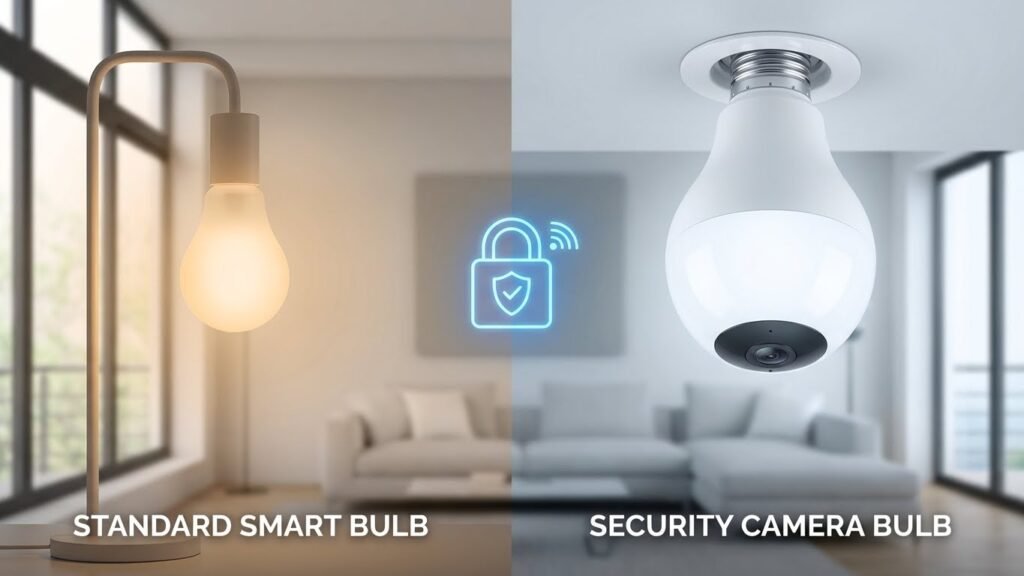
Smart bulbs do not usually hide cameras, but some products are made as light fixtures with built-in cameras you can buy on purpose. If you want lighting alone, most smart bulbs only control color, brightness, and schedules—only specific “bulb cameras” combine a light and a camera in one screw-in unit.
You should check product specs and images before buying so you don’t get a camera when you only want a bulb. If a bulb does include a camera, it will say so, list the field of view, and show app features like live view and recording.
Key Takeaways
- Most smart bulbs only offer lighting and connectivity, not cameras.
- Some bulbs are purpose-built as cameras plus lights and will be clearly labeled.
- Always verify product details and app features before purchasing.
Understanding Smart Bulbs
Smart bulbs connect to your phone or home network and let you control light level, color, and schedules. They use wireless protocols and apps to receive commands and often work with voice assistants and smart home hubs.
How Smart Bulbs Work
Smart bulbs contain LED diodes, a small control circuit, and a wireless radio. The LED produces light; the circuit manages brightness and color; the radio (Wi‑Fi, Bluetooth, Zigbee, or Z‑Wave) receives commands from your phone, a hub, or a voice assistant.
You pair the bulb by following the manufacturer’s app steps. Once paired, the app sends on/off and dimming instructions through your router or hub. Some bulbs talk directly to your phone (Bluetooth). Others route commands through a hub that translates protocols and can group multiple bulbs.
Power and firmware matter. Bulbs still need the lamp socket’s power to run the electronics. Manufacturers release firmware updates to fix bugs and security issues, so you should apply updates through the app when offered.
Types of Smart Bulbs
You’ll find several common types based on protocol and capability:
- Wi‑Fi bulbs: connect directly to your home network; easy to set up but use more bandwidth.
- Bluetooth bulbs: pair to a phone nearby; good for single-room control without internet.
- Zigbee/Z‑Wave bulbs: require a hub or bridge; use less power and scale better for many bulbs.
- Tunable white and color bulbs: tunable white change temperature (warm to cool); color bulbs offer millions of RGB colors.
Choose based on range, number of bulbs, and integration needs. If you already have a hub (like a Zigbee bridge), Zigbee bulbs often offer more stable mesh networking for many fixtures.
Common Features of Smart Bulbs
Most smart bulbs include these core features:
- On/off and dimming control via app or voice.
- Scheduling and timers to automate lights by time or sunrise/sunset.
- Color temperature control (warm to cool) and full RGB color on color models.
- Grouping and scenes to control multiple bulbs together.
Additional features can include energy monitoring, motion-triggered lighting, and integration with routines for locks, cameras, or thermostats. Security options vary: look for bulbs that support encrypted connections and regular firmware updates to reduce privacy risks.
Do Smart Bulbs Have Built-In Cameras?
Some smart bulbs include cameras, but most do not. You should check product specs, look at the bulb’s shape and weight, and be aware of privacy claims when deciding whether a bulb might have a camera.
Manufacturer Specifications
Check the product page and user manual first. Manufacturers list camera resolution, field of view, and whether video is stored locally or in the cloud. If a bulb has a camera, the listing will usually state “HD camera,” “motion detection,” or show sample footage.
Also verify network requirements. Camera-enabled bulbs often require Wi‑Fi and a companion app or cloud account. Look for certifications like FCC or CE and privacy statements about encryption and data retention. If none of these items appear, the bulb almost certainly lacks a camera.
Physical Design and Components
Camera bulbs look bulkier at the head where the lens sits. You might see a small glass or plastic lens, vents, or a darker circular area at the bulb’s center. Bulbs with built-in cameras are heavier and often need extra space around the socket for the lens to capture a wide view.
Internally, camera bulbs add a sensor module, microcontroller, microphone, and sometimes an SD slot. Regular smart bulbs only contain LEDs, drivers, and wireless radios (Wi‑Fi, Zigbee, or Bluetooth) and lack imaging hardware. If a bulb screws into a standard socket but seems unusually large or warm, examine it closely for a lens.
Privacy Concerns and Myths
Many people fear hidden cameras in ordinary smart bulbs. That is uncommon. Most smart bulbs do not contain any imaging hardware; only purpose-built “lightbulb cameras” include cameras. Scammers could mislabel devices, so buy from trusted brands and retailers.
If you discover a camera-enabled bulb, check permissions in the app and disable camera access if you don’t want recording. Secure your Wi‑Fi with a strong password and keep firmware updated to reduce hacking risk. If privacy is your main concern, choose bulbs that explicitly state they have no camera.
Identifying Smart Bulbs With Camera Features
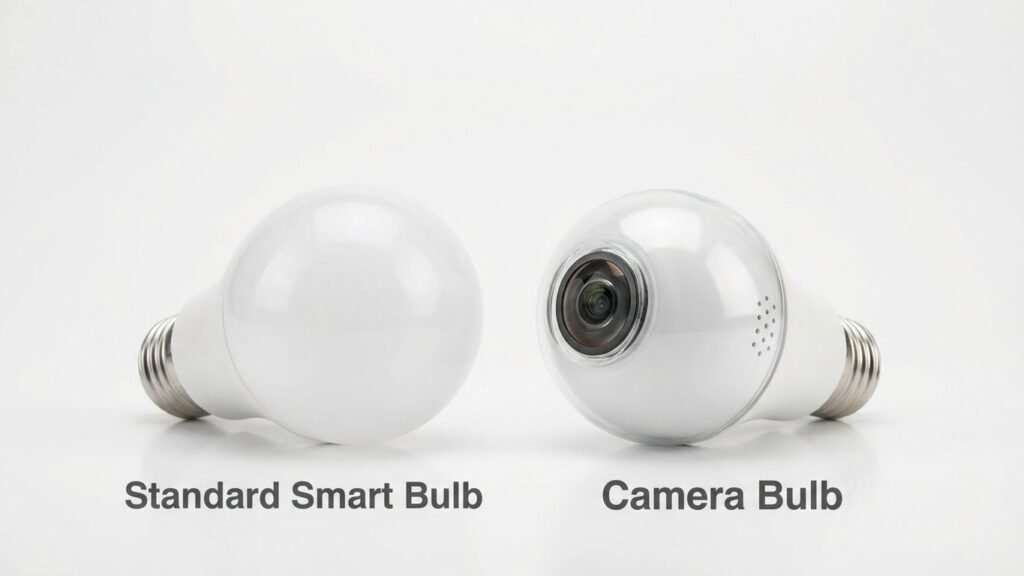
You will learn which bulbs actually include cameras, how to spot them, and how they differ from plain smart bulbs. Look for physical lens clues, app features, and model names that advertise surveillance capabilities.
Notable Models That Include Cameras
Some brands sell bulbs that are both lights and cameras. Examples include “Fisheye” or “360°” camera bulbs from budget security makers and models labeled as “light bulb camera” on sites like Amazon. These often use an E26/E27 base so they screw into standard sockets.
Key features to check:
- Built-in camera lens visible near the top or center of the bulb.
- Wi‑Fi or 2.4 GHz-only connectivity explicitly listed.
- App support for live view, recording, and motion alerts.
- Mention of cloud storage or microSD slot for local video.
You should check product photos and the spec sheet. Reviews often show close-up images of the lens or reveal whether the bulb sends video off the device.
How to Recognize Camera-Equipped Bulbs
Look for a small glass or plastic dome that sits where a typical LED chip would not be. That dome often hides the lens and may look different from the rest of the bulb surface. Some models have tiny pinholes or perforations that serve as microphone or lens openings.
Other detection steps:
- Inspect labeling: terms like “security,” “surveillance,” “camera,” or “live view” indicate video capability.
- Review the app: a camera option, live stream, or recording settings confirm a camera.
- Check for wireless specs: most camera bulbs use 2.4 GHz Wi‑Fi and list RTSP, ONVIF, or proprietary streaming protocols.
- Use a flashlight or phone camera to look for reflective lens surfaces if you suspect a hidden camera.
Difference Between Smart Bulbs and Camera Bulbs
Smart bulbs control light functions: color, brightness, schedules, and voice assistants. They typically do not include a lens, microphone, or video streaming features. Their firmware focuses on lighting protocols like Zigbee, Z‑Wave, or Wi‑Fi light commands.
Camera bulbs combine lighting with surveillance hardware. They add a camera sensor, image processor, and storage or cloud upload functions. Expect different privacy and security considerations:
- Smart bulb: focus on lighting, lower data risk.
- Camera bulb: requires camera permissions, account creation, and often a subscription for advanced features.
If a product lists both lighting controls and camera functionality, treat it as a camera device for privacy and network security decisions.
Privacy Implications of Camera-Equipped Smart Bulbs
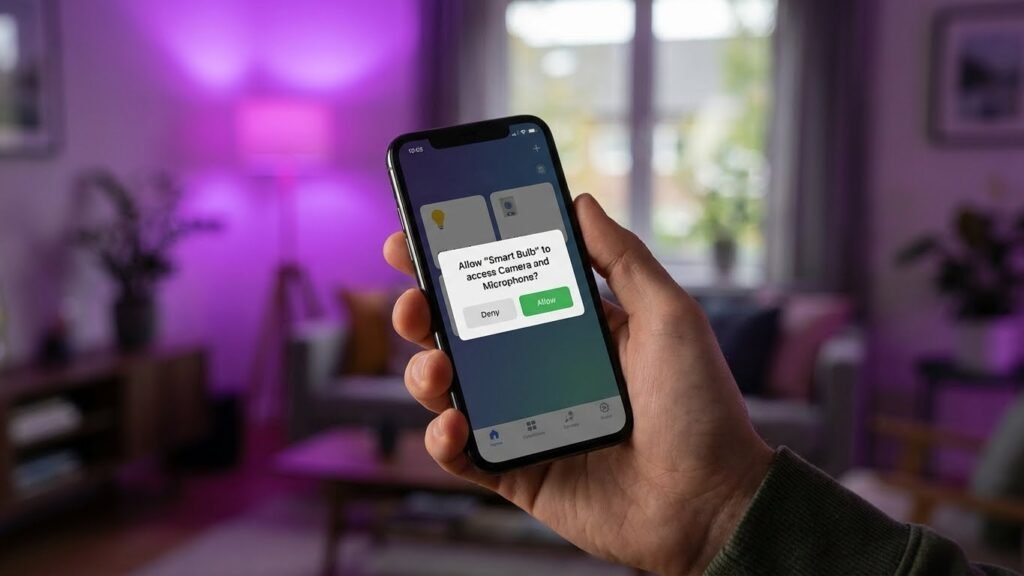
Camera-equipped bulbs can record video and audio, store footage to the cloud or local storage, and connect to your home network. These functions create risks for unauthorized access and for data being used in ways you did not intend.
Potential Security Risks
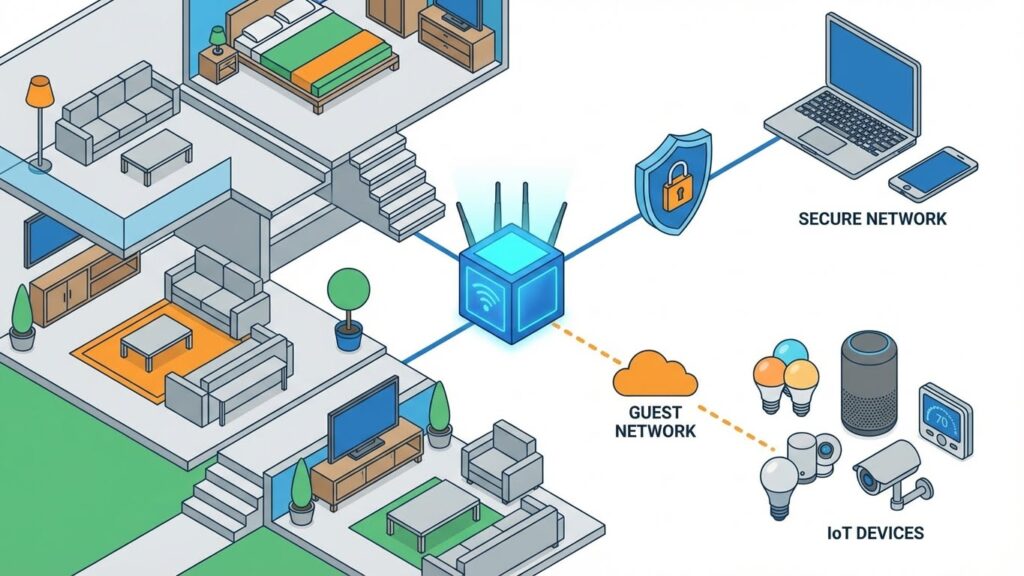
If the bulb’s app or firmware is weak, attackers can access live feeds or recorded clips. That can expose where you are in the home, when you are away, and who visits. A compromised bulb can also be a stepping stone into other devices on your Wi‑Fi network, making routers, computers, or smart locks vulnerable.
Some manufacturers keep footage on their servers. If their cloud is breached or policies allow wide data sharing, your private video could be viewed by third parties. Even local storage like microSD cards can be stolen or read if someone gains physical access or the bulb’s files are not encrypted.
Pay attention to default passwords, outdated firmware, and apps requesting broad permissions. Those are common attack vectors you can fix.
Safe Installation Practices
Choose bulbs from reputable brands that publish firmware updates and a clear privacy policy. Verify the bulb supports encrypted video streams (look for TLS/HTTPS) and local-only storage if you prefer no cloud upload. Use strong, unique passwords for the bulb’s account and the associated app.
Place camera bulbs where they cover only the intended area. Avoid pointing them at neighbors’ windows or public spaces to limit legal and privacy issues. Put the bulb on a guest or isolated VLAN if your router supports it to keep the camera separate from sensitive devices.
Keep firmware current and limit app permissions to what’s necessary. Turn off features you don’t use, such as remote access or microphones, and review access logs or account activity regularly.
Alternatives to Camera-Integrated Lighting
You can get the same or better security by using separate cameras and smart lights. This lets you pick better camera quality, place lights where they help most, and control privacy settings independently.
Separate Smart Cameras and Lights
Use dedicated cameras for better image quality, night vision, and wider fields of view. Look for cameras with at least 1080p resolution, infrared or low-light sensors, and adjustable lenses. These give clearer footage than most bulb cameras.
Place cameras where they cover entry points and long sightlines. Mount them high and aim slightly downward to reduce glare and blind spots. Use weatherproof outdoor models for porches or driveways.
Pair cameras with smart lights that have motion-triggered routines. Let lights turn on when cameras detect movement to deter intruders and improve video clarity. Keep cameras on a separate power or backup to avoid losing both functions if a light fails.
Choosing the Right Smart Home Devices
Match device features to your needs. If you want remote alerts and cloud clips, confirm the camera supports reliable cloud storage or local microSD. Check subscription costs before buying so you won’t lose key features later.
Consider network and privacy settings. Put cameras on a guest or separate VLAN if your router supports it. Use strong, unique passwords and enable two-factor authentication for device accounts.
Balance budget and performance. Low-cost bulbs save money but often cut video clarity and night capability. Midrange standalone cameras usually offer the best mix of reliability, image quality, and privacy controls.
Future Trends in Smart Bulb Technology
Smart bulbs will link more tightly with other home devices and gain stronger security controls. Expect bulbs to act as sensors, automation triggers, and networked endpoints that respect privacy while offering new features.
Integration With Other Smart Devices
You will see bulbs work as more than lights. Many bulbs will use standards like Matter to talk directly with thermostats, locks, and hubs without extra apps. That lets you set routines such as: when your door unlocks, lights in the entryway come on to a preset scene.
Bulbs will also act as low-cost sensors. Motion, ambient light, and sound-level data from bulbs can help adjust heating, close blinds, or alert you to activity. Device makers will expose simple, local APIs so your hub or phone can use that data without cloud roundtrips.
Expect tighter voice and presence integration. Bulbs may join into multi-room audio or act as proximity beacons to switch profiles for personal devices. You should check compatibility lists and update firmware to keep integrations working.
Emerging Security Features
Manufacturers will add concrete security tools to protect your network and privacy. Look for mandatory encrypted firmware updates, signed code, and secure boot to stop tampered software from running on a bulb.
Access controls will improve. You will be able to set per-device permissions for who can change color, read sensor data, or pair new devices. Enterprise-grade WPA3 Wi‑Fi and individual device keys will reduce risks from a compromised router.
Local-first modes will grow in popularity. These let bulbs perform automation and store basic logs on your hub rather than sending data to the cloud. Combined with regular security patches, these features lower the chance that a bulb could leak sensitive information.
Conclusion
You can trust most common smart bulbs do not have cameras inside them. Standard bulbs use tiny computers and wireless chips for color, dimming, and schedules, not video recording.
Some devices do combine light and cameras. These are sold as “light bulb cameras” and look like regular bulbs. If you buy one, it will say it has a camera and list features like live view, motion alerts, and cloud storage.
Protect your privacy by checking labels, reading specs, and buying from trusted brands. Use strong Wi‑Fi passwords, enable encryption on your network, and install firmware updates when available.
If you worry about hidden cameras, inspect fixtures and packaging before you buy. Consider using a regular smart bulb and a separate, clearly labeled camera if you need video surveillance.
Quick tips:
- Verify the product name and specs before buying.
- Use secure Wi‑Fi and unique passwords.
- Keep firmware and apps updated.
These steps help you enjoy smart lighting while keeping your home and data safe.
FAQs
Can smart bulbs have cameras?
Most standard smart bulbs do not include cameras. Some special products combine a camera with a bulb base so they look like regular lights, but these are sold as camera-bulb devices, not typical smart bulbs.
How can you tell if a bulb has a camera?
Look for a lens, vents, or a power draw higher than normal. Check product specs and the packaging. If the bulb needs an app that asks for video or microphone access, treat it as a camera device.
Could a smart bulb without a camera still invade your privacy?
Yes. Even without a camera, bulbs can reveal patterns about your life by logging on/off times. Labels and schedules can show when rooms are used. Secure your network and limit data sharing to reduce this risk.
What security steps should you take?
Use a strong Wi-Fi password and enable WPA3 or WPA2. Keep firmware updated and change default device passwords. Put smart lights on a separate IoT network when possible.
Are light bulb cameras legal?
Laws vary by location. You generally cannot record people where they have an expectation of privacy, like bathrooms or locker rooms. Check local rules before installing any camera device.
Should you buy a bulb-camera or a separate camera?
Choose based on quality and need. Dedicated cameras often offer better image quality and features. Bulb-cameras hide easily and may suit casual monitoring, but check specs and privacy controls before buying.
Conclusion
Smart bulbs do not normally include cameras. Most smart bulbs only contain LEDs, a tiny computer, and wireless radios like Wi‑Fi, Bluetooth, Zigbee, or Z‑Wave to let you control light and automation. If a device looks like a bulb but offers video, it is a dedicated light‑bulb camera, not a typical smart bulb.
You should check product specs and photos before buying. Look for clear mentions of “camera,” video streaming, or an app that shows live video. Trusted sites such as the Federal Trade Commission or consumer tech reviews can help you verify claims and spot fake features.
Security and privacy depend on the device and how you set it up. Use strong Wi‑Fi passwords, keep firmware up to date, and limit app permissions to reduce risk. If you want surveillance, choose a known camera product with good reviews and solid privacy settings.
If you’re cautious about hidden cameras, inspect the device physically. Cameras need a lens and usually a wider housing or vents. When in doubt, buy from reputable brands and read independent reviews and tests to confirm what a device actually does.