
In our increasingly connected world, your digital presence is as important as your physical one. Whether you’re leading a critical team meeting, teaching an online class, or simply catching up with family, a clear, professional video feed can make all the difference. It’s about more than just being seen; it’s about being understood, engaging effectively, and making a lasting impression.
I’m Mahmud — the founder and writer behind HomeYarr. My extensive background involves meticulously analyzing digital communication tools and the evolving landscape of remote work technology, ensuring I bring you insights derived from comprehensive market research.
Choosing the right webcam can feel like navigating a maze of technical jargon and endless options, but it’s a crucial step in building a productive and professional home office setup. To ensure your virtual presence is always sharp and clear, navigating the many options for the best home office webcam is crucial for impactful digital interactions.
How To Choose The Best Home Office Webcam
Selecting the ideal webcam for your home office involves balancing image quality, audio performance, and smart features with your specific usage needs and budget. Here’s what to consider to make an informed decision.
Prioritize Image and Audio Quality
For a professional presentation or a clear family call, 1080p resolution is a solid baseline, but 4K offers superior detail for those who demand the absolute best. Look for cameras with larger sensors (like 1/2″ or larger) and good low-light correction to ensure you look bright and clear even in less-than-ideal lighting. Dual or omnidirectional microphones with noise cancellation are also key for ensuring your voice is heard without distracting background sounds.
Consider Smart Features and Flexibility
Features like autofocus, adjustable field of view (FOV), and AI tracking can significantly enhance your video experience, keeping you perfectly framed and in focus. Integrated privacy shutters offer peace of mind, while flexible mounting options and remote controls add convenience. Think about whether you need features like a built-in ring light or unique placement options, such as a center-screen camera, to suit your specific setup.
Ensure Compatibility and Ease of Use
Your webcam should be plug-and-play with your operating system (Windows, macOS, ChromeOS, Linux) and seamlessly integrate with your preferred video conferencing platforms (Zoom, Teams, Google Meet, Skype). Check for USB-A or USB-C connectivity, and consider if any accompanying software offers valuable customization without being overly complicated. A simple setup means you can focus on your calls, not troubleshooting.
Quick Comparison
On smaller screens, swipe sideways to see the full table.
| Model | Type | Best For | Key Feature | Amazon |
|---|---|---|---|---|
| acer 4K Webcam | 4K | Overall Value | Sony 1/2″ Sensor, PDAF Autofocus | Amazon |
| OBSBOT Tiny 2 | 4K PTZ | AI-Powered Tracking | 1/1.5″ Sensor, Voice/Gesture Control | Amazon |
| YOLOLIV YoloCam S3 | 4K DSLR-Like | Cinematic Quality | 1/1.28″ Sensor, Uncompressed Video | Amazon |
| Insta360 Link 2 | 4K AI PTZ | Smart Gesture Control | AI Tracking, Auto Privacy Tilt | Amazon |
| TONGVEVO 3-in-1 4K Webcam | 4K All-in-One | All-in-One Solution | AI Auto Framing, Built-in Speaker | Amazon |
| Center Cam V2 | 1080p Unique | Direct Eye Contact | 16-inch Flexible Tube, Center Screen | Amazon |
| j5create 360 Degree Webcam | 1080p 360° | 360° Conference View | 6 Display Modes, Omnidirectional Mic | Amazon |
| Angetube Streaming Webcam | 1080p Ring Light | Integrated Ring Light | 3-Color LED, Remote Control | Amazon |
| Anker PowerConf C200 | 2K HD | Clear 2K Resolution | AI Noise-Canceling, Adjustable FOV | Amazon |
| Microsoft Modern Webcam | 1080p Certified | Reliable Workhorse | Noise-Cancelling Mic, Teams/Zoom Certified | Amazon |
| DEPSTECH 4K Webcam DW49 | 4K Budget | Affordable 4K Autofocus | Sony Sensor, Dual Mics, Tripod Included | Amazon |
| EMEET 1080P Webcam C960 | 1080p Value | Dual Mic Clarity | 2 Omnidirectional Mics, Low-Light Correction | Amazon |
| NexiGo N60 1080P Webcam | 1080p Budget | Solid Budget Pick | Noise-Cancelling Mic, Privacy Cover | Amazon |
| Logitech Brio 101 | 1080p Compact | Everyday Essential | Auto-Light Balance, Integrated Shutter | Amazon |
| Poly Studio P5 | 1080p Professional | Compact & Certified | Exceptional Optics, USB Headset Port | Amazon |
In‑Depth Reviews: Best Home Office Webcam
1. acer 4K Webcam
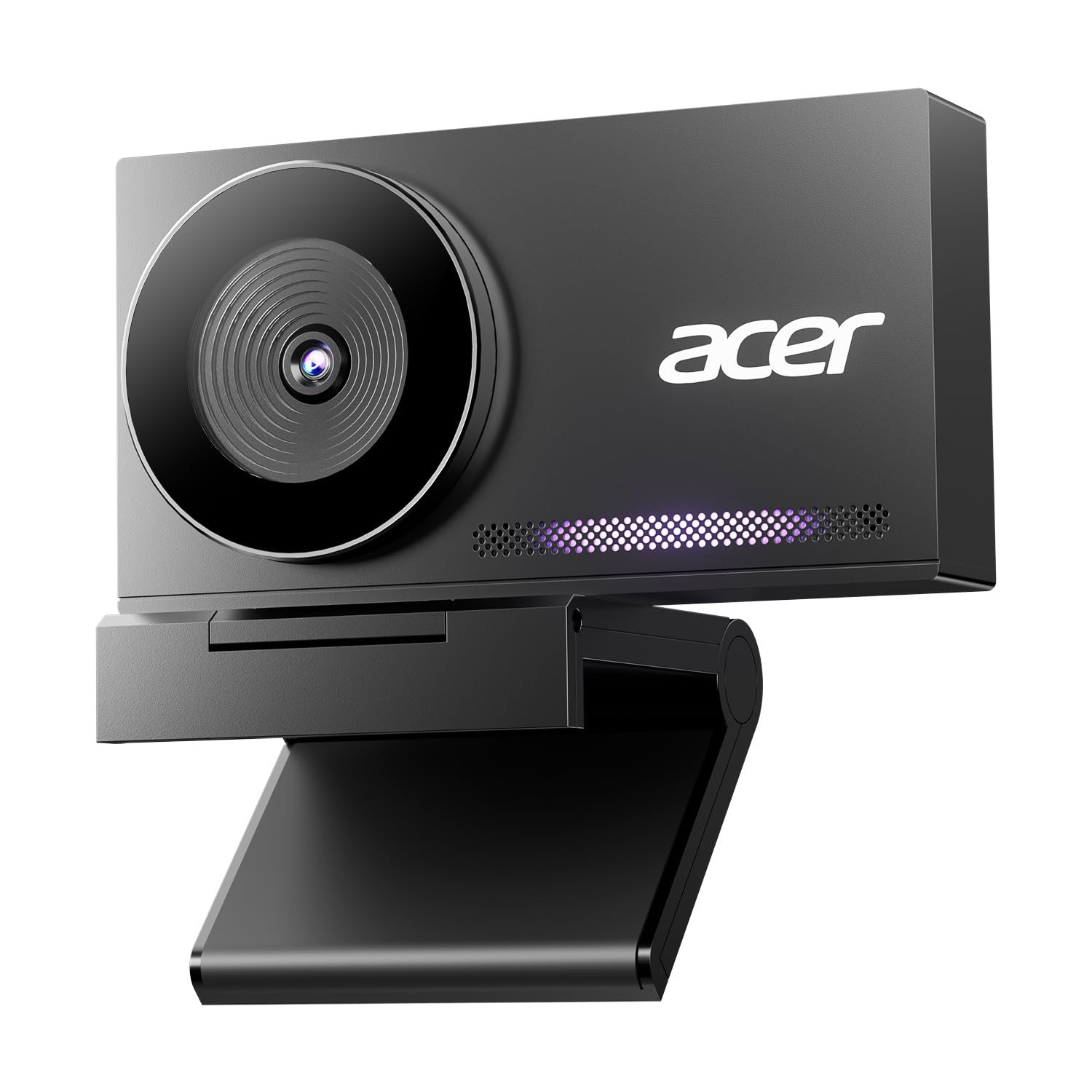
The acer 4K Webcam stands out as a true overachiever, delivering premium 4K image quality at a price point that genuinely surprises. Crafted with an all-metal unibody from aerospace-grade aluminum, this webcam not only looks sleek but ensures fast heat dissipation for stable, continuous performance. Its large Sony 1/2″ CMOS sensor and HDR capabilities capture balanced, true-to-life visuals, making it an exceptional choice for anyone looking to upgrade their virtual presence without a hefty investment.
Professionals are consistently impressed by the razor-sharp 4K clarity and natural color reproduction, even in challenging low-light conditions. The advanced Phase Detection Autofocus (PDAF) ensures focusing is fast, accurate, and stable, preventing any blur during active calls or presentations. Moreover, the dual high-sensitivity digital microphones excel at capturing voices clearly from over 2 meters away while effectively filtering out distracting ambient noise like keyboard clicks, providing exceptional audio clarity.
This webcam is a plug-and-play dream, requiring no drivers or additional software, making setup effortless across Windows, Mac, and ChromeOS. Its lightweight, compact design and magnetic privacy cover add to its convenience and security, making it perfect for mobile workers or those who value privacy. For virtual communicators seeking a reliable camera that delivers crisp 4K visuals and clear audio for meetings, streaming, or content creation, this acer model offers outstanding value.
Why it’s great
- Exceptional 4K image quality with HDR
- Large Sony 1/2″ CMOS sensor for low light
- Fast and accurate PDAF autofocus
- Dual noise-reduction microphones
- Premium all-metal unibody design
- Magnetic privacy cover for security
Good to know
- Some early user confusion about Acer branding
- No optical zoom, relies on software zoom
2. OBSBOT Tiny 2 Webcam

The OBSBOT Tiny 2 is a game-changer for anyone needing dynamic camera control in their home office. Equipped with an industry-leading 1/1.5″ CMOS sensor—the largest and most advanced in webcams—it delivers stunning 4K visuals even in challenging low-light conditions. What truly sets it apart is its fully upgraded AI algorithm, enabling superior auto-tracking that keeps you perfectly framed, no matter how much you move. This PTZ (Pan-Tilt-Zoom) webcam is designed for professionals, streamers, and educators who demand intelligent camera operation.
Users consistently praise the Tiny 2’s incredibly fast and smooth AI tracking, which boasts four distinct modes, including Upper Body, Close-Up, Hand Tracking, and Zone Tracking, adapting to diverse scenarios. Its breakthrough voice and gesture control features allow for hands-free operation, letting you zoom, track, or activate modes with simple commands like “Hi, TINY” or specific gestures. The all-pixel autofocus is remarkably quick, locking onto your silhouette in just 0.3 seconds—four times faster than many competitors—ensuring crisp, blur-free video at all times.
Beyond its core tracking capabilities, the Tiny 2 offers a suite of customizable features through its desktop software, including Beauty Mode, Whiteboard Mode, and Portrait Mode, catering to various professional and creative needs. While it can get warm during extended use due to its powerful performance, this is a normal characteristic of such advanced hardware. For tech-savvy professionals or content creators who want a webcam that intelligently follows their movements and offers extensive control options, the OBSBOT Tiny 2 is an unparalleled choice.
Why it’s great
- Largest 1/1.5″ CMOS sensor for superior image quality
- Advanced AI tracking with 4 modes
- Groundbreaking voice and gesture control
- Ultra-fast 0.3-second all-pixel autofocus
- Customizable modes (Beauty, Desktop, Whiteboard)
- SDK, OSC, Stream Deck, Global Hotkey support
Good to know
- May run warm during extended use
- 60fps only available at 1080p/720p, not 4K
- HDR not available in 60fps mode
- Requires modern PC configuration for optimal performance
3. YOLOLIV YoloCam S3

The YOLOLIV YoloCam S3 is engineered for those who crave DSLR-like image quality and cinematic effects from a webcam. Featuring an exceptionally large 1/1.28″ sensor—likely the biggest ever in a webcam—it delivers uncompressed 4K/30fps and 1080p/60fps video with stunning detail and organic background blur. Its master-tuned 4K clarity, combined with AI-enhanced imaging, ensures faces are 2.5 times clearer and details are finer, even in low-light conditions, making every video call or stream look professionally produced.
Content creators and professionals alike are consistently amazed by its instant zero-lag PDAF (Phase Detection Autofocus), which keeps subjects crisp and blur-free, even during close-ups or movement. The AI auto-tuned smart exposure, white balance, and HDR work in harmony to produce vibrant, true-to-life colors. The YoloCam S3 also distinguishes itself with its comprehensive software for DSLR-like camera settings, allowing users to fine-tune contrast, sharpness, saturation, exposure, white balance, and even color grading with its unique Picasso Resolve engine for Windows users.
Designed with a premium all-aluminum body, the YoloCam S3 acts as a high-performance heat sink, guaranteeing stable, 24/7 non-stop streaming without overheating. Its plug-and-play USB3.0 connectivity with PC or Mac, along with a foldable magnetic mount and integrated tripod interface, provides versatile setup options. For anyone seeking the absolute pinnacle of webcam image quality for high-stakes presentations, streaming, or content creation, the YoloCam S3 delivers a truly cinematic experience that stands leagues above conventional webcams.
Why it’s great
- Largest 1/1.28″ sensor for DSLR-like quality
- Uncompressed 4K/30fps and 1080p/60fps video
- Fast PDAF autofocus with zero lag
- AI-enhanced imaging for clearer faces in low light
- Extensive software for manual DSLR-like controls
- All-aluminum body for guaranteed no overheating
Good to know
- Picasso Resolve color grading is Windows-only (Mac coming soon)
- USB-C port can be loose for some users
- Premium price point reflects advanced features
4. Insta360 Link 2
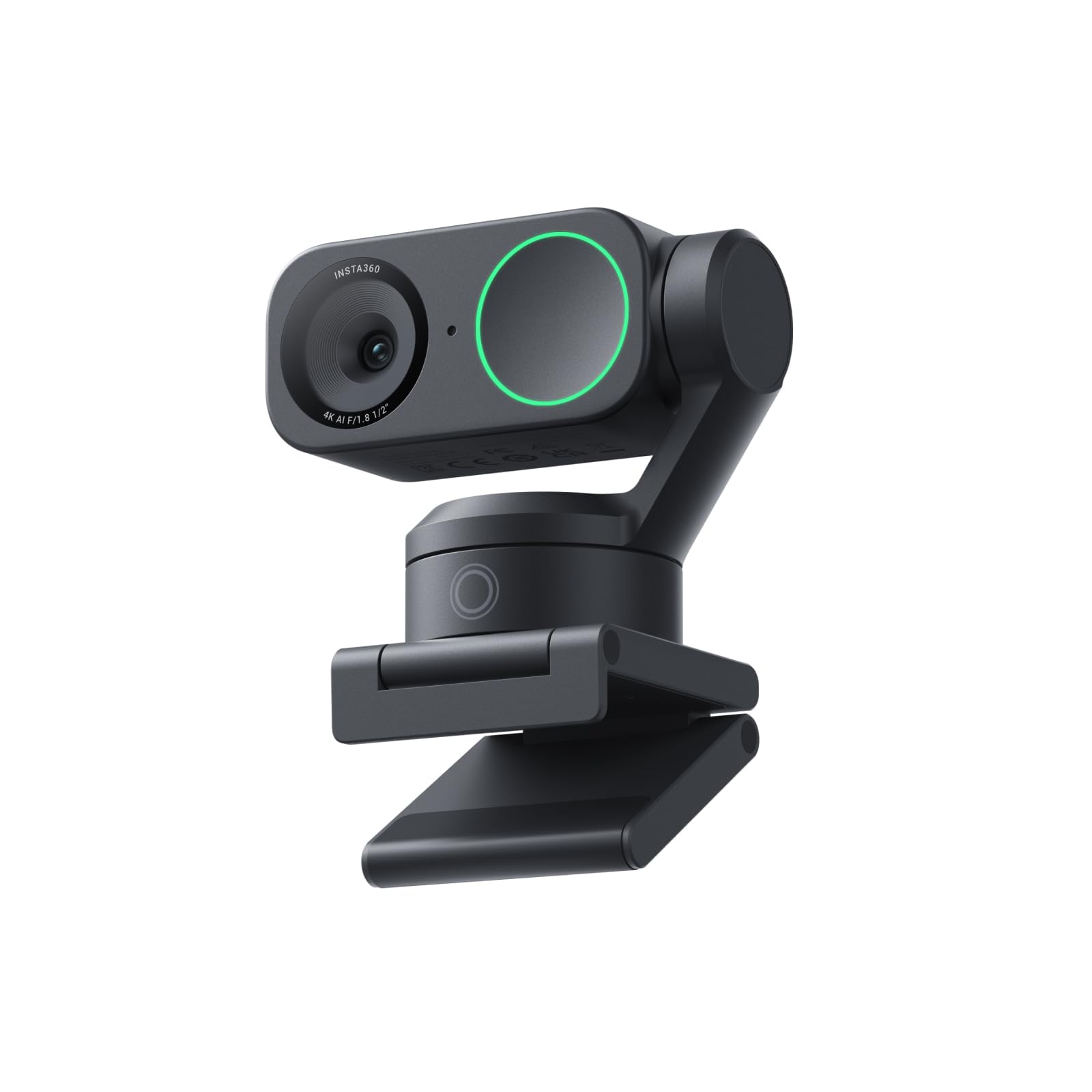
The Insta360 Link 2 redefines what a webcam can do, blending premium 4K image quality with sophisticated AI tracking and intuitive gesture controls. Its 1/2″ sensor captures true-to-life visuals with HDR and exceptional low-light performance, ensuring you look your best in any environment. This PTZ webcam physically pans and tilts to follow your movements, keeping you or your group perfectly in frame, making it ideal for dynamic presentations or interactive online sessions.
Users consistently highlight the Link 2’s impressive AI tracking, which is smooth and responsive, adapting to slight movements without distraction. The Phase Detection Auto Focus (PDAF) delivers true focus with no blurry shots, ensuring instant and crisp video. A standout feature is the natural bokeh effect, which replicates a DSLR-like depth of field, giving your background a professional blur directly from the Link Controller software. Furthermore, its advanced AI noise-canceling algorithms provide best-in-class audio, filtering out unwanted background noise for crystal-clear communication.
The Insta360 Link 2 offers specialized modes like DeskView and Whiteboard, enhancing its versatility for various professional and creative tasks. Control is seamless, either remotely from your smartphone or through simple hand gestures to activate tracking, zoom, or mode changes. For privacy, the camera automatically tilts down after 10 seconds of inactivity. This webcam is fully compatible with all major video conferencing and live streaming platforms, making it an excellent investment for professionals and content creators who want advanced features and superior quality.
Why it’s great
- Premium 4K image quality with 1/2″ sensor and HDR
- Advanced AI tracking for dynamic framing
- Intuitive gesture and remote smartphone control
- True Focus PDAF for instant, crisp video
- Natural bokeh effect for professional backgrounds
- Automatic privacy mode (tilts down when inactive)
Good to know
- Not compatible with ARM-based Windows systems or Windows Hello
- Gesture control can be accidentally triggered by expressive hand talkers
- Software required for advanced features like backgrounds on Mac
5. TONGVEO 3-in-1 4K Webcam
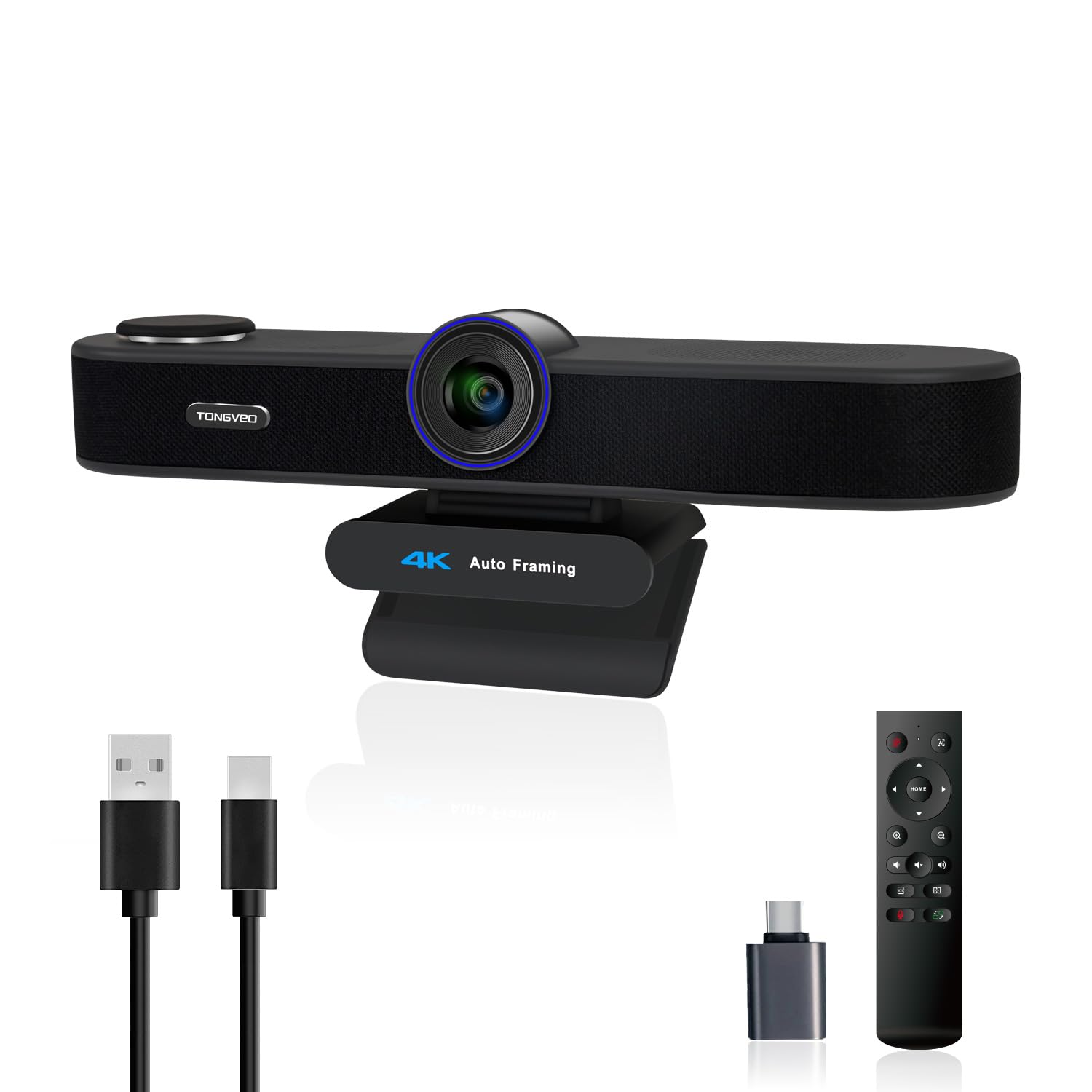
The TONGVEO 3-in-1 4K Webcam is a powerhouse solution for any home office or small conference room, integrating a 4K camera, dual microphones, and a 3W speaker into a single device. This webcam features a 1/2.8-inch 8.29 Megapixel Ultra HD sensor, delivering crisp 4K resolution at 30fps for professional-grade video. It’s designed to simplify your setup, providing an unparalleled audio-visual experience for all your video calls, live streams, and online teaching sessions.
Home office users appreciate its intelligent AI Auto Framing, which detects attendees and automatically centers everyone into the frame, ensuring comprehensive room views. Additionally, the advanced voice tracking feature quickly locates and follows the active speaker within 3 seconds, while the built-in speaker dynamically focuses on the speaker’s movements for enhanced clarity. The included remote control offers convenient 5x digital zoom and allows easy switching between three adjustable FOV modes (118°, 100°, 88°), letting you perfect your view for both group calls and solo presentations.
With 360° omnidirectional microphones that feature noise cancellation, your voice is captured clearly from up to 16.4ft away, making external audio equipment unnecessary for most situations. The plug-and-play USB 2.0/3.0 connectivity ensures hassle-free setup on Windows and Mac, compatible with all popular video conferencing software. The TONGVEO 4K webcam is ideal for those who need a comprehensive, high-quality, and easy-to-manage solution for professional meetings, online classes, or family calls, offering robust performance in a single, integrated unit.
Why it’s great
- Integrated 4K camera, dual mics, and 3W speaker
- AI Auto Framing and Voice Tracking
- 5x digital zoom with 3 adjustable FOV modes
- 360° omnidirectional mics with noise cancellation
- Remote control for easy adjustments
- Plug-and-play USB connectivity
Good to know
- Built-in speakers are tinny for music, but clear for voice
- Larger size may not fit small monitors comfortably
- Privacy cap is magnetic and lacks a lanyard, easy to misplace
6. Center Cam V2 Middle-Screen Webcam
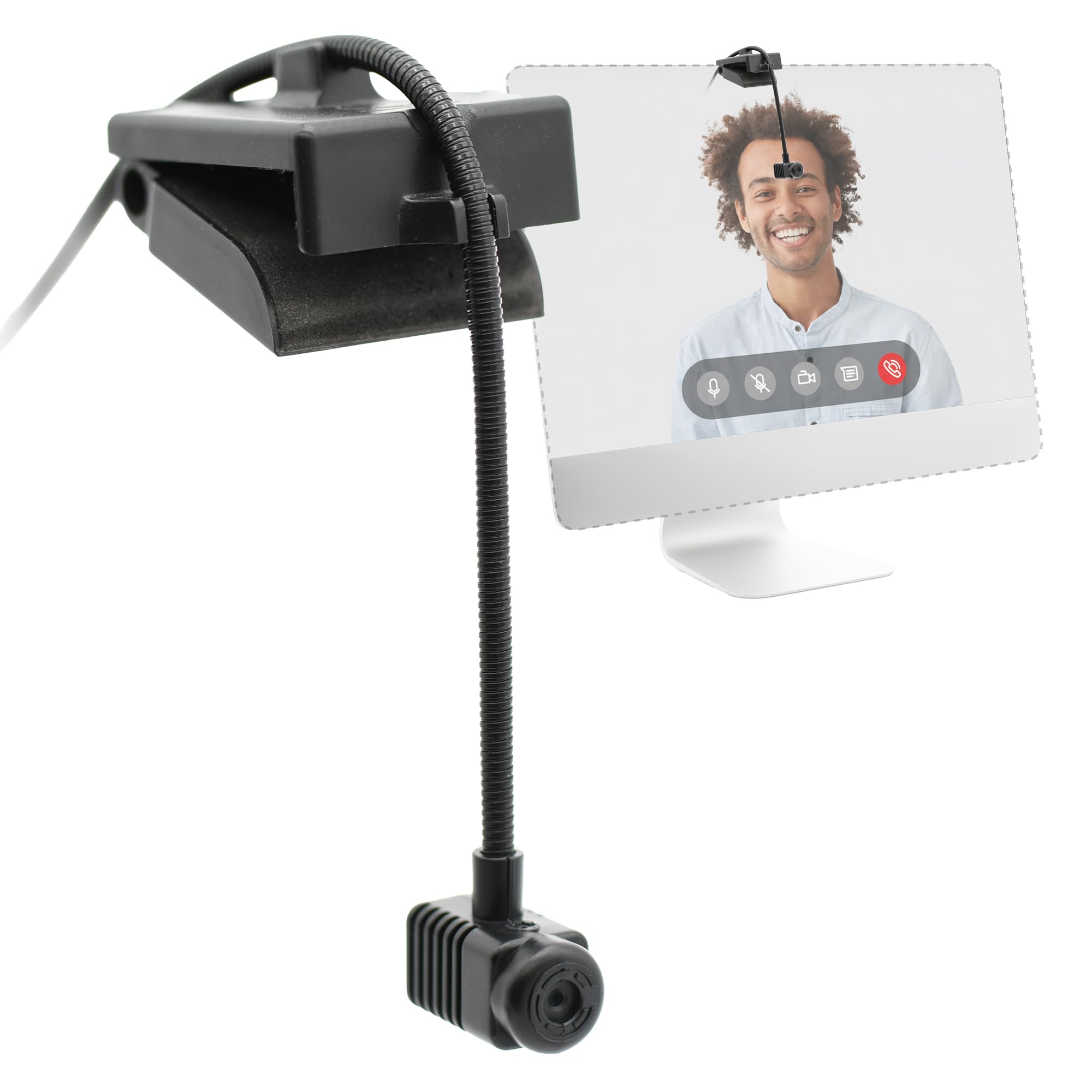
The Center Cam V2 offers a unique solution for achieving natural eye contact during video calls, a feature often overlooked by traditional webcams. This innovative camera positions itself directly in the center of your screen, eliminating the awkward off-center gaze common with top-mounted cameras. Delivering clear, crisp 1080p visuals with a fixed-focus lens, it’s specifically designed to enhance professional video calls, streaming, and online meetings by fostering a more genuine connection with your audience.
Therapists and educators find this camera incredibly helpful for creating a better connection with clients and students, noting a significant difference in engagement. The 16-inch flexible tube allows for customizable placement, ensuring the camera is precisely where you need it, even on ultra-wide monitors where it can sit subtly between screen partitions. Its 70° HFOV keeps the focus squarely on you, minimizing distractions from your surroundings. The rich built-in mono microphone provides reliable audio, often negating the need for an additional mic.
With auto-orientation sensing, the camera automatically adjusts for top-down or bottom-up orientations, simplifying setup. While some users note that the video quality, though clear, might not be as vibrant as other HD webcams, particularly with a slight yellowish hue or being “washed out” in certain lighting, its core benefit of facilitating direct eye contact is invaluable. For professionals who prioritize natural interaction and connection in their virtual communications, especially those with large or multi-monitor setups, the Center Cam V2 is a thoughtful and effective tool.
Why it’s great
- Enables natural eye contact by positioning mid-screen
- 16-inch flexible tube for precise, customizable placement
- 70° HFOV keeps focus on the user
- Auto-orientation sensing for easy setup
- Built-in mono microphone provides clear audio
- Wide compatibility (Apple, PC, Android, Linux)
Good to know
- Video quality may appear slightly washed out or yellowish to some
- Installation on wide monitors can require finesse
- Not compatible with Windows Hello logins
- Higher price point for 1080p resolution
7. j5create 360 Degree All Around Meeting Webcam

The j5create 360 Degree All Around Meeting Webcam is an innovative solution for collaborative environments, offering a full 360-degree panoramic view that eliminates blind spots and captures everyone in the room. With full HD 1080p video playback at 30 Hz, this camera is designed to make hybrid meetings more inclusive and engaging. Its built-in omnidirectional microphone ensures high-fidelity audio capture from all angles, making it a powerful tool for video conferencing, online classes, and team collaboration.
Meeting organizers find its six distinct display modes incredibly flexible, allowing them to choose the best viewing angle for any situation, from a full wrap-around panorama to focused views on presenters. The USB UVC/UAC plug-and-play setup is straightforward, and a touch bar on top allows for instantaneous cropping to specific participants, a faster response than some higher-priced alternatives. While the video quality might not match premium 4K models, it provides a more than adequate picture for adding an in-person touch to virtual gatherings.
This webcam is highly compatible with popular video conferencing apps like Skype, Microsoft Teams, Zoom, and Google Meet, ensuring seamless integration into your existing workflow. Its robust design includes a metal tripod mount, offering versatility for placement in various room configurations, from conference tables to a circle of chairs. For teams or individuals involved in hybrid meetings who need to capture an entire room and keep remote participants engaged without breaking the bank, the j5create 360 Degree Webcam offers exceptional value and functionality.
Why it’s great
- True 360° panoramic video coverage
- Six versatile display modes
- Built-in omnidirectional microphone with good pickup
- USB plug-and-play with touch bar for quick participant focus
- Robust metal tripod mount for flexible placement
- Excellent value for a 360-degree conference camera
Good to know
- Video quality is closer to 720p than true 1080p for some users
- No built-in speaker, requires external audio
- Does not automatically zoom to speaking person (manual touch bar control)
- Optimal performance in brightly lit, small to mid-sized rooms
8. Angetube Streaming Webcam

The Angetube Streaming Webcam with Microphone is a standout choice for anyone seeking to enhance their virtual presence with superior lighting and image quality. Designed for streaming and professional video calls, it boasts 1080p HD resolution at a smooth 60 frames per second, ensuring crisp, true-to-life colors. Its most distinctive feature is the built-in multi-function ring light, offering three different LED colors and stepless adjustable brightness, delivering soft, glare-free illumination for perfect portraits, even in dimly lit environments.
Content creators and remote workers appreciate the convenience of the integrated ring light, which can be adjusted with a rotating bezel or the included RF 360° omnidirectional remote control, eliminating the need to delve into software settings. The remote also offers control over 5x digital zoom, video disable, mute, and white balance, providing unparalleled flexibility, especially for Mac users. Auto low-light correction ensures you remain prominent even in poor lighting, while real-time autofocus means you never have to worry about adjusting focal length.
Equipped with dual omnidirectional microphones and noise cancellation, this webcam captures clear audio from every angle, making external mics optional for most users. The built-in privacy cover and remote video disable function offer peace of mind. With USB-A and USB-C compatibility (adapter included) and plug-and-play functionality across Windows, Mac, Linux, and Chrome OS, the Angetube Streaming Webcam is a versatile and user-friendly device. For those who frequently participate in video calls or streaming and desire professional lighting and control, this webcam is an excellent all-in-one upgrade.
Why it’s great
- Built-in multi-function ring light with 3 colors and adjustable brightness
- 1080p HD at 60 FPS for smooth, crisp video
- RF 360° omnidirectional remote control for zoom, light, and privacy
- Dual omnidirectional mics with noise cancellation
- Real-time autofocus and auto low-light correction
- USB-A and USB-C compatibility (adapter included)
Good to know
- Lens cover design might make it unclear if camera is truly off
- Remote requires CR2 batteries (included)
- Some users may not need all the advanced features
9. Anker PowerConf C200

The Anker PowerConf C200 is a fantastic choice for professionals seeking a significant upgrade in video and audio clarity for their home office. This 2K resolution webcam delivers sharp, detailed video for professional-grade conferences, making a noticeable difference compared to standard 1080p or built-in laptop cameras. Anker, known for reliable tech, brings its expertise to this webcam, offering a product that balances performance with user-friendly features.
Users are consistently impressed by the C200’s superior low-light performance, which captures crisp images even in dim settings without the need for additional lighting, a crucial advantage for any home office or late-night streaming. The advanced audio clarity is powered by dual microphones with AI noise cancellation, ensuring voices are crystal clear and free from distracting background noise. The webcam also offers customizable viewing angles (65°, 78°, or 95° via software), allowing you to frame your shot perfectly for solo calls or group discussions.
Setup is a breeze with plug-and-play functionality across Windows 7 or later and macOS 10.11 or later, ensuring broad compatibility. The integrated privacy cover slides easily over the lens, providing essential security and peace of mind between calls. While it doesn’t offer 4K resolution, its 2K quality is surprisingly clean for its price point, often outperforming more expensive basic models. For anyone needing a reliable, high-quality webcam with excellent audio and adaptable viewing for daily work meetings, the Anker PowerConf C200 is a solid and dependable choice.
Why it’s great
- 2K ultra-clear resolution for sharp video
- Superior low-light performance without extra lighting
- Dual mics with AI noise cancellation for crystal-clear audio
- Customizable viewing angles (65°, 78°, 95°)
- Integrated privacy cover for security
- Broad compatibility and easy plug-and-play setup
Good to know
- Not 4K resolution, but 2K is excellent for the price
- Some users prefer dedicated audio gear over built-in mics
- May not be ideal for green screen setups without additional lighting adjustments
10. Microsoft Modern Webcam

The Microsoft Modern Webcam is designed as a reliable and straightforward solution for your daily video conferencing needs, especially for those heavily integrated into the Microsoft Teams ecosystem. Delivering 1080p HD video with auto white balance and exposure compensation, including HDR, it ensures you appear clear and well-lit. This webcam focuses on core functionality, providing a stable and professional image without unnecessary frills, making it a dependable choice for your home office.
Users appreciate its solid stability and easy attachment to monitors, laptops, and desktops, maintaining a consistent presence. The integrated privacy shutter with a clear usage indicator light offers peace of mind when not on camera. While the microphone might be natively turned off and require a quick adjustment in computer settings, once enabled, the built-in noise-cancelling microphone performs well for work settings. Its fixed focus, covering a range from 0.4m to 1.5m, is optimized for individual use, ensuring you’re always sharp within that sweet spot.
Certified for both Microsoft Teams and Zoom, this webcam integrates seamlessly into most professional workflows. Its compact size and plug-and-play USB connectivity make it incredibly easy to set up and use. However, Mac OS users should note that the Microsoft Accessory Center software, which allows for camera setting modifications, is not available on Mac, potentially limiting control over video output. For Windows users, particularly those who rely on Microsoft Teams, this webcam is a solid, affordable, and highly functional choice for consistent, quality video calls.
Why it’s great
- 1080p HD video with HDR and auto-light correction
- Built-in noise-cancelling microphone
- Integrated privacy shutter with usage indicator light
- Excellent stability and attachment to various displays
- Certified for Microsoft Teams and Zoom
- Compact, small size and plug-and-play ease of use
Good to know
- Microphone may need to be enabled in computer settings
- Fixed focus (0.4m to 1.5m) might not suit all scenarios
- No dedicated software for Mac OS, limiting control options
- Video quality on Mac OS can be subpar for some users
11. DEPSTECH 4K Webcam DW49

The DEPSTECH 4K Webcam DW49 offers an accessible entry point into 4K video quality, making it a compelling option for those seeking high-resolution clarity without a premium price tag. Equipped with a Sony 1/3” CMOS sensor, this 8-megapixel PC external webcam delivers up to 3840×2160 resolution at 30fps, ensuring crisp images and clear video calls that feel remarkably close to in-person conversations. It’s a solid choice for professionals, online educators, and streamers looking to make an impactful visual statement.
Users frequently highlight the DW49’s reliable autofocus feature, which includes a face-tracking mechanism that keeps you in sharp focus while minimizing background distractions, even in low-light conditions. The dual microphones, enhanced with digital noise filtering technology, automatically pick up your voice and filter out ambient noise, providing clear audio for hassle-free communication in noisy environments. The inclusion of a privacy cover, an upgraded extendable metal tripod, and fun stickers adds thoughtful touches to the overall package, enhancing both security and versatility.
This webcam boasts simple plug-and-play setup with its 5.9ft USB 2.0 cable, requiring no additional drivers or software for Windows XP/Vista/7/8/10, Mac OS, and more. While some initial units may have microphone issues, DEPSTECH’s responsive customer service is noted for quickly resolving problems with replacements. For individuals desiring a high-definition 4K webcam with dependable autofocus and clear audio for webinars, Zoom meetings, online classes, and streaming, the DEPSTECH DW49 offers substantial value and performance.
Why it’s great
- Solid 4K 8-megapixel video quality with Sony sensor
- Reliable autofocus with face tracking
- Dual microphones with digital noise filtering
- Includes privacy cover, extendable metal tripod, and stickers
- Plug-and-play setup with wide compatibility
- Responsive customer service for issue resolution
Good to know
- Some users experienced initial microphone issues (resolved by support)
- Fixed mounting option may limit angle adjustments for some setups
- No power LED indicator when plugged into USB
12. EMEET 1080P Webcam C960

The EMEET 1080P Webcam C960 is a solid choice for home office users prioritizing clear communication and reliable video calls. Optimized for professional video streaming, this webcam delivers realistic 1920 x 1080p video through its 5-layer anti-glare lens, ensuring smooth and clear visuals. Its fixed focal length is expertly set to keep objects sharp within a comfortable range of 11.8 to 118.1 inches, making it perfectly suited for typical home office setups.
Customers frequently highlight the effectiveness of its two built-in omnidirectional microphones, which excel at picking up voices clearly and creating an excellent radio effect, enhancing communication quality. The C960 also features automatic low-light correction technology, including low-light boost and color boost, which adjusts exposure to ensure you look your best even in dim or harsh lighting conditions. This means you can take calls confidently, even when working in front of a sunny window, without worrying about being washed out.
With its plug-and-play functionality, the C960 requires no drivers, making setup incredibly fast and easy. The upgraded 2025 version includes both USB Type-A and an A-to-C adapter for wider compatibility, along with a foldable design for portability. While it’s noted that the camera may lack automatic exposure control for extreme outdoor bright spots, its performance for indoor use is consistently praised. For professionals seeking a dependable and easy-to-use 1080p webcam with excellent dual microphones and robust low-light capabilities, the EMEET C960 offers great value.
Why it’s great
- Full HD 1080p video with 5-layer anti-glare lens
- Built-in 2 omnidirectional microphones for crystal-clear voice
- Automatic low-light correction, color boost, and exposure adjustment
- Plug-and-play with USB Type-A and A-to-C adapter
- 90° wide-angle lens for broader framing
- Foldable design for portability
Good to know
- Lacks automatic exposure control for very bright outdoor scenes
- Not compatible with Windows Hello, TVs, tablets, or game consoles
- Sound can be a little low at times for some users
13. NexiGo N60 1080P Webcam

The NexiGo N60 1080P Webcam is an excellent entry-level option, proving that quality video conferencing doesn’t have to break the bank. Powered by a 1080p FHD two-megapixel CMOS sensor, it produces exceptionally sharp and clear videos at resolutions up to 1920 x 1080 with 30fps. The 3.6mm glass lens ensures a crisp image at fixed distances, optimized for almost any indoor use, making it a reliable workhorse for daily home office tasks.
Users consistently praise its straightforward plug-and-play setup, which gets you up and running in about a minute on virtually any compatible device (Mac OS, Windows, Android, Linux, Chrome OS, Ubuntu). The built-in noise-canceling microphone effectively reduces ambient noise, enhancing the sound quality for video calls, streaming, and online classes. While some content creators might wish for crisper video quality for ultra-sharp productions, for most everyday needs, the N60 delivers solid performance and natural-looking images even in normal room lighting.
A notable feature is the integrated privacy protection cover, which blocks the lens when not in use, offering security and peace of mind. The versatile base allows for easy mounting on monitors or tripods, and indicator lights clearly show when the camera or audio is active. While some users express a preference for a sliding privacy cover over a flip-up design, its functionality remains effective. For those seeking an affordable, reliable, and easy-to-use webcam for Zoom, Skype, Teams, or online content creation, the NexiGo N60 is a fantastic budget-friendly choice that punches above its weight.
Why it’s great
- Full HD 1080p video at 30fps
- Built-in noise-canceling microphone
- Integrated privacy protection cover
- Wide compatibility (Windows, Mac, Android, Linux, Chrome OS)
- Easy plug-and-play setup
- Versatile base for monitor or tripod mounting
Good to know
- Fixed focus, optimized for specific distance range
- Privacy cover is a flip-up design, not a slide
- Some users reported audio delays (firmware update available)
- Wide field of view might show more background than desired for some
14. Logitech Brio 101 Full HD 1080p Webcam

The Logitech Brio 101 Full HD 1080p Webcam is designed as a straightforward, dependable choice for everyday video calls, streaming, and desktop use. As a product from a reputable brand like Logitech, it offers a blend of quality and ease of use that makes it a popular option for home office setups. With 1080p resolution, it delivers clear picture quality that’s a significant upgrade from many built-in laptop cameras, ensuring you look presentable in all your virtual interactions.
Users appreciate its Auto-Light Balance feature, RightLight, which boosts brightness by up to 50% and reduces shadows, helping you look your best even in challenging lighting conditions. The integrated webcam cover provides total, reliable privacy when the camera is not in use, a simple yet crucial feature for peace of mind. The built-in microphone allows others to hear you clearly during calls, making it a complete solution for basic video conferencing needs.
This webcam is truly plug-and-play, working seamlessly with most video calling platforms like Microsoft Teams, Zoom, and Google Meet without any hassle or extra drivers. Its compact and modern design, available in various colors, blends well with any desk setup. While some users note that the mounting bracket might not attach securely to very thin monitors or that the field of view feels a little too zoomed in for their preference, its overall quality and ease of use are highly praised. For individuals seeking an affordable, reliable, and aesthetically pleasing webcam for daily video calls and general home office use, the Logitech Brio 101 is an excellent choice.
Why it’s great
- Full HD 1080p video resolution
- Auto-Light Balance (RightLight) for optimal brightness
- Integrated privacy cover for security
- Built-in microphone for clear audio
- Easy plug-and-play setup with wide platform compatibility
- Compact, stylish design with color options
Good to know
- Mounting bracket may not be secure on very thin monitors
- Field of view can feel a little too zoomed in for some users
- Uses USB-A connection, may require adapter for USB-C only devices
- Instruction booklet font size is tiny
15. Poly Studio P5 Professional Webcam

The Poly Studio P5 Professional Webcam, from the renowned Plantronics brand, is a compact yet powerful device optimized specifically for video conferencing and distance learning. Delivering 1080p HD video with exceptional camera optics, it ensures vivid color rendering and clarity that makes your presence impactful in any virtual meeting. Its 80-degree field of view is designed to frame you just right, focusing on you without revealing too much of your surroundings, perfect for a professional home office setting.
Professionals frequently highlight its automatic low-light technology, which maintains proper lighting even when working from home in varied conditions. The built-in directional microphone focuses on your voice, effectively reducing distracting background noises. A standout convenience feature is the integrated privacy shutter, providing peace of mind by preventing unintentional image transmissions. Additionally, a clever built-in USB port in the back streamlines the use of a Bluetooth headset or speakerphone, freeing up valuable ports on your computer.
The Poly Studio P5 is easy to set up with its tripod mount and monitor mounting clamp, and its rugged design makes it portable for use wherever you need to make video calls. It works seamlessly with Microsoft Teams (certified), Zoom (certified), and other platforms, ensuring broad compatibility. While some users have reported issues with the microphone on certain units, Poly’s software (Poly Lens Desktop App) allows for customization and firmware updates to optimize performance. For a professional-grade webcam that offers exceptional optics, smart features, and certified compatibility for business communication, the Poly Studio P5 is a strong contender.
Why it’s great
- Exceptional 1080p HD camera optics with vivid color
- Optimized 80-degree field of view for ideal framing
- Automatic low-light technology
- Built-in directional microphone with noise focus
- Integrated privacy shutter for security
- Built-in USB port for headset/speakerphone connectivity
- Certified for Microsoft Teams and Zoom
Good to know
- Some users reported microphone issues on specific units
- USB cable length (4 feet 3 inches) can be short for some setups
- Autofocus can be slow for rapid movement
- Poly Lens Desktop App needed for full customization
Understanding the Specs
Video Capture Resolution
This refers to the maximum resolution at which the webcam can record or stream video. 1080p (Full HD) is the standard for crisp, clear video conferencing. 2K (QHD) offers even finer detail, while 4K (UHD) provides the highest level of clarity, ideal for professional content creation or large displays. Higher resolutions mean more pixels, resulting in a sharper and more detailed image on screen.
Photo Sensor Technology & Size
The photo sensor is the “eye” of the webcam, converting light into digital signals. Most webcams use CMOS (Complementary Metal-Oxide-Semiconductor) sensors. The sensor size (e.g., 1/2″, 1/1.5″) is crucial: larger sensors can capture more light, leading to better image quality, especially in low-light conditions, and can often produce a more natural depth of field, making your background appear slightly blurred (bokeh effect).
Autofocus vs. Fixed Focus
Autofocus webcams automatically adjust the lens to keep your face or objects in sharp focus, even if you move. This is highly convenient for dynamic presentations or if you frequently shift in your seat. Fixed focus cameras, on the other hand, have a set focal range (e.g., 0.4m to 1.5m) within which objects appear sharp. While less versatile, a good fixed-focus lens can offer consistent sharpness within its intended range without “hunting” for focus.
Field of View (FOV)
FOV describes how much of the scene the camera can capture. A wider FOV (e.g., 90° or 118°) is great for including multiple people in a frame or showing more of your background, suitable for group meetings. A narrower FOV (e.g., 70° or 80°) focuses more tightly on you, minimizing distractions and creating a more personal, professional look, which is often preferred for solo presentations or interviews.
Microphone Type & Noise Cancellation
Webcams typically feature built-in microphones. Omnidirectional mics pick up sound from all directions, ideal for group settings. Directional mics focus on sound coming from a specific direction, usually directly in front of the camera, to isolate your voice. Noise cancellation technology is essential for filtering out ambient sounds like keyboard clicks, air conditioning, or background chatter, ensuring your voice comes through crystal clear.
Connectivity & Compatibility
Most webcams connect via USB (USB-A or USB-C), offering plug-and-play simplicity without needing additional drivers. Ensure the webcam is compatible with your operating system (Windows, macOS, ChromeOS, Linux) and your preferred video conferencing platforms (Zoom, Teams, Google Meet, Skype). Some webcams offer USB-A to USB-C adapters for broader device support, and some even have additional USB ports for integrating other peripherals.
FAQ
Do I really need an external webcam for my home office?
What resolution is best for a home office webcam?
How important is the microphone in a webcam?
What are AI tracking and gesture control features?
Can I use these webcams with any video conferencing software?
Final Thoughts: The Verdict
For most people, the best home office webcam winner is the acer 4K Webcam because it delivers exceptional 4K clarity and premium build quality at an incredibly competitive price. If you want cutting-edge AI tracking and voice control, grab the OBSBOT Tiny 2 Webcam. And for cinematic quality with DSLR-like controls, nothing beats the YOLOLIV YoloCam S3.