

You can use smart bulbs outside if you protect them from weather or choose bulbs made for outdoor use — bulbs that are weatherproof, rated for damp or wet locations, and able to connect reliably to your hub or Wi‑Fi. Choose outdoor-rated smart bulbs or place indoor smart bulbs in fully sealed, weatherproof fixtures within range of your hub to keep them working safely and reliably.
You’ll learn which bulb types work best, what weather and connectivity ratings matter, and simple setup tips so your porch, patio, or pathway lights run smoothly. This guide helps you pick bulbs that fit your fixtures, match your smart home system, and last through the seasons.
Key Takeaways
- Pick outdoor-rated bulbs or use sealed fixtures for indoor bulbs placed outside.
- Check weather ratings, brightness, and network range before buying.
- Match bulbs to your smart hub and plan placement for easy setup and maintenance.
Types of Smart Bulbs Suitable for Outdoor Use
You should pick bulbs that match the fixture, exposure, and connection method you need. Focus on weather rating, how they connect to your hub or phone, and the range they offer.
Weatherproof Smart Bulbs
Weatherproof bulbs have an IP rating that tells you how well they resist dust and water. Look for IP65 or higher for exposed fixtures; IP44 may work inside a covered porch. Metals and seals matter too—aluminum housings and silicone gaskets last longer in wet or salty air.
Choose bulbs labeled for outdoor use when mounting in exposed fixtures, floodlights, or landscape posts. Those bulbs resist rain, sleet, and temperature swings down to the low negatives in many models. Check operating temperature ranges on the spec sheet if you live where winters get very cold.
Install weatherproof bulbs in fixtures that still allow heat to escape. Overheating shortens LED life. If a bulb is intended only for damp locations, don’t use it where water can directly hit the lamp.
Wi-Fi Enabled Outdoor Bulbs
Wi‑Fi bulbs connect directly to your home network without a hub. They let you control brightness, schedule times, and set colors from your phone or voice assistant. Make sure the bulb supports 2.4 GHz if your router separates bands—many outdoor bulbs don’t support 5 GHz.
Placement matters: keep bulbs within about 100 feet of your router or a mesh node for stable control. Concrete walls and thick siding reduce range, so test placement before final mounting. Wi‑Fi bulbs often allow grouping multiple lights and creating routines for security or scenes.
Security and updates matter. Choose a brand that issues firmware updates and supports secure logins. If you plan many outdoor bulbs, consider network load—each bulb uses some bandwidth and may need a robust router or mesh Wi‑Fi.
Bluetooth Smart Bulbs for Patios
Bluetooth bulbs pair directly to your phone or to a Bluetooth gateway for voice control. They work well for single patios, decks, and small yards because Bluetooth range is shorter—typically up to 30–50 feet in open air. Walls and doors reduce that range.
You get simple setup and low latency for music-sync or instant on/off. Use a Bluetooth bridge or smart speaker with Bluetooth support to control bulbs when you’re not nearby. That bridge extends control to your home assistant and lets more than one person manage lights.
Bluetooth bulbs use less network overhead and often cost less than Wi‑Fi models. They usually lack cloud features unless paired through a hub, so plan for local control if internet access is limited.
Key Features to Consider in Outdoor Smart Bulbs
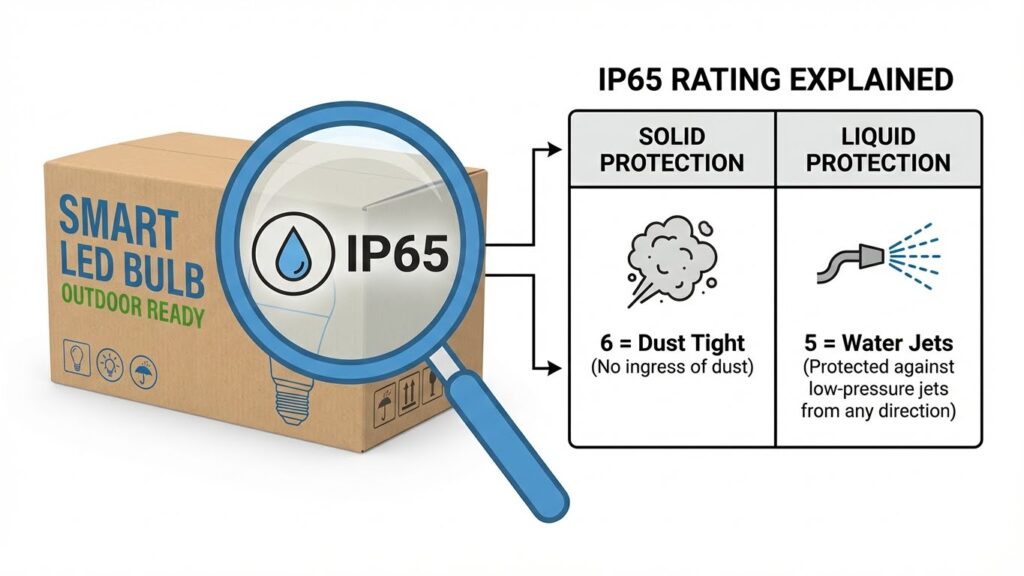
Pick bulbs that survive weather, handle temperature swings, and give the right brightness and color for your space. Focus on casing ratings, the operating temperature range, and lumen/color specs to match fixtures, mood, and security needs.
Water and Dust Resistance Ratings
Look for an IP rating on the package. IP65 means the bulb resists dust and can handle water jets, while IP67 adds short-term immersion protection. For exposed fixtures, choose at least IP65; for buried or flood-prone areas, prefer IP67 or higher.
Check how the bulb is installed. Even an IP65 bulb can fail if placed in a fixture that traps moisture or has gaps. Use sealed, outdoor-rated fixtures and silicone gaskets when needed.
Mind connector and base protection as well. Bulbs with rubberized or fully enclosed bases reduce corrosion risk at the socket. If you plan to use smart bulbs in pendant or exposed fixtures, prioritize models with proven outdoor housings.
Temperature Tolerance
Verify the operating temperature range on the spec sheet. Many outdoor smart LEDs work from about -4°F to 104°F (-20°C to 40°C). If you live in colder or hotter climates, choose bulbs rated beyond that range to avoid dimming, flicker, or failure.
Consider startup behavior in cold weather. Some LEDs and electronics need warmer temps to connect or to reach full brightness. If you need immediate lighting in winter, pick bulbs explicitly tested for low-temperature starts.
Also check warranty terms tied to temperature. Manufacturers often exclude damage from extreme temps. For year-round reliability, prefer products with extended operating ranges and clear temp specs.
Brightness and Color Options
Match lumens to the fixture’s purpose. For walkway or porch lighting, 400–800 lumens usually work. For security or floodlighting, aim for 1,000 lumens or more. Check beam angle too: narrow beams focus light; wide beams cover larger areas.
Decide if you need tunable white or full RGB. Tunable white (2700K–6500K) helps set warm ambiance or cool task light. RGB or color-change bulbs add mood and holiday effects but often cost more and may reduce max lumen output.
Confirm compatibility with your smart hub and app. Some bulbs limit color or brightness when used with certain hubs. Look for clear specs on maximum lumens at full color and how color temperature shifts affect output.
Compatibility With Popular Smart Home Systems
Smart outdoor bulbs must match the voice assistants and hubs you already use, support the right connection method (Wi‑Fi, Zigbee, or Bluetooth), and work in the same app ecosystem for routines and schedules.
Integration With Amazon Alexa
Most outdoor smart bulbs advertise Alexa support. You should check whether bulbs connect directly over Wi‑Fi or require a Zigbee hub like Echo Plus or Echo 4th Gen. Direct Wi‑Fi bulbs let you add the skill in the Alexa app and control bulbs with voice commands, groups, and routines right away.
If a bulb uses Zigbee, pair it with an Echo device that includes a Zigbee radio or a separate hub. Zigbee bulbs typically offer faster local control and more reliable group syncing for multiple fixtures. Confirm the bulb’s Alexa skill name, and test discovery and grouping before final installation.
Also check for Alexa routines that include triggers like sunset/sunrise or motion sensors. Look at firmware update support; Alexa-compatible bulbs that get regular updates stay more secure and stable.
Support for Google Home
Google Home works with many outdoor smart bulbs, but you must verify whether the bulb links via cloud (Wi‑Fi) or requires a local hub. For cloud-based bulbs, you connect the manufacturer’s account in the Google Home app and then assign bulbs to rooms and routines for automation.
If your bulbs use Zigbee, you’ll need a compatible hub that Google Home supports, or use a bridge that exposes devices to Google. Expect slight delays with cloud connections; local Zigbee setups can be faster. Also confirm that color, brightness, and power state commands are fully supported by the Google integration.
Check voice command examples you’ll use, such as “Hey Google, set patio to 50%” or “turn on driveway color blue.” Test sunset-based automations in the Google Home app to ensure outdoor lights follow your schedule.
Apple HomeKit Compatibility
If you use Apple devices, prioritize bulbs with HomeKit certification for direct, secure control in the Home app. HomeKit bulbs either connect over Wi‑Fi or require a HomeKit‑enabled hub (like a HomePod, Apple TV, or HomePod mini) to enable remote access and automations.
HomeKit gives you local encryption and Siri voice control. Make sure the bulb explicitly lists HomeKit support; some bulbs work with HomeKit only via a manufacturer bridge. Verify that scenes, adaptive lighting, and automation triggers (time of day, location, or motion) operate as you expect in the Home app.
Also confirm firmware update paths through the manufacturer’s app and that the HomeKit pairing code is accessible before final mounting outdoors.
Installation and Setup Considerations

You need the right hardware and power plan before you fit smart bulbs outdoors. Check the fixture type and how you will supply electricity to avoid damage and poor connectivity.
Socket Type Requirements
Match the bulb base to your fixture. Most outdoor smart bulbs use common bases like E26 (standard screw) or B22 (bayonet). Confirm the base size printed on the bulb box or in the product specs before buying.
Also check the fixture’s socket depth and cover. Deep or enclosed fixtures can trap heat; choose bulbs rated for enclosed fixtures if your light has a cover. For integration with existing timers or dimmers, ensure the bulb is compatible—many smart bulbs need a plain on/off switch and won’t work with some legacy dimmer circuits.
If you plan to install smart flood or pathway bulbs, verify the housing type (wet-rated, damp-rated). Use wet-rated bulbs where rain can hit the bulb directly. Damp-rated bulbs work in covered porches or under eaves.
Power Source Options
Decide between mains-powered bulbs and low-voltage setups. Most residential smart bulbs run on standard AC (120V or 230V). If your outdoor lights use low-voltage (12V) fixtures, buy smart modules or bulbs designed for low-voltage systems rather than forcing a standard smart bulb into the circuit.
Consider battery-powered or solar smart lights for locations without wiring. These are self-contained and avoid trenching or new wiring. Check run-time, recharge time, and integrated motion sensors if you need reliable night lighting.
Finally, protect outdoor wiring with GFCI-protected circuits and weatherproof connectors. Use sealed junction boxes and silicone-rated gaskets to keep water out and reduce the chance of shorts or corrosion.
Best Outdoor Smart Bulbs by Brand
These brands offer outdoor-ready bulbs that balance brightness, weather resistance, and smart features. You’ll find options that work with major smart hubs, provide good lumen output for yards and patios, and meet IP ratings for outdoor use.
Philips Hue Outdoor Range
Philips Hue makes several outdoor products designed for gardens, porches, and driveways. You can choose from white, white ambiance, and full-color bulbs and fixtures. Many Hue outdoor lights use a Hue Bridge for full feature access like schedules, geofencing, and HomeKit, Alexa, or Google integration.
Look for IP65-rated fixtures and bulbs for rain and dust protection. Hue bulbs and fixtures typically offer high CRI for accurate color and wide dimming ranges. Bulbs and lamps come in different form factors (spot, pathway, wall) so you can match mounting needs and beam angles.
If you already use Hue indoors, sticking with the same ecosystem simplifies scenes and routines across inside and outside. Note that full functionality often requires the Hue Bridge rather than Bluetooth alone.
LIFX Outdoor Bulbs
LIFX sells outdoor-rated smart bulbs and strips that are bright and connect directly to Wi‑Fi without a separate hub. Their outdoor bulbs offer high lumen output (good for yards and security lighting) plus vibrant color and fine dimming control via the LIFX app.
Most LIFX outdoor models are IP65 or similar, which protects against rain and splashes. They work with Alexa, Google Assistant, and certain smart home platforms. You get strong scheduling, preset scenes, and instant cloud control since bulbs talk straight to your Wi‑Fi.
Keep in mind Wi‑Fi range matters outdoors. Place your router or a Wi‑Fi extender close enough so bulbs stay connected. LIFX suits you if you prefer hub-less setup and strong color/brightness from a single bulb.
Controlling and Automating Outdoor Smart Bulbs
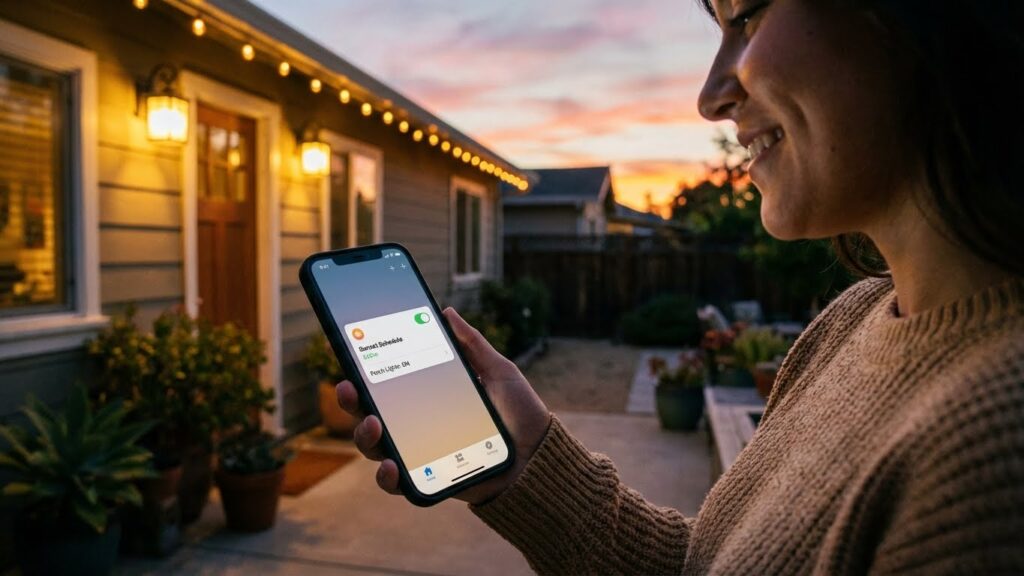
You can set exact on/off times, link bulbs to events, and control them from anywhere. Pick the right hub or app, and plan for Wi‑Fi range and weatherproof fixtures.
Scheduling and Timers
Use the bulb’s app or a smart-home hub to build schedules tied to days, times, and scenes. Set bulbs to come on before dusk and off after midnight, or create a weekday/weekend schedule with different brightness levels. For security, randomize on/off times within a window so lights don’t follow a rigid pattern.
Many systems let you chain actions: turn porch lights on at sunset, then lower garden lights after guests leave. Choose schedules that match your router’s range—keep the bulb within about 100 feet of the hub or a strong Wi‑Fi signal. Battery‑backed hubs or bulbs with local schedules keep lights running through brief internet outages.
Remote Access and Monitoring
Remote control requires an internet‑connected hub or bulbs that support cloud services. Use the vendor app to check status, turn lights on or off, and change color or brightness from anywhere. Enable two‑factor authentication to secure remote access.
Add motion sensors or camera triggers for automatic responses: when a sensor detects motion, the app can send an alert and switch on entry lights. Verify that outdoor fixtures are weatherproof and that the bulb’s firmware is up to date to reduce connectivity issues.
Maintenance and Longevity of Outdoor Smart Bulbs
Keep bulbs dry, clean, and in the right fixtures to prevent failures and keep connectivity strong. Regular checks and simple cleaning extend life and keep color and brightness steady.
Cleaning and Upkeep
Turn off power before touching bulbs or fixtures to avoid shocks. Wipe bulbs and fixture lenses monthly with a soft, dry cloth to remove dust, pollen, and spider webs that dim light and trap moisture. For greasy or sticky buildup, use a cloth lightly dampened with water; avoid solvents that can strip coatings or damage sealing.
Check gasket seals and fixture covers every three months. Replace cracked or brittle gaskets to keep water and insects out. Tighten loose fittings and ensure bulbs sit fully in sockets to prevent flicker and corrosion. If a bulb shows condensation inside, remove it, dry the fixture, and inspect the bulb’s IP rating—don’t reinstall non‑rated bulbs outdoors.
Keep firmware and app software updated to fix bugs and improve connectivity. Reboot hubs or bridges if bulbs lose connection. Log bulb locations and last service dates so you can track recurring issues.
Expected Lifespan
Most LED smart bulbs last 15,000–25,000 hours under normal conditions, which equals about 4–7 years at 8 hours per day. Outdoor stressors — temperature swings, humidity, and vibration — can cut life short if bulbs lack proper weatherproofing or are in exposed fixtures.
Choose bulbs with an IP65 rating or higher for wet locations; these resist rain and dust and usually meet the higher end of lifespan estimates. Lower-rated indoor-only smart bulbs will fail sooner if exposed to moisture or freezing temperatures. Check manufacturer specs for rated operating temperature range; placing bulbs within that range helps maintain light output and electronics life.
Expect color or brightness to drift near end of life. When bulbs exceed half their rated hours, watch for fading, slower startup, or random disconnects. Replace bulbs showing these signs rather than repeatedly troubleshooting.
Safety and Security Benefits of Outdoor Smart Bulbs
Smart outdoor bulbs boost visibility around doors, driveways, and pathways and let you control lights from anywhere. They can make your home look occupied when you’re away and react quickly to movement near windows or entry points.
Deterring Intruders
Smart bulbs let you create schedules and randomize on/off times to mimic normal activity. Set bulbs to turn on in the evening, flash on then off at varied intervals, or run different rooms on different timers. This makes it harder for burglars to tell if no one is home.
You can pair bulbs with motion sensors or your smart hub to trigger multiple lights at once. When lights suddenly come on at the driveway and porch, it increases the chance an intruder will move on. Use warm-white tones for porch lights and brighter white for driveway lights to improve sightlines for cameras and neighbors.
Also use remote control to turn lights on if you get an alert. If you see suspicious activity on a camera, switch on yard and entry lights instantly to deter the person and give clear video evidence.
Motion-Activated Lighting
Motion activation gives immediate light where you need it and saves energy when no one is around. Choose bulbs or fixtures with adjustable sensitivity and timeouts so lights won’t trigger from small animals or passing cars.
Link motion events to actions: turn on floodlights, send a phone alert, and record video. Set zones—front door motion only lights the porch while driveway motion lights the yard—so you avoid lighting the whole property every time.
Pick bulbs and sensors rated for outdoor use and test placement. Mount sensors 6–10 feet high, aim them to cover walkways, and keep them away from heat sources to reduce false triggers.
Troubleshooting Common Issues With Outdoor Smart Bulbs
If a bulb won’t turn on, first check the power and the bulb itself. Swap in a known-good bulb or test the fixture with a regular LED. Loose wiring or a tripped breaker can also cause dead fixtures.
If connectivity drops, move the hub or router closer or add a range extender. Outdoor fixtures often sit far from your Wi‑Fi; signal strength matters more than you might think. Make sure the bulb’s protocol (Wi‑Fi, Zigbee, Z‑Wave) matches your hub.
For dimming or flicker problems, confirm the bulb and dimmer are compatible. Some smart bulbs don’t work with older mechanical dimmers. Try running the bulb without the dimmer or update firmware if available.
If weather or moisture affects performance, check the IP rating and fixture seal. Use only bulbs and fixtures rated for outdoor use or put smart bulbs inside a weatherproof enclosure. Replace corroded sockets and add silicone gaskets if needed.
When automations or schedules fail, inspect app settings and time zones. Reboot the hub and update the bulb firmware. Also check for interference from other wireless devices and reduce crowded channels.
Keep a short checklist you can follow: power → bulb swap → signal strength → compatibility → weather protection → firmware/settings. This helps you fix most outdoor smart bulb issues quickly and safely.
FAQs
What makes a smart bulb safe for outdoor use?
Look for an IP rating (like IP65) or the word “outdoor” on the package. Those bulbs resist dust and water better. Install them in weatherproof fixtures whenever possible.
Can indoor-only smart bulbs work outside?
They can if you place them inside a fully sealed, waterproof fixture. Otherwise, moisture and temperature swings can damage the bulb or its electronics.
Will my Wi‑Fi or hub reach outdoor bulbs?
Signal strength drops with distance and obstacles. Aim to keep bulbs within about 100 feet of your router or use a mesh system or outdoor-rated hub to extend coverage.
Do outdoor smart bulbs need different wiring or fixtures?
No special wiring is required if the fixture is compatible with the bulb’s base and power type. Use fixtures rated for outdoor use and follow local electrical codes.
How do you protect bulbs from cold or heat?
Choose bulbs rated for the climate extremes where you live. Some smart LEDs list operating temperature ranges; pick one that matches your winters and summers.
What about security and firmware updates?
You should keep the bulb’s firmware and your hub or app updated. Updates fix bugs and improve security. Use strong home Wi‑Fi passwords and enable two‑factor authentication if available.
Can you use color-changing bulbs outside?
Yes, if they are outdoor-rated or placed in sealed fixtures. Color and brightness work the same, but UV exposure and weather can shorten lifespan if not protected.
Conclusion
You can use smart bulbs outdoors if you choose the right type and protect them properly. Pick bulbs labeled for outdoor use or with an IP rating like IP65 for water and dust resistance. Place indoor-rated bulbs only inside weather-tight fixtures.
Check compatibility with your hub or Wi‑Fi before you buy. Some bulbs need a bridge (for example, Philips Hue) while others work on Wi‑Fi or Zigbee. Keep bulbs within the recommended range of your router or hub to avoid connection dropouts.
Think about the fixture, climate, and placement. Enclosed fixtures, covered porches, and motion-sensor fittings add safety and extend bulb life. In cold or very wet climates, choose bulbs rated for those conditions.
For guidance on IP ratings and outdoor electrical safety, see resources from the National Electrical Manufacturers Association and the U.S. Consumer Product Safety Commission. These sources help you match bulb specs to real-world conditions.
Make a short checklist before installing: outdoor-rated or protected fixture, correct hub or protocol, suitable brightness and color, and secure mounting. That approach helps you get reliable, long-lasting outdoor smart lighting.