
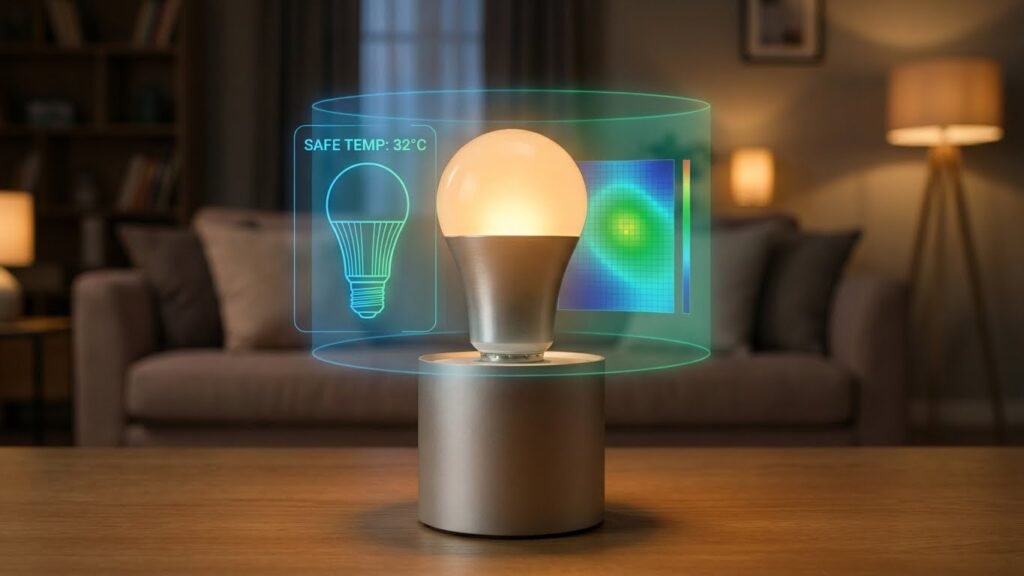
Most smart bulbs pose a low fire risk when you use them correctly, but some hazards can appear from bad wiring, poor-quality chips, or blocked fixtures. Choose certified bulbs, install them properly, and watch for signs of overheating to keep your home safe.
You likely want convenience and energy savings without new risks. This article shows what really raises the danger, how smart bulbs compare to old-style bulbs, and simple steps you can take to prevent problems.
Key Takeaways
- Certified, well-made smart bulbs are generally safe when installed correctly.
- Faulty wiring, poor fixtures, and cheap components raise the fire risk.
- Regular checks and proper ventilation cut the chance of overheating.
Understanding Smart Bulbs and Fire Hazards
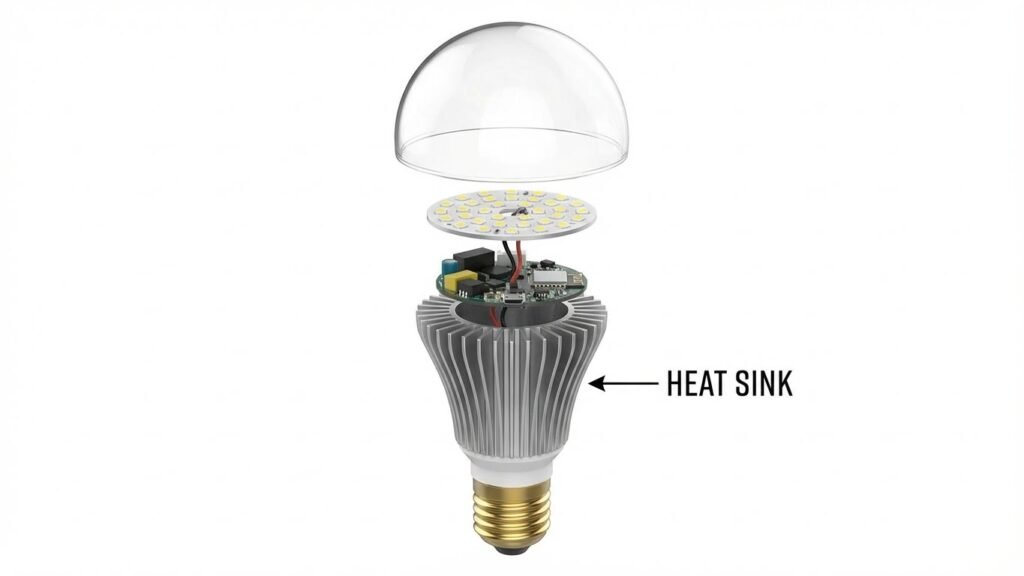
Smart bulbs are LED-based lighting with built-in electronics. They use small chips and heat sinks and can connect to your phone or home network. You should know how they make light, how they get power, and what can go wrong electrically.
What Are Smart Bulbs?
Smart bulbs are LED lamps that include a wireless radio, control circuitry, and often a small processor. They screw into regular fixtures like A19 or GU10 bulbs so you use them with existing lamps and ceiling fittings.
You control them by apps, voice assistants, or automation rules. Many models offer dimming, color changes, schedules, and energy monitoring.
They vary by power rating (usually 6–15 W for common home bulbs) and by certification marks such as UL, ETL, or CE. Those marks matter because they show the bulb met basic safety tests.
How Smart Bulbs Work
A smart bulb converts mains AC power to low-voltage DC through a driver circuit inside the base. That driver feeds LED chips which emit light. The base also houses a heat sink and small electronics for wireless communication (Wi‑Fi, Zigbee, or Bluetooth).
Heat is generated mainly by the LEDs and driver; the heat sink moves that heat away from the electronics. If the driver or chipset fails, it can short-circuit or overheat. Poor ventilation, enclosed fixtures, or incompatible dimmer switches raise the risk of excessive temperature.
Firmware and network features let you turn the bulb on and off remotely. Those features do not change the electrical behavior, but they can reduce risk by preventing bulbs from being left on unnecessarily.
Defining Fire Hazards in Electrical Devices
A fire hazard in an electrical device means a condition that can start a fire, such as overheating, sparks, or electrical shorts. For bulbs, hazards include failed drivers, exposed wiring, or contact with combustible materials.
Key causes to watch for:
- Overheating from poor ventilation or enclosed fixtures.
- Short circuits from damaged chips or poor manufacturing.
- Incompatibility with dimmers or fixtures that exceed the bulb’s rating.
Look for safety certifications, correct fixture type, proper wattage and socket fit, and visible damage. Those steps lower the chance that a smart bulb’s electronics will become a real fire hazard.
Factors That Influence Fire Risk in Smart Bulbs
Several key elements affect whether a smart bulb could become a fire hazard: component quality, how the bulb matches your fixture and dimmer, and how you install and use it. Each of these can raise or lower the chance of overheating or electrical faults.
Quality of Manufacturing
You should check certifications and brand reputation before buying. Look for UL, ETL, or CE marks and model-specific safety listings; these show the bulb met basic safety and thermal tests. Cheap bulbs often cut corners on circuit boards, solder joints, and heat sinks, which raises the odds of failure.
Materials matter. Poorly designed heat sinks or thin plastic housings trap heat, stressing internal electronics. Low-quality chips and capacitors can fail under normal voltage swings, increasing short-circuit risk.
Buy from known manufacturers and keep receipts. Warranties and support indicate the maker stands behind safety. If a bulb feels unusually hot to touch during ordinary use, remove it and replace it with a certified unit.
Electrical Overload and Compatibility
Match the bulb to the fixture’s voltage and wattage limits. Even though LEDs draw far less power than incandescents, using a bulb in a fixture rated for higher currents, or in circuits with multiple incompatible devices, can create overheating points.
Check dimmer compatibility. Many older dimmer switches were designed for incandescent loads and can cause LED drivers to overheat, flicker, or fail. Use dimmers labeled for LED or the bulb maker’s recommended dimmer models.
Watch the circuit load. Overloading a fixture hub, such as enclosed recessed cans or multi-bulb chandeliers, can trap heat. Follow the fixture manufacturer’s guidance on enclosed fixtures and total permitted wattage.
Improper Installation
You must install bulbs correctly to avoid risk. Ensure the bulb screws in securely and that the fixture’s socket shows no signs of corrosion, loose wiring, or exposed conductors. Loose connections cause arcing and heat.
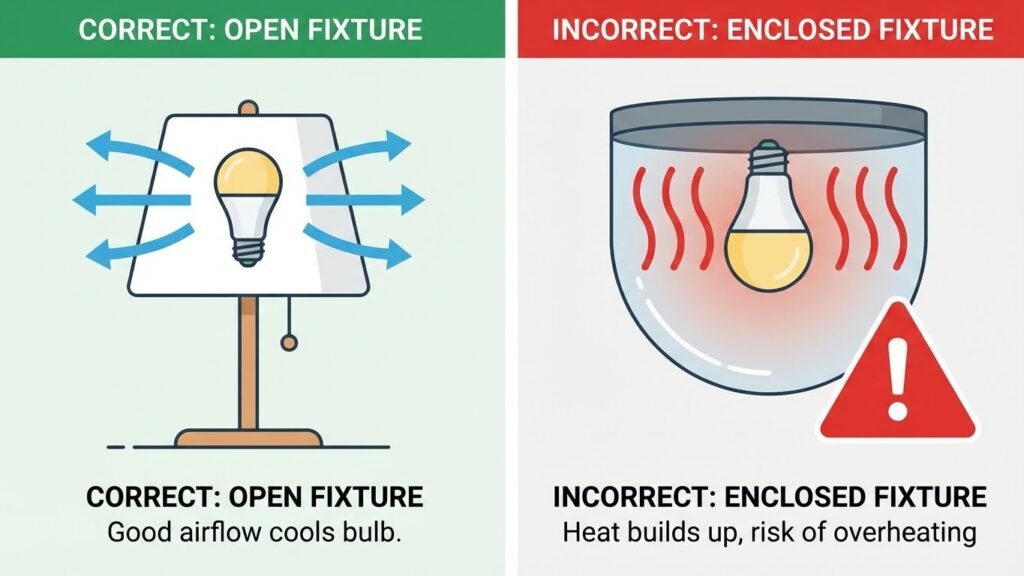
Avoid placing smart bulbs in fully enclosed fixtures unless the bulb is rated for them. Enclosed spaces prevent heat from escaping, raising internal temperatures and stressing electronics. Also, don’t use outdoor-rated bulbs indoors or vice versa; ratings account for humidity and temperature ranges.
When replacing bulbs, power down the circuit first. If you find scorch marks, melted insulation, or a buzzing socket, stop using that fixture and have an electrician inspect it before reinstalling any bulb.
Common Causes of Fire Incidents Involving Smart Bulbs
Smart bulbs can overheat, be used in the wrong fixtures, or fail because of bad parts. These specific problems are where most risks come from and are easy to prevent with the right checks.
Overheating From Poor Ventilation
If you put a smart LED bulb in a covered or recessed fixture without ventilation, heat can build up. LEDs and their driver chips need some air to cool; trapped heat can damage the bulb’s electronics and the socket insulation.
Check fixtures for clearance and avoid fully enclosed shades unless the bulb states it is rated for enclosed fixtures. Watch for discoloration, melting, or a hot-to-touch fixture after a few hours of use. Use lower brightness or lower temperature settings in lamps that run long hours. Proper airflow, occasional power-off periods, and using bulbs rated for enclosed fixtures reduce the chance of heat-related failures.
Use With Incompatible Fixtures
Not all fixtures match smart bulbs. Dimmers, three-way sockets, or high-watt fixtures can interact badly with smart bulb electronics. Using a smart bulb with an incompatible dimmer can cause flicker, excess heat, or electronic stress that shortens the bulb’s life.
Read both the bulb and fixture manuals for compatibility notes. Replace old mechanical dimmers with LED-compatible ones or disable the wall dimmer and control brightness through the bulb’s app. Avoid fixtures labeled for higher incandescent wattage than the bulb supports. When in doubt, test a new bulb in a simple, compatible lamp before installing it in a built-in or hard-to-access fixture.
Defective Components
Smart bulbs contain small circuit boards, Wi‑Fi chips, and drivers that can fail. Manufacturing defects, poor solder joints, or low-quality capacitors may create shorts or overheating under normal use.
Buy bulbs with safety certifications (UL, ETL) and check for recalls. Inspect new bulbs for cracked bases, loose parts, or a burning smell when first powered on. If a bulb flickers, emits smoke, or runs unusually hot, unplug it immediately and stop using bulbs from the same batch until you verify they are safe. Replace defective bulbs promptly and report serious faults to the seller or maker.
How to Reduce Fire Hazard With Smart Bulbs

Use the right bulb for the fixture, follow the maker’s instructions for wattage and placement, and check bulbs and sockets regularly to catch problems early.
Following Manufacturer Recommendations
Always install bulbs exactly as the manufacturer states. Check the fixture’s maximum wattage and only use bulbs that match that limit. Even if a smart bulb is LED and uses less power, heat buildup inside enclosed fixtures can still damage electronics.
Do not use indoor-rated bulbs outdoors or in damp locations unless the label allows it. Mount bulbs in fixtures that provide adequate airflow. For recessed or enclosed fixtures, pick smart bulbs labeled safe for enclosed use.
Follow the setup steps the maker gives for wiring, dimmer compatibility, and app updates. If the manufacturer warns against certain dimmers or switches, replace those parts before installing smart bulbs.
Choosing Certified Smart Bulbs
Look for safety marks like UL, ETL, or CSA on the bulb or packaging. These certifications show the product passed basic electrical and thermal safety tests. Avoid unbranded or very cheap bulbs that lack certification.
Check the product manual for electrical ratings: input voltage, operating temperature range, and approval for enclosed fixtures. Prefer bulbs from known brands with clear safety data and a warranty. Read customer reviews that mention overheating or early failure.
Buy bulbs with built-in thermal protection or automatic shutoff. These features reduce the chance of an electrical fault creating heat large enough to start a fire.
Routine Maintenance and Inspection
Inspect bulbs and fixtures every few months. Look for discoloration, melted plastic, black soot, or a loose fit in the socket. These signs point to overheating or poor contacts and you should replace the bulb or fixture immediately.
Keep fixtures and bulbs free of dust and debris. Dust can trap heat and, in rare cases, ignite if the bulb gets hot. Turn off power before cleaning and use a dry cloth or a soft brush.
Update bulb firmware when vendors release safety fixes. If a bulb feels unusually hot, flickers, or causes circuit trips, remove it and test on a different circuit. Replace any bulb that repeatedly malfunctions.
Comparing Smart Bulbs to Traditional Bulbs for Fire Safety
Smart LED bulbs run cooler, use less power, and last far longer than incandescent bulbs. You should focus on heat output, the bulb’s internal parts, and how aging or damage can change risk.
Heat Generation Differences
LED-based smart bulbs produce far less heat at the envelope than incandescent bulbs. An incandescent 60W bulb converts most energy to heat at the glass surface; a 9–12W smart LED gives similar light but keeps the glass and surrounding area much cooler. Cooler surfaces mean lower risk when bulbs are near paper, fabric, or plastic.
Smart bulbs still generate heat at their base and in the driver electronics. If you enclose an LED bulb in a poorly ventilated fixture or use a non-rated dimmer, you can trap heat around the base and raise failure risk. Check fixture ratings and avoid fully enclosed fixtures unless the bulb is rated for them.
Design and Build Quality
Smart bulbs include extra parts: a small circuit board, Wi‑Fi/Bluetooth radios, and a power driver. Those components add points of possible failure, but reputable brands use thermal management and safety certifications (UL, ETL, CE) to reduce risk. Buying certified bulbs from known manufacturers lowers chances of defects.
Poorly made bulbs may use thin heat sinks, weak solder joints, or low‑quality drivers that overheat. You should inspect bulbs for visible damage and buy from sellers with return policies. Replace bulbs that flicker, emit odd smells, or run unusually hot.
Lifespan and Degradation
LEDs last typically 15,000–50,000 hours, far longer than 750–2,000 hours for incandescents. As smart bulbs age, their driver components or radios can degrade faster than the LED chips, which can increase heat output or cause electrical faults. Monitor older smart bulbs more closely.
Degradation signs include dimming, color shifts, buzzing, or intermittent connectivity. Replace bulbs showing these signs rather than continuing to use them in high‑risk locations. Routine replacement and using bulbs within their rated temperature and fixture type keeps fire risk low.
What to Do If a Smart Bulb Overheats
Turn off power, move away from the fixture if you smell burning, and check the bulb and fixture for visible damage once cool. If the problem looks electrical or the bulb repeats overheating, get professional help and report the product to the maker and regulators.
Immediate Safety Steps
First, cut power to the light. Flip the wall switch off and, if safe, switch off the circuit breaker for that room. Do not touch the bulb or fixture while it feels hot.
Open windows to clear any smoke or fumes. If you see flames, leave the house and call emergency services immediately.
When the bulb has cooled, remove it by the base, not the glass, and place it on a nonflammable surface. Inspect the bulb and socket for melting, discoloration, or a burned smell.
Document what you find with photos and note the time and model of the bulb. Keep that evidence in case you need to report the issue or show it to an electrician.
When to Call an Electrician
Call a licensed electrician if you see melted wiring, scorch marks in the socket, or if adjacent outlets or switches also feel warm. Those signs point to wiring or socket problems, not just a bad bulb.
If the fixture hums, sparks, or the breaker trips repeatedly when you install a bulb, stop using that circuit. An electrician can test the circuit for overloads, loose connections, and proper grounding.
Bring the bulb and any photos to your appointment. Ask the electrician to check fixture compatibility with the bulb’s wattage and heat requirements, and to confirm the socket and wiring are rated for LED smart bulbs.
Reporting Product Issues
Contact the bulb manufacturer with model number, purchase date, and photos. Use the company’s support email or phone number listed on the packing or website.
If the manufacturer does not respond or you suspect a defect that could harm others, file a report with your national product safety agency (for example, the U.S. Consumer Product Safety Commission). Include photos, your contact information, and a short description of the problem.
Keep the damaged bulb in a safe place in case the manufacturer or authorities request it. Save receipts and any correspondence; this helps with refunds, replacements, or safety recalls.
Conclusion
Smart bulbs are not inherently dangerous. Most use LEDs that run cool and lower fire risk compared with old incandescent bulbs.
You still must pick quality products. Look for safety certifications and buy from reputable brands to reduce risks from faulty electronics.
Install bulbs correctly and keep fixtures ventilated. Avoid enclosed fixtures not rated for LEDs, and don’t exceed the fixture’s wattage limits.
Take simple precautions like checking for flicker, unusual heat, or burning smells. If a bulb or socket feels hot or behaves oddly, turn it off and replace the bulb or get an electrician to inspect.
Keep firmware and apps updated, and secure your network if your bulbs are connected. That cuts the chance of electronic faults and reduces cyber-related issues that could indirectly cause problems.
Use this short checklist to stay safe:
- Choose certified, well-reviewed bulbs.
- Use compatible, ventilated fixtures.
- Monitor for heat or strange behavior.
- Keep software and network security up to date.
Following these steps will help you enjoy smart lighting with low risk.
FAQs
Are smart bulbs likely to start a fire?
Smart LED bulbs run cooler than incandescent bulbs and are less likely to ignite nearby materials. The main risks come from faulty wiring, damaged fixtures, or a defective bulb’s electronics.
What should I check before installing a smart bulb?
Make sure the fixture is rated for LED bulbs and that the socket and wiring are in good condition. Tighten the bulb securely, avoid exposed wiring, and follow the manufacturer’s instructions.
Do smart bulbs need special fixtures or ventilation?
Most smart bulbs work in standard fixtures, but some high-power bulbs need fixtures that allow heat to escape. If a bulb feels unusually hot, move it to a better-ventilated fixture.
Which safety marks should you look for?
Look for recognized safety certifications (such as UL, ETL, or CE) on the packaging. These marks show the bulb has passed basic electrical safety tests.
Can a smart bulb’s chipset cause a fire?
A faulty chipset could short-circuit and cause overheating, but this is uncommon. Using certified bulbs and replacing ones that flicker or smell burned lowers your risk.
What steps reduce fire risk with smart bulbs?
* Use bulbs that match the fixture’s wattage and type.
* Replace damaged bulbs or fixtures immediately.
* Avoid using bulbs with signs of malfunction like flicker, smoke, or burning smells.
When should you contact an electrician?
Call an electrician if you notice frequent tripped breakers, sparks, burning odors, or hot fixtures. Those signs point to wiring or fixture problems that you should not ignore.
Conclusion
Smart bulbs are not inherently dangerous if you use them correctly. Choose bulbs with safety certifications like UL or ETL, and follow the manufacturer’s installation and wattage guidelines to reduce risk.
Keep fixtures ventilated and avoid enclosed fixtures unless the bulb is rated for them. Overheating mainly happens when bulbs are misused, paired with faulty wiring, or placed in unsuitable fixtures.
Watch for signs of trouble: flickering, burning smells, or excessive heat at the bulb base. If you see any of these, turn off power and replace the bulb or have an electrician inspect your wiring.
Keep firmware updated and buy bulbs from reputable brands to lower both electrical and cybersecurity risks. For guidance on electrical safety, consult resources from the U.S. Consumer Product Safety Commission or your local electrical code authority.
Use common-sense habits: don’t mix incompatible dimmers, avoid overloading circuits, and replace old or damaged bulbs promptly. With sensible choices and routine checks, you can enjoy smart lighting without adding significant fire risk.